How to Get the Most Out of the Squarewave Comptroller: Contour, Threshold Timing, and the Peak Limiter Explained
Most stereo compressors are built to disappear. The Comptroller was built to be heard.
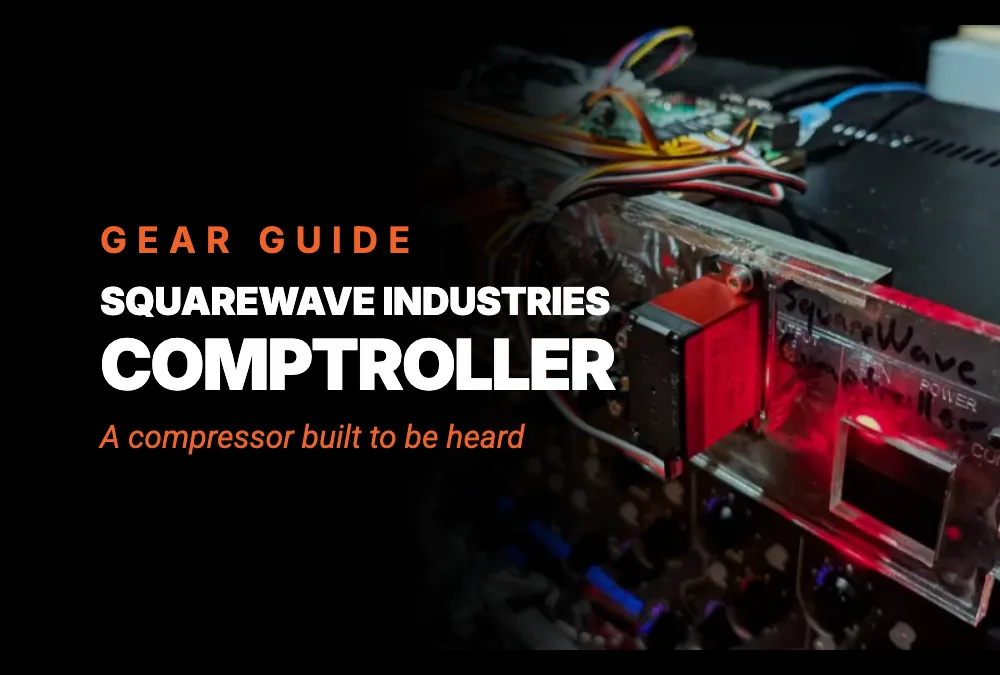
Drop the Squarewave Industries Comptroller into a chain expecting a polite bus compressor and you'll miss the point. Its Contour control makes the compressor overreact to transients on purpose, its Threshold changes the timing as well as the depth, and an always-on JFET peak limiter sits right after it. Learn how those three interact and it becomes a transient-shaping, groove-changing tool unlike anything else in the rack. This guide covers how it works, a five-minute quick start, its designer's own settings, and how to run the real unit from your DAW with Access Analog.
A big thank you to Sam Winston of Squarewave Industries, who designed and built the Comptroller, provided our unit, and reviewed this guide. Every tip credited to Sam comes straight from him.
Key Takeaways
- It's a VCA compressor followed by a JFET peak limiter, an original circuit rather than a clone of anything.
- Contour makes the compressor overshoot after a transient, so a hit pops forward and the sound behind it ducks. That can make drums explode or make them pump.
- The Threshold sits after the timing controls, so moving it changes the attack and release as well as the depth.
- The peak limiter is always in circuit, with Soft, Medium, and Hard modes, and it decides how much of the transient survives.
- There's no gain-reduction meter on purpose. Two LEDs tell you it's working; your ears tell you everything else.
Push the input, set the Threshold high, and let Contour carve the envelope. Then let the peak limiter decide how much of the transient survives.
What Is the Squarewave Comptroller?
The Squarewave Industries Comptroller is a stereo dynamics processor that pairs a VCA compressor with a JFET peak limiter. The signal path is simple to say: Input Gain, then the VCA compressor, then the peak limiter, then the Output. It's electronically balanced and DC coupled, flat within ±0.1 dB from 10 Hz to 63 kHz, and good for +25 dBu out.
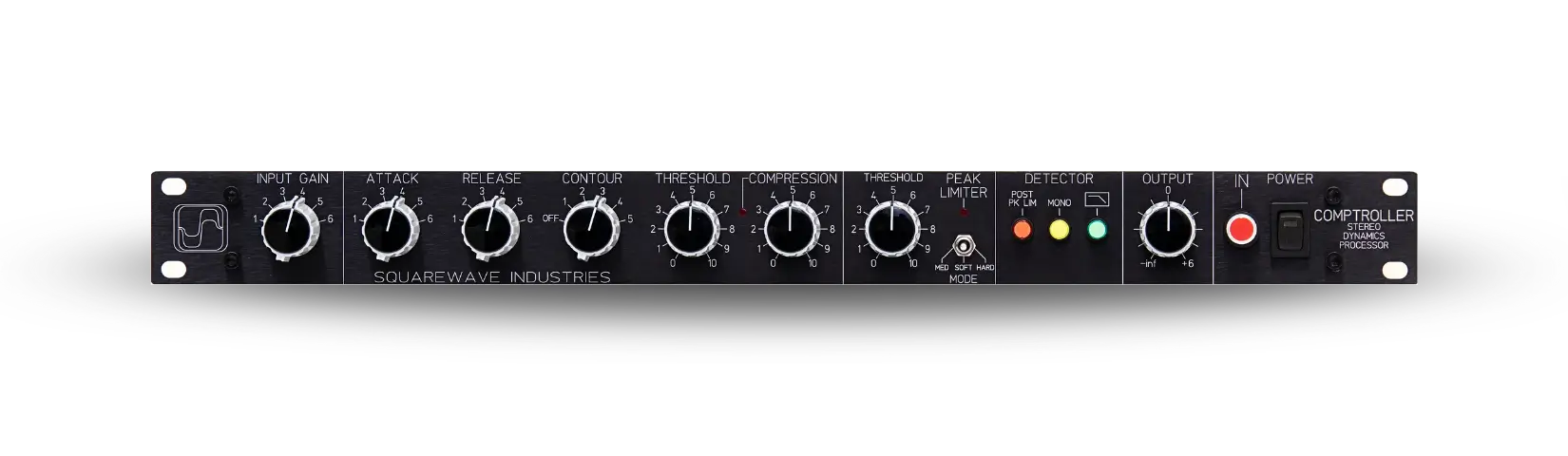
It's built by one person. Sam Winston worked as an audio engineer for years, went back to school for an electrical engineering degree from the University of Washington, has been the in-house tech at Sage Arts Recording since 2017, and has built custom gear for rooms including Black Belt Mastering and Bayona Mastering. The Comptroller is his first standard product, through-hole and hand-soldered.
Its defining feature started as an accident.
"I originally built a fairly straightforward compressor on breadboard. It worked fine but was pretty boring. I discovered the contour effect on accident by randomly adding components to the side chain. The effect was immediate and very compelling."
Sam Winston, Squarewave Industries
It then took a lot of R&D, in Sam's words, to work out what was going on and how best to control it. The name? "Comptroller just seemed like an interesting name for a compressor."
The Comptroller manual sets expectations bluntly: it's wild, complex, and a bit unwieldy until you get used to it, and it was not designed to be transparent. That's part of why there's no meter. You're meant to listen.
What Does the Contour Control Actually Do?
Contour makes the compressor slower and slightly unstable, so it overreacts to every transient and then settles. When a transient crosses the threshold, Contour adds a short delay before the compressor can respond. During that delay the sidechain stores up the incoming energy. When the compressor finally acts, it releases that stored energy all at once and turns the signal down further than it needs to, producing a brief dip in volume before it settles into normal, steady compression.
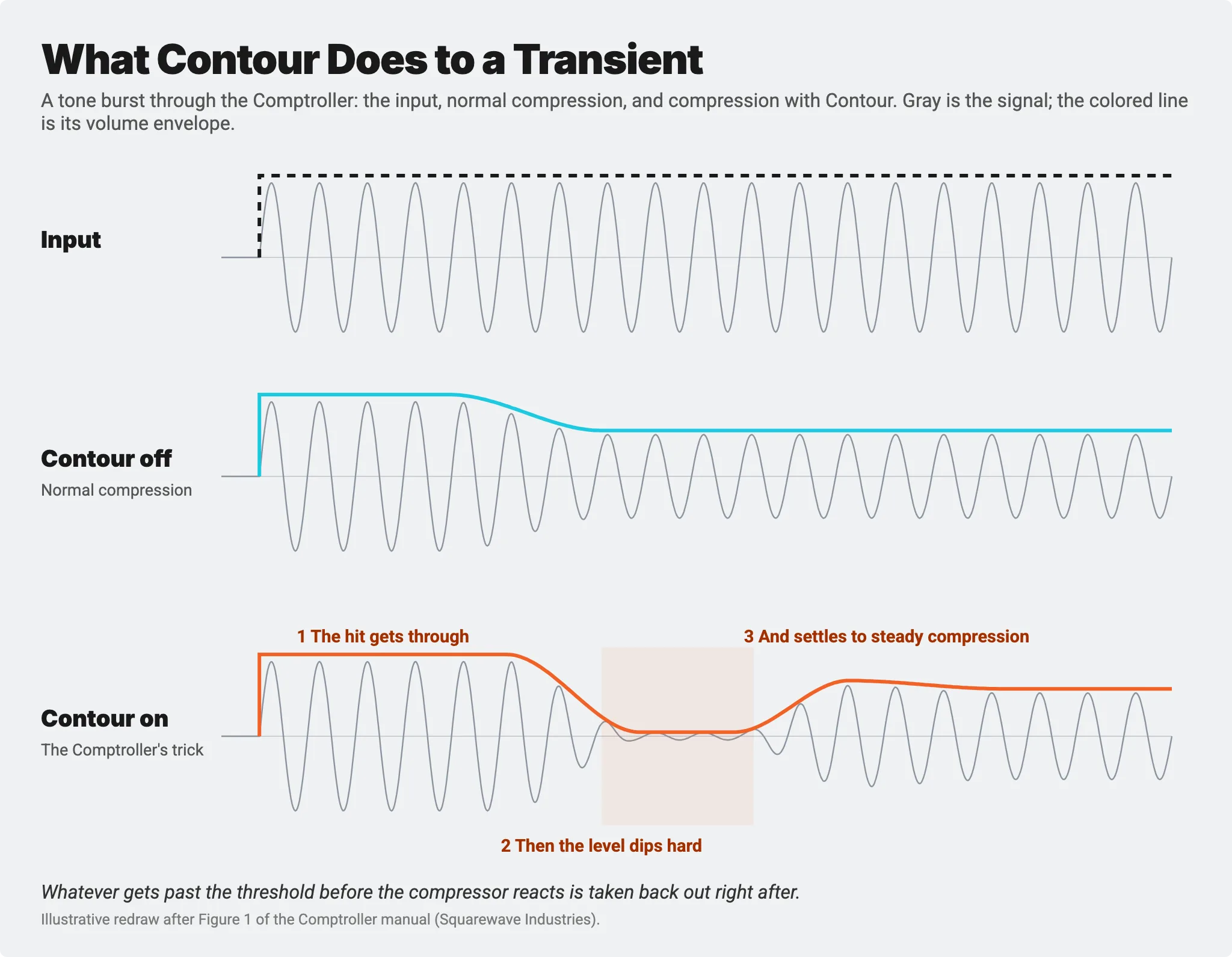
The simplest way to picture it, as the manual puts it: whatever transient energy gets past the threshold before the compressor kicks in is subtracted afterward. So the hit itself pops forward, and the moment just behind it is pulled down. On a drum bus that reads as punch and separation; push it further and it becomes pumping or even gating.
Think of a goalkeeper who's a half-step late to every shot. The ball gets through (that's your transient), and then the keeper dives so hard that they overshoot the post. That overshoot is the dip you hear.
Engineers will recognize the behavior as control-loop overshoot, or an underdamped response. Sam's view is that the labels don't help much: "Any number of technical terms can be used to describe what's happening (control loop overshoot, underdamped, etc) but those don't seem to mean anything to the average person." What matters is what it does to the groove.
Contour lets the transient through, then takes the energy back out of the space behind it. That's the punch.
Why Does the Threshold Change the Attack and Release?
Because the Comptroller puts its Threshold after the timing controls instead of before them. On a typical compressor, the threshold decides when compression starts and the attack and release times are fixed from there. In the Comptroller, the timing circuit starts ramping up as soon as the signal rises, and compression begins when that ramp crosses the Threshold. A higher Threshold means the ramp takes longer to get there.
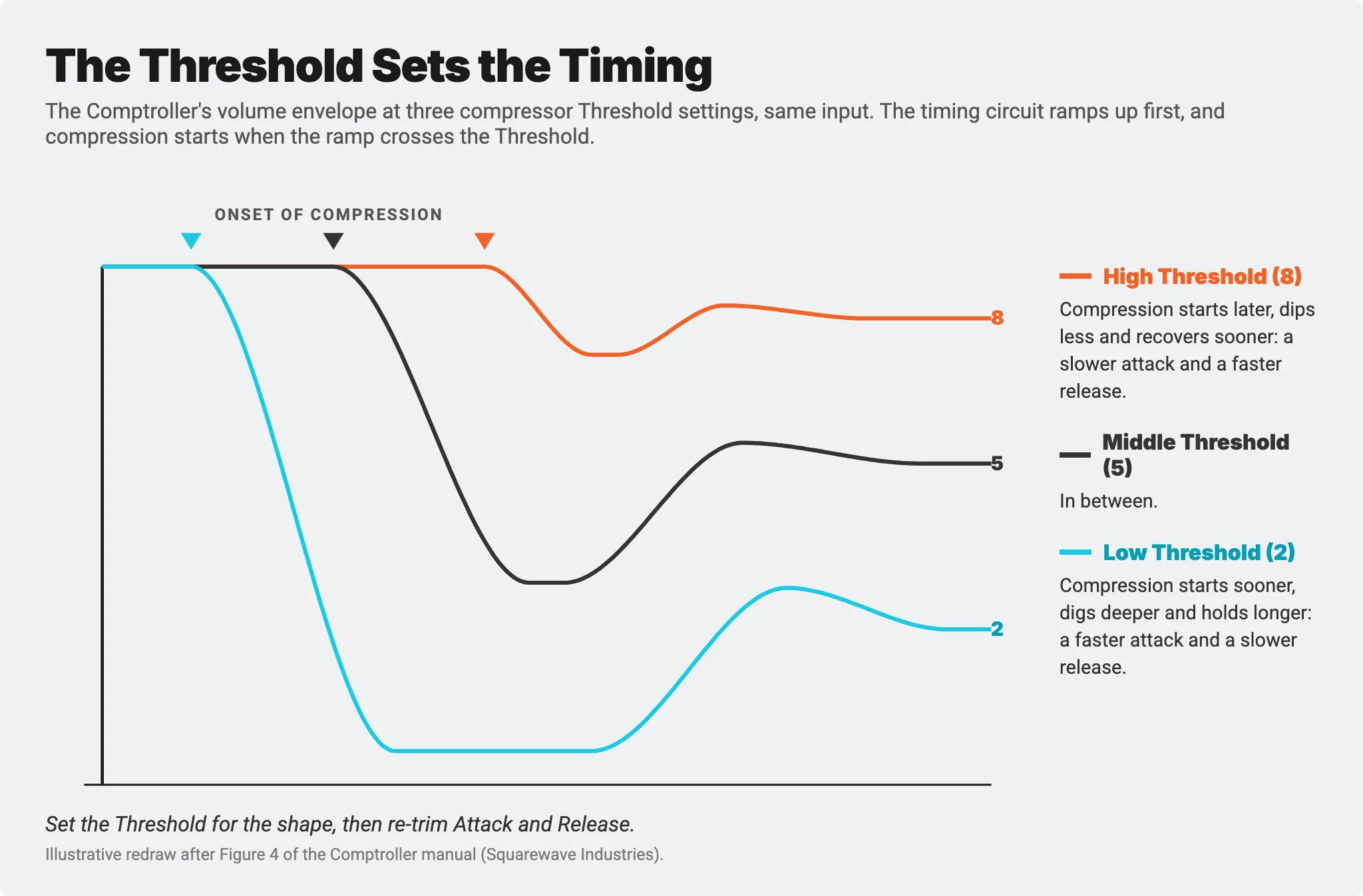
The rule of thumb from the manual:
- High Threshold = slower attack, faster release. More transient gets through, the compressor recovers between hits, and the Contour effect is bigger. The sound is more open and aggressive.
- Low Threshold = faster attack, slower release. More of the signal is compressed, the peaks are accentuated by pulling down everything between them, and the response smooths out. The Contour effect is smaller, because there's no time to recover between hits.
There's a second, hidden threshold too. Sam points out something the manual doesn't cover: there's a natural threshold built into the rectifier at the start of the sidechain. Turning up the Input Gain pushes more of the signal into the sidechain, which increases how much energy is stored before the real Threshold kicks in. In other words, Input Gain isn't only drive. It's part of the Contour effect.
Where should the Threshold sit? It depends entirely on the level of the signal and the Input Gain, so Sam doesn't give a number. He gives a method: turn the gain up a few clicks, set Compression around 4 or 5, then bring the Threshold down until it starts grabbing the peaks. "The envelope changes dramatically around the upper limit of where the signal crosses the threshold." That edge is where the interesting sounds live.
Set the Threshold for the shape, then re-trim the timing. On the Comptroller, they're the same decision.
How Do the Comptroller's Controls Work?
Every control interacts with the others, so treat the ranges below as a map, not a recipe. Lower numbers are faster on all three timing controls.
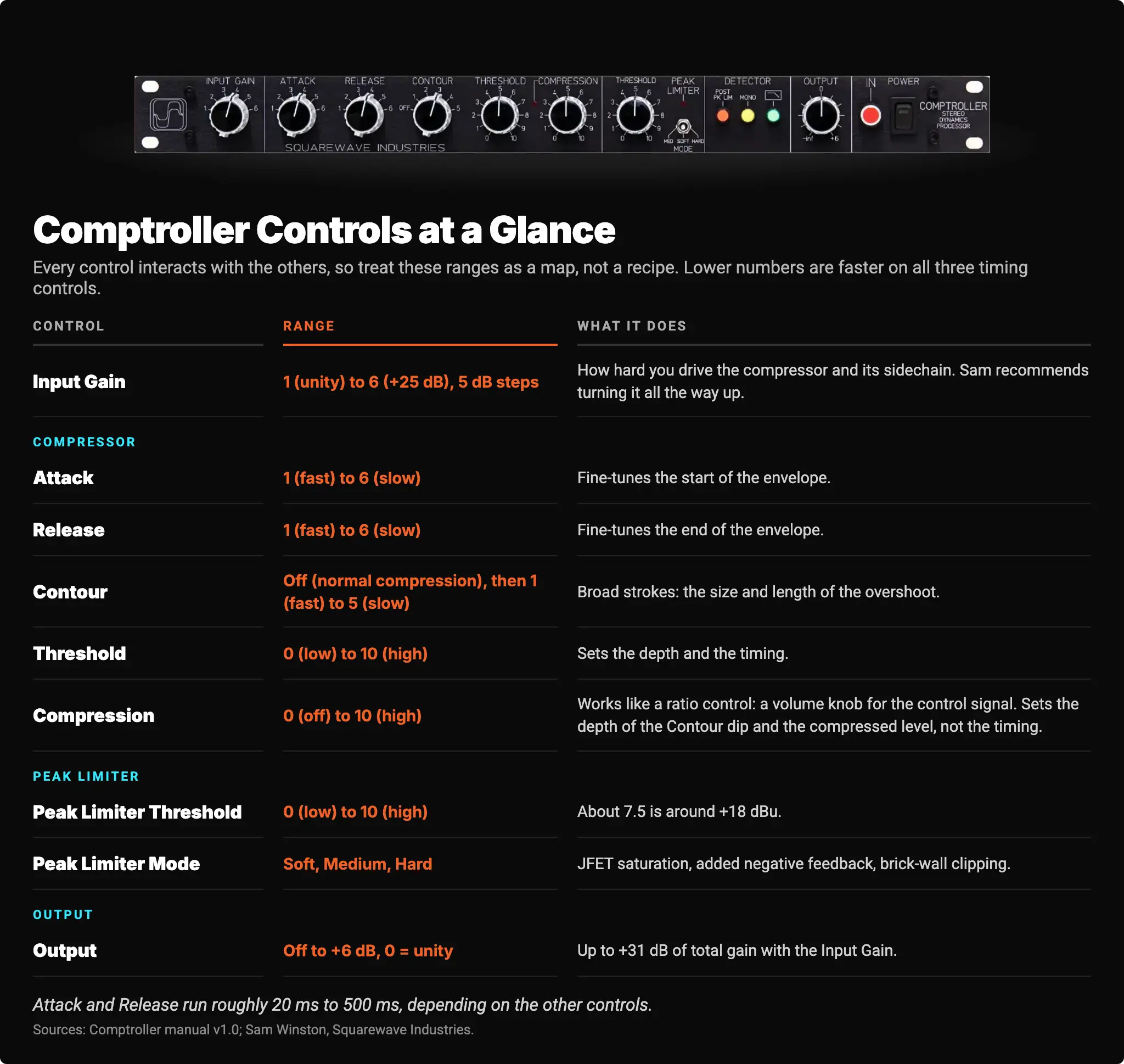
There are no published millisecond values for Attack and Release, because the real times depend so much on the Threshold, Contour, and Input Gain. Sam's rough range for both is about 20 ms to 500 ms.
The interaction worth learning first: the Contour effect is strongest when Attack, Release, and Contour are on similar numbers (all fast or all slow). The timing controls overlap, so spreading them far apart dilutes the effect.
What does each timing setting sound like?
Sam's own shorthand for the three timing controls:
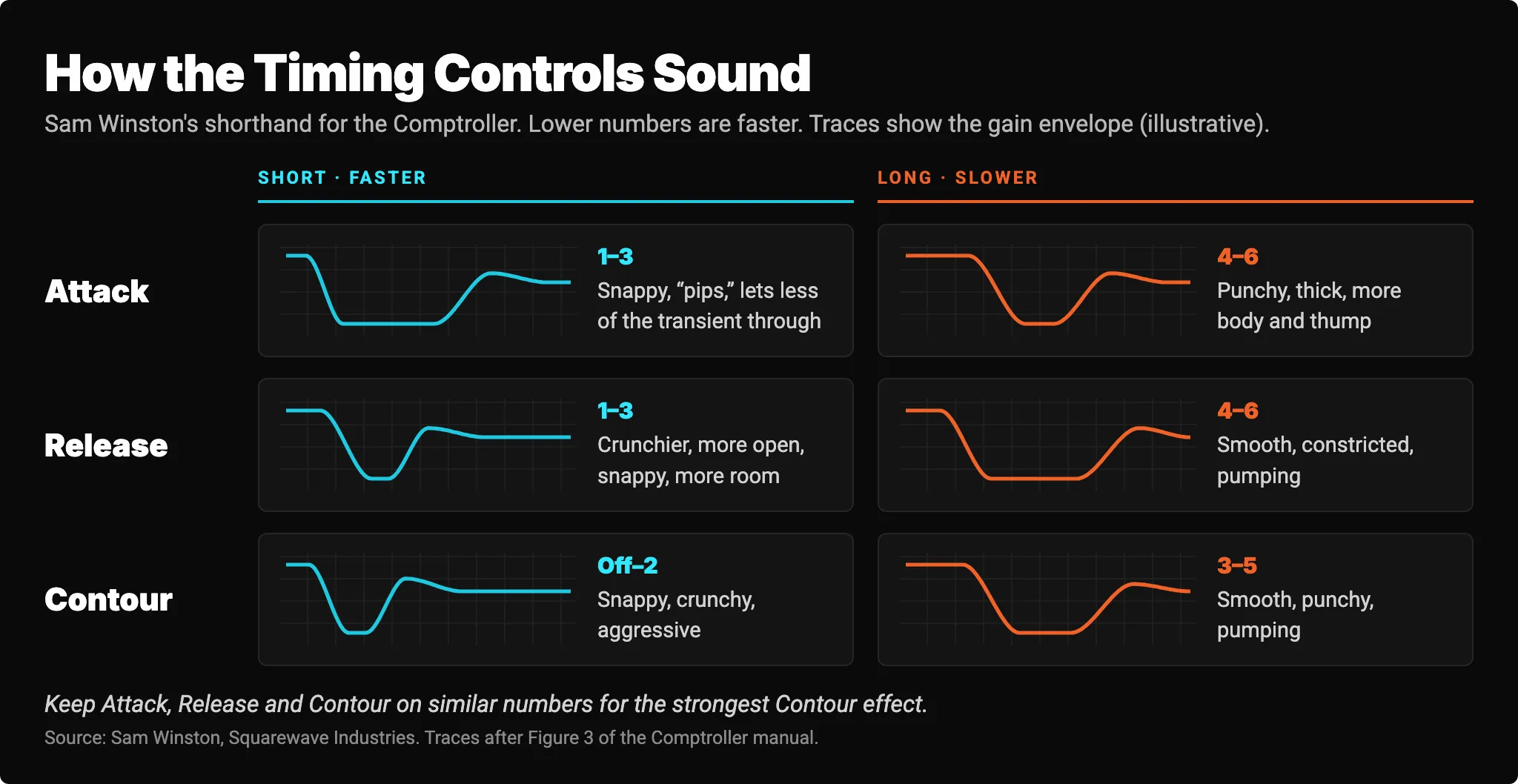
Release is where the room lives. A short Release lets the volume dip recover quickly, so you hear more of the drum decay and the room's early reflections. A long Release holds the dip longer, which pulls those early reflections down and hides the sound of a small room.
How Should You Use the Peak Limiter?
Use it to set the balance between the transient and the compressed body, and to protect whatever comes next. The JFET peak limiter follows the compressor and is completely independent of it. Each channel has its own detector and limiter, and it reacts instantly, with no attack or release time.
- Soft exploits the JFET's saturation region and is fairly gentle.
- Medium adds negative feedback that lowers the maximum level further.
- Hard is a brick wall: nothing gets past the threshold, and it clips to get there, so expect harmonic distortion.
It can't be bypassed, but its maximum threshold sits just below the clipping point of the circuit itself (around +25 dBu), so at the top of its range it's out of the way.
Why it matters: high Input Gain with heavy compression can throw extreme transient peaks. The limiter lets you pull those peaks down while keeping the same Contour response. Sam's drum setting is Hard at around 7.5 (roughly +18 dBu, the standard maximum level for most A/D converters), "that way you can push the input gain as much as you want without worrying about the output level."
Because each channel limits on its own, heavy limiting on stereo material does move the image a little. Sam says it tends to pull toward the center, as the limiting evens out the levels between the two sides. For drum buses that's rarely a problem; on a wide mix, listen for it. Our Bettermaker Limiter 2.0 explainer covers the difference between limiting and clipping in more depth.
Hard mode at 7.5 is your safety net. With it in place, the Input Gain becomes a tone control you can push all the way.
What Do the Comptroller's Detector Switches Do?
They change what the compressor listens to. None of them touch the peak limiter, and none of them filter what you hear.
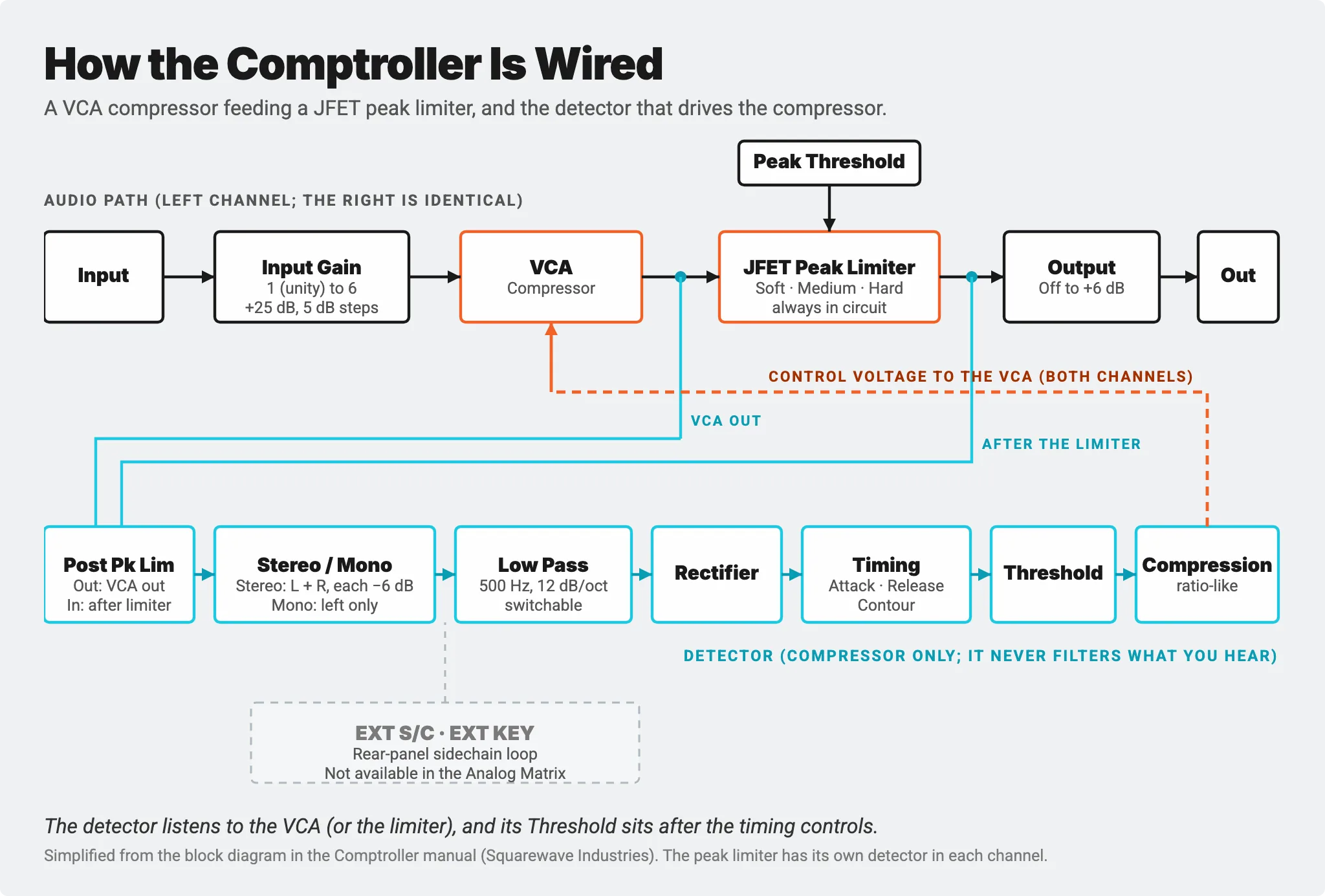
Post Pk Lim. By default the compressor's detector is fed from the VCA output. Post Pk Lim moves it to after the peak limiter. That matters because the depth of the Contour dip is proportional to the level of each transient, so uneven transients give an uneven Contour response. The manual's example is a room mic that picks up far more kick than snare. Engage Post Pk Lim, add some limiting, and the compressor sees evened-out transients, so the Contour effect becomes more consistent and the sound gets less constricted. Sam usually leaves Post Pk Lim engaged, then uses the Peak Limiter Threshold to set the balance between the peak transient level and the volume drop.
Stereo and Mono. In Stereo (the default), the left and right channels are each dropped by 6 dB and summed, and one control voltage drives both channels. In Mono, only the left channel feeds the detector, at full level, while the right channel is still compressed. That keeps the Threshold consistent between the two modes. Engage Mono whenever you run a mono source, or the detector will see too little level.
Low Pass. A 500 Hz, 12 dB/octave low-pass filter on the detector, so the compressor only responds to low frequencies. Most compressors put a high-pass in the sidechain to stop the low end pumping the mix. The Comptroller goes the other way, and Sam explains why. The Contour dip follows the change in level that comes with a transient, so the effect is stronger when there's less ambient sound between hits. The filter strips out high-frequency ambience so the compressor only reacts to the low-frequency transients of the drums. "500Hz just seemed to work the best. It's great on a mix or drum buss for maximizing the contour effect without constricting everything else."
EXT S/C and EXT KEY. On the hardware, EXT S/C opens an external sidechain loop for EQ or other processing in the detector path, and EXT KEY routes an outside source through a separate VCA so it can trigger compression while keeping the correct Contour response. Note: The rear-panel sidechain isn't available in the Analog Matrix.
How Do You Get Started on the Comptroller in Five Minutes?
Put it on a drum bus, start from Sam's settings, and move the Threshold first. This is the manual's quick start, and Sam says it's his basic approach too: "It just brings the drums forward and makes them punchier."
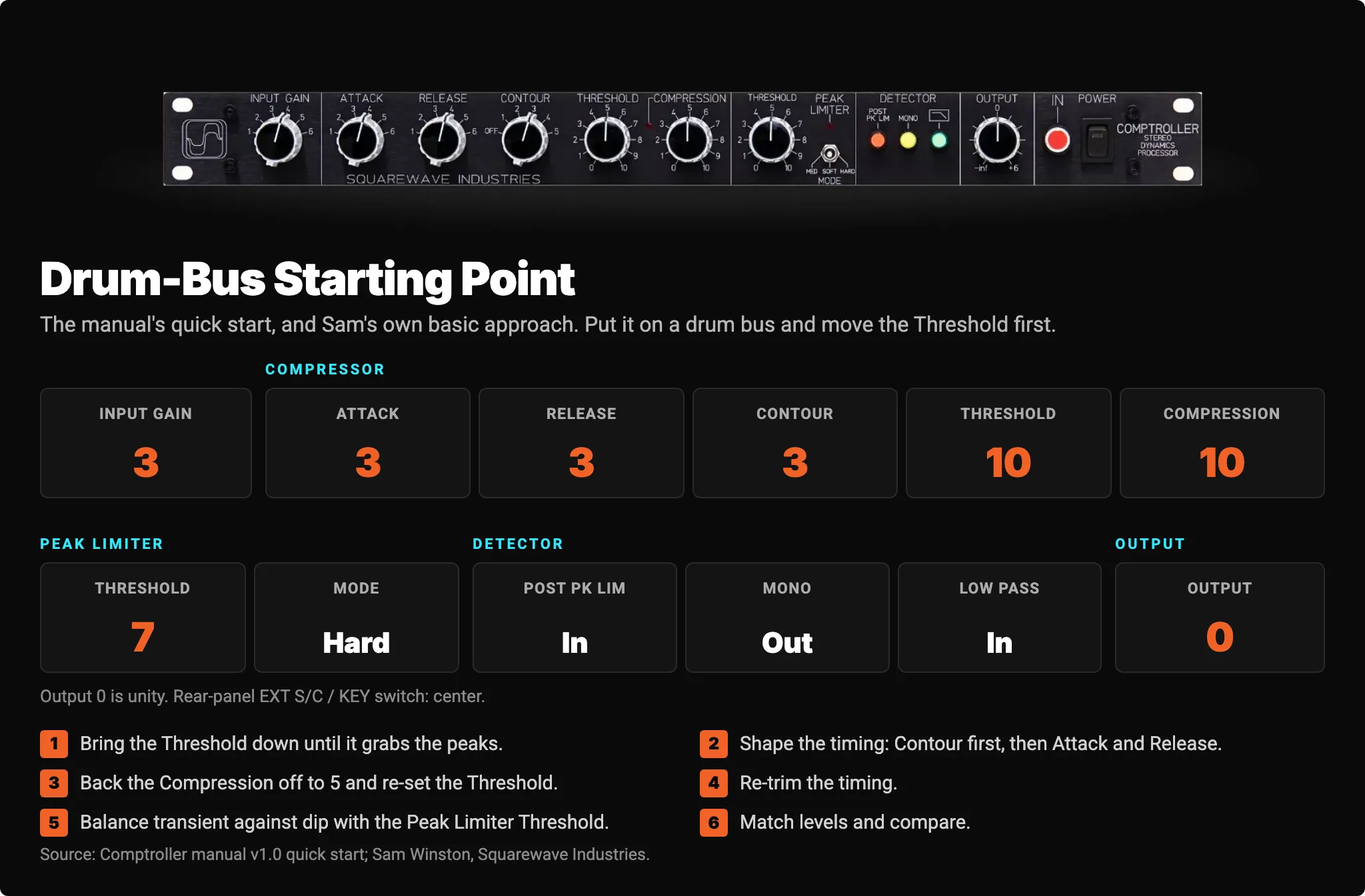
- Bring the Threshold down until the compressor starts grabbing the peaks and you can clearly hear it working.
- Shape the timing. Contour for broad strokes, then Attack and Release to fine-tune. Keep them on similar numbers for the strongest effect.
- Back the Compression off to 5 and re-set the Threshold. Keep it high, catching only the peaks, for a more aggressive, open sound. Bring it lower to accentuate the peaks and smooth the response.
- Re-trim the timing. A lower Threshold has made the attack faster, so adjust to compensate.
- Use the Peak Limiter Threshold to balance how loud the transient is against how deep the dip is.
- Match levels and compare against the dry drums. Louder always sounds better, so don't let it fool you.
Sam Winston's Comptroller Settings
Once the quick start makes sense, these are Sam's starting points for the Comptroller's more extreme sounds.
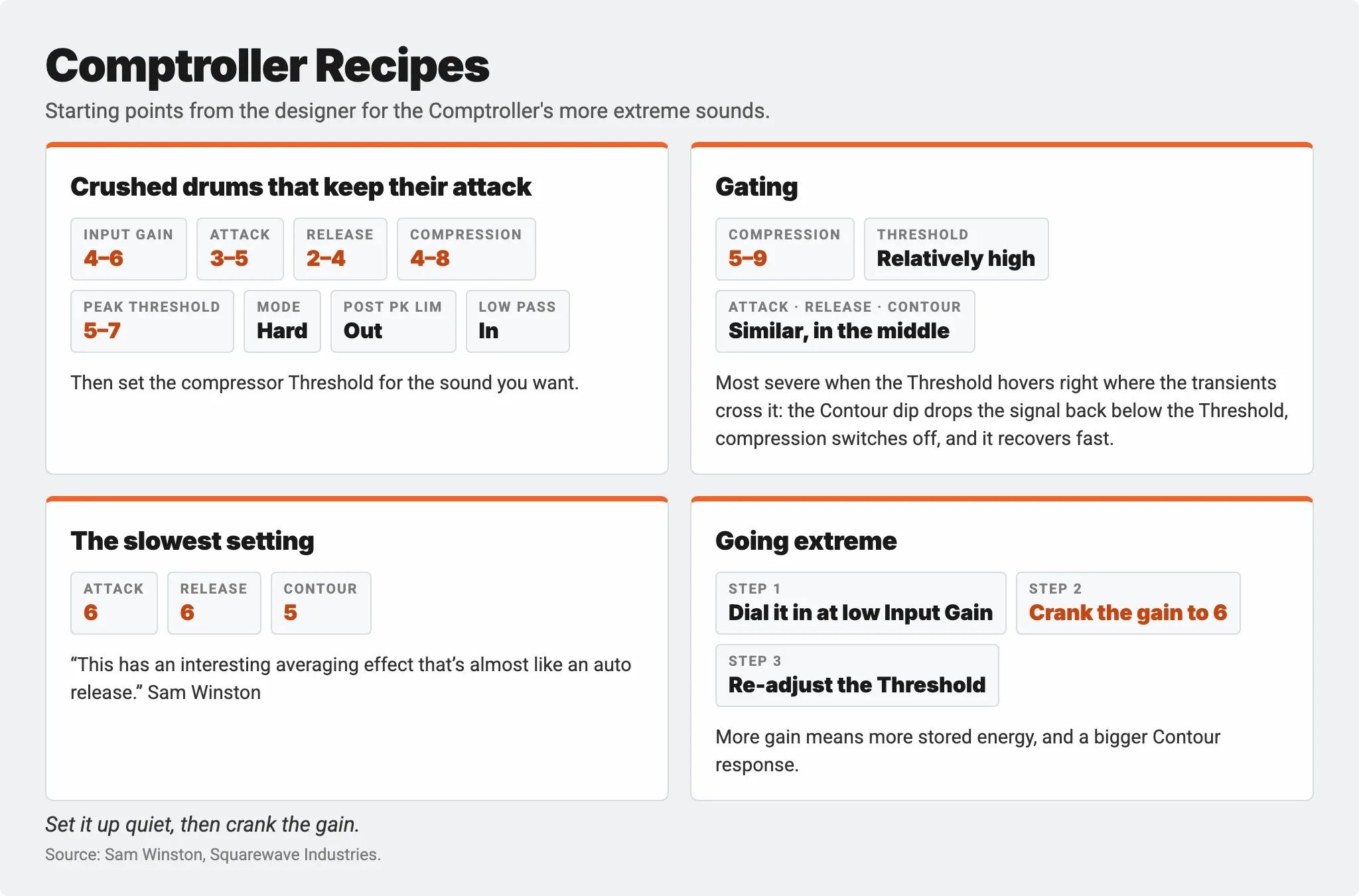
Crushed drums that keep their attack. Input Gain 4–6, Attack 3–5, Release 2–4, Compression 4–8, Peak Limiter Threshold 5–7 in Hard mode, Post Pk Lim out, Low Pass in. Then set the compressor Threshold for the sound you want.
Gating. High Compression (5–9), a relatively high Threshold, and Attack, Release, and Contour all on similar settings in the middle. The gating is most severe when the Threshold hovers right where the transients cross it. Sam explains the mechanism: the Contour dip drops the signal back below the Threshold, which switches the compression off and causes a fast recovery. The compressor effectively chops itself.
The slowest setting. Attack and Release on 6, Contour on 5. Sam really likes this one: "This has an interesting averaging effect that's almost like an auto release."
Going extreme. Sam's favorite approach for the wildest sounds is to dial in the controls at a low Input Gain, then crank the gain all the way up to 6 and re-adjust the Threshold. Remember the hidden rectifier threshold: more gain means more stored energy, and a bigger Contour response.
Set it up quiet, then crank the gain. The Comptroller sounds cooler the more you push it.
Where Should You Use the Comptroller?
The drum bus is its home, but Sam says it's "surprising on most things, because it simply doesn't behave like you would expect." Some places to start:
Drum bus. Fast-to-middle timing, Contour, and the Low Pass in. The Contour dip pushes each hit forward and clears space behind it. Our bus compressor guide covers the conventional approach the Comptroller departs from.
Room mics. Use the Release to choose how much room you keep. A short Release brings the early reflections and decay up; a long one pushes them down and makes a small room sound less boxy. Add Post Pk Lim with some limiting if the kick dominates the room mic. Reviewing the Comptroller for Tape Op, Don Gunn used Contour and the limiter to turn room mics into short, percussive hits.
Mix bus. Gently, with a high Threshold and the Low Pass in, so the low-frequency transients drive the compressor without constricting everything else. Gunn found it smoothed transients and made a mix feel glued and wider. If you want a more conventional glue compressor, our guide to mix-bus and master-bus glue covers the classic routes.
Mastering. Sam says it's "definitely useful for mastering with more gentle settings." Keep the Compression low and the Threshold high, and watch the image if the peak limiter is working hard.
What Mistakes Should You Avoid on the Comptroller?
- Compressing or limiting before it. It's most effective on very dynamic signals. Feed it the raw drums.
- Heavy peak limiting with Post Pk Lim engaged, then wondering where Contour went. That's Sam's top pick. With Post Pk Lim in, heavy limiting flattens the transients the compressor sees, and the Contour dip follows the transients.
- A low Threshold with no recovery time. The compressor never gets to release between hits, so the Contour effect shrinks.
- Spreading Attack, Release, and Contour far apart. The effect is strongest when they're on similar numbers.
- Forgetting that the Threshold moved the timing. Re-trim Attack and Release after every big Threshold move.
- Leaving Mono off on a mono source. The detector sees half the level it should.
- Expecting transparency, or looking for a meter. As Sam puts it on the Comptroller's product page: "If you can't hear what it's doing, then you're not using it right!"
How Do You Use the Comptroller on Access Analog?
You run the real Squarewave Comptroller in our Colorado racks from your own DAW. Open the Analog Matrix plugin, add the Comptroller, and set its controls just as you would on the front panel. Every knob and switch is set remotely, including Post Pk Lim, Mono, Low Pass, and the peak limiter mode. The exceptions are the hardware's IN button (use the plugin's bypass to compare) and the rear-panel sidechain input.
The Analog Matrix also adds a Mix slider, so you can blend the compressed signal with the dry one. That makes parallel compression a single control: crush the drums with Sam's settings, then tuck the result under the dry kit.
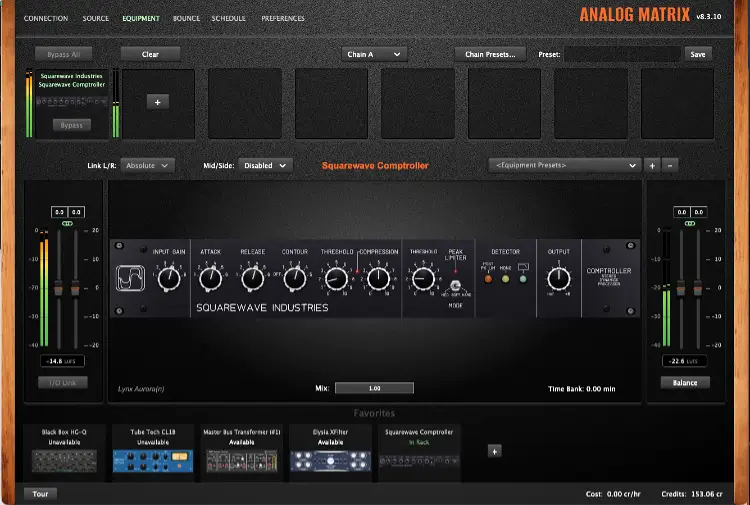
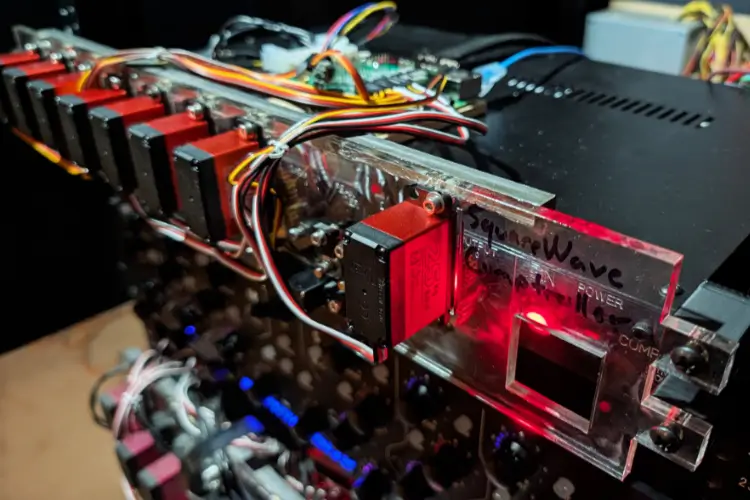
Your settings save with your DAW session and recall with it, and you can automate the controls from your DAW, handy for switching Contour or the limiter mode at the start of a new section. It's real hardware, not an emulation. The Comptroller is included in the Pro tier of the Access Analog Subscription, or you can reserve it on its own; its rate is on our gear prices page with the rest of the rack. Plans start at $9.98 a month, and new accounts get 12 free credits, about an hour on an average device.
Conclusion: A Compressor That Shapes the Groove
Most compressors manage dynamics. The Comptroller rewrites them. Contour lets each hit through and then takes the energy back out of the space behind it, the Threshold decides how fast all of that happens, and the peak limiter sets how much of the transient survives. It's an original circuit that rewards experimenting, and its own designer recommends turning the gain all the way up.
Push it, listen to it, and hear what the real Squarewave Comptroller does to your drums, straight from your DAW.
FAQs
What is the Squarewave Comptroller?
The Squarewave Industries Comptroller is a stereo dynamics processor that combines a VCA compressor with a JFET peak limiter. Designed and hand-built by Sam Winston, it's an original circuit whose Contour control makes the compressor overreact to transients, shaping punch and groove rather than staying transparent.
What does the Contour control do on the Comptroller?
Contour delays the compressor's response and lets the sidechain store up energy during a transient, so the compressor overshoots and briefly dips the volume before settling. The hit pops forward and the sound behind it ducks, which can add punch, pumping, or a gating effect.
Why doesn't the Comptroller have a gain-reduction meter?
It was designed to be heard rather than set by eye. Two LEDs show when the compressor and the peak limiter are working, and the manual's advice is that if you can't hear what it's doing, you're not using it right.
Can you bypass the Comptroller's peak limiter?
No. The JFET peak limiter is always in circuit, but its maximum threshold sits just below the circuit's own clipping point, around +25 dBu, so at the top of its range it stays out of the way. Around 7.5 in Hard mode, about +18 dBu, it protects a typical A/D converter.
What is the Comptroller's 500 Hz low-pass filter for?
It filters only the compressor's detector, not the audio, so the compressor responds to low-frequency drum transients and ignores high-frequency ambience. That strengthens the Contour effect on drum buses, room mics, and full mixes without constricting the rest of the sound.
Is the Comptroller good on the mix bus or for mastering?
Yes, with gentle settings. Its designer, Sam Winston, says it's definitely useful for mastering with more gentle settings, and Tape Op's reviewer found it smoothed transients and made a mix feel glued and wider. The drum bus is still its main job.
Is the Comptroller at Access Analog real hardware or an emulation?
It's the real Squarewave Comptroller, racked in Access Analog's Colorado facility. The Analog Matrix plugin sets its real controls from your DAW, and your settings save and recall with your session.
Hear what real analog gear does to your own mix, before you buy a single piece of it.
Run real outboard hardware from your DAW. New accounts get 12 free credits.
Connect todayMore in Gear Guides
All posts →