How to Get the Most Out of the Black Box HG-Q: Quick-Start Tips for the Tube EQ That Isn’t Just an EQ
The Black Box HG-Q looks like a three-band mastering EQ, and that's the trap.
Treat the HG-Q like an ordinary EQ and you'll get a very good ordinary EQ. Treat it the way its makers do and you get six EQs per channel, clean cuts, and a tube stage that only wakes up when you boost. This guide covers how it works, a quick-start routine, and how to run the real unit from your DAW with Access Analog.
A big thank you to Eric Racy of Black Box Analog Design for his contributions to this guide. Every tip from him is straight from the source: the people who built the HG-Q.
"The HG-Q is a contouring, shaping and enhancement device that lets you reach deep into your mix in a way that is transformative yet keeps the integrity intact. For that reason, it has the unique ability to be dramatic and subtle at the same time."
Eric Racy, Black Box Analog Design
Key Takeaways
- It's transparent until you boost. No transformers and a flat response mean no footprint when it's set flat.
- Every band is two EQs. A boost and a cut, each with its own frequency and Q: six EQs per channel.
- The tube saturation lives only in the boosts. Zero boost means zero saturation.
- Boost first, then cut to shape and pay back level. That's how Eric Racy works it.
- Series is the clean default; parallel opens new curves. Flip a band and rebalance the level.
Boost to color, cut to shape. The HG-Q rewards you for pushing and pulling at the same time.
What Is the Black Box HG-Q?
The Black Box Analog Design HG-Q is a stereo tube EQ and saturator from the makers of the HG-2. Each of its three bands per channel is split into a solid-state cut and a boost with its own parallel 12AT7 tube saturation stage. The audio path is fully analog and transformerless; only the controls are digital, which is why every encoder is stepped, shows its setting on an LED ring, and recalls exactly.
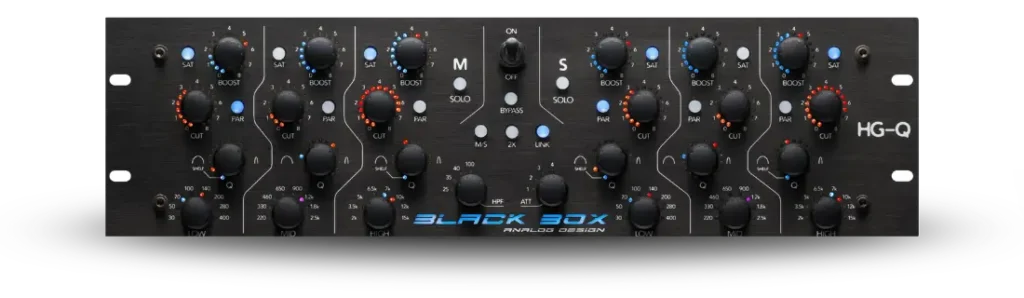
Seven years in development and unveiled at NAMM 2025, it's pitched in Black Box's own description as an enhancement tool as much as an EQ. Eric Racy, a Black Box partner and a platinum-selling mixer, engineer and producer, says the goal "was a new kind of enhancement tool that was intuitive and powerful yet hard to make sound bad. Most importantly it had to be musical." The first concept used ordinary pots and switches. When those couldn't do what the team wanted, they brought on Ian MacGregor and rebuilt the control system digitally, which Eric calls "the platform for everything Black Box will do in the future."
How Is the HG-Q Different from the HG-2?
The HG-2 colors everything that passes through it; the HG-Q stays clean until you boost. Its boost-band saturation is essentially the HG-2's parallel saturation circuit, aimed at one frequency range instead of the whole signal.
Eric uses the two together all the time, for opposite jobs. The HG-2's strength is the "squeeze": its tubes absorb transients naturally, controlling peaks and adding density without a compressor's attack-and-release artifacts. The HG-Q does the opposite. With high headroom and its tube stages always in parallel inside the boost, you can drive it hard without softening transients or adding the intermodulation distortion other saturators produce.
"The detail and transients are preserved so your mix is preserved while it's enhanced."
Eric Racy
His order: HG-Q first to shape, then the HG-2 to squeeze, which means less limiting downstream. Our Black Box HG-2 guide covers the other half of that pairing.
The HG-2 squeezes; the HG-Q enhances. Shape first, then squeeze.
How Do the HG-Q's Controls Work?
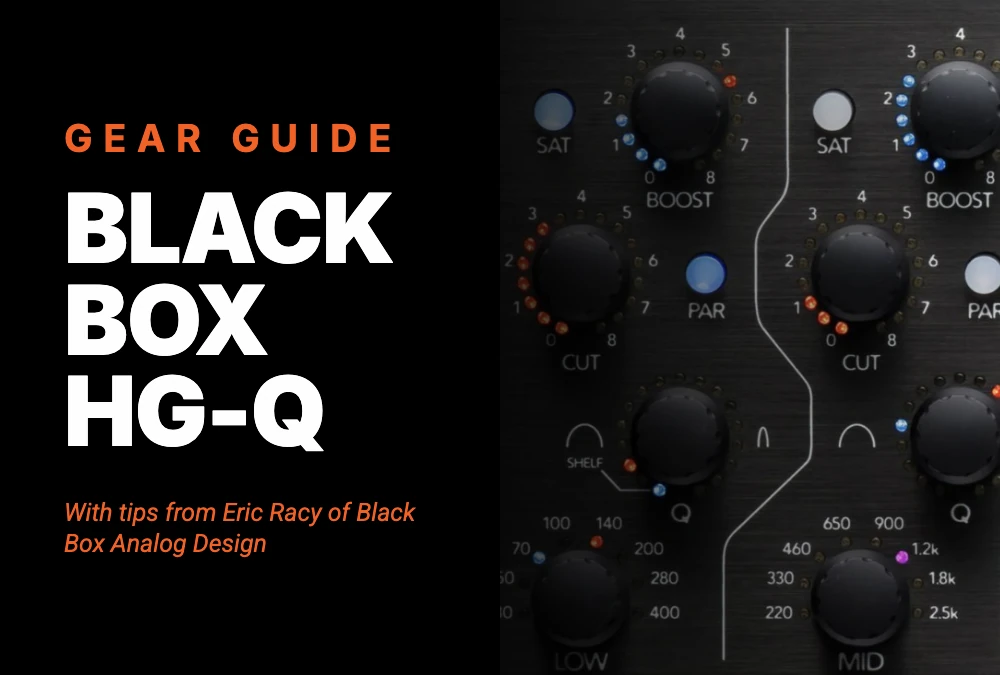
Each band is two EQs sharing four push-button encoders. The color code does most of the explaining: blue is boost, red is cut, purple is both.
- Boost: up to 8 dB in 0.5 dB steps. With Sat on, press to switch the knob to Sat Drive.
- Cut: up to 8 dB in 0.5 dB steps. Press to bypass the whole band.
- Q: clockwise narrows it, with a shelf setting on the low and high bands. Press to cycle between boost Q, cut Q, and both.
- Frequency: eight per band. Press to cycle between boost, cut, and both.
- Sat and Par: engage the band's tube stage; switch the band from series to parallel.
- Center section: M/S (with Mid and Side solo), Link, 2X, HPF, ATT (output attenuation), and true hardware Bypass.
Eric says the push functions are what new users miss: "people initially forget that you can not only boost and cut at the same time but change the frequency and bandwidth for the boost and cut separately." Think of each band as two bands laid over each other, one for cuts and one for boosts.
What Frequencies Can You Pick on Each Band?
Each band has eight fixed frequencies, and the bands overlap on purpose. The low and high bands can shelve; the mid band is always a bell.
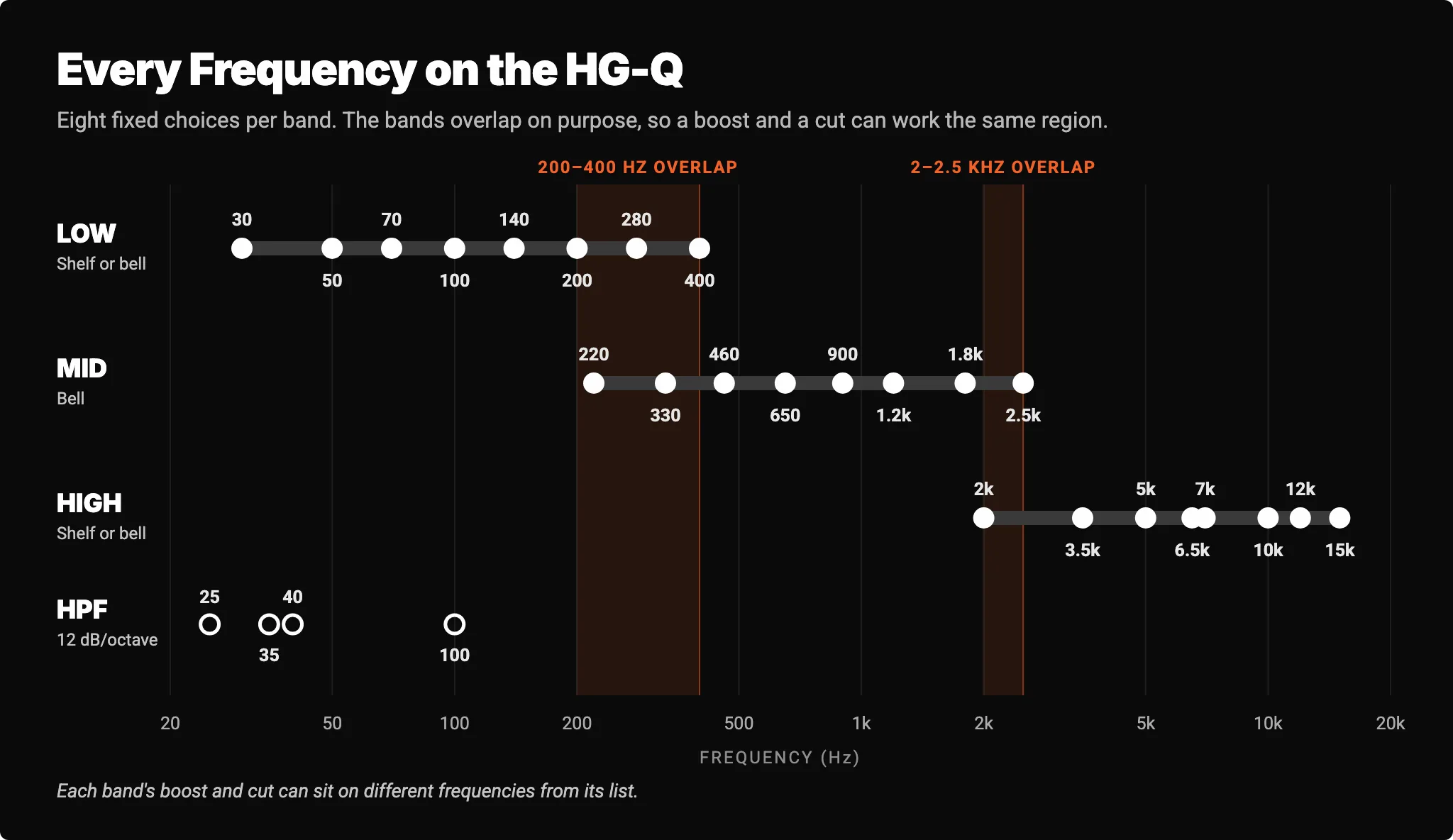
Eric's example of why the overlap matters: you can boost 70 or 100 Hz on the low band and still use the mid band to go after the 220 Hz area of a snare. The frequencies themselves came from notes taken in real sessions, input from mixing and mastering engineer friends, and the mathematically ideal spread.
How Do You Get Started on the HG-Q in Five Minutes?
Start by boosting, not cutting. Eric does his corrective EQ before the HG-Q (plenty of tools, many in the box, handle mud and harshness) so no band is spent on repairs. Here's his routine:
- Shelve the low and high bands and boost. Low at 70 or 100 Hz, high around 10 kHz.
- Cut just above the low boost. Set the low cut to a bell with a medium Q, one or two frequency steps above the boost. It tightens the shelf and clears mud.
- Do the same up top. Cut around 7 kHz with a narrower Q to take out harshness.
- Push the saturation, then cut deeper. Engage Sat on each boost, raise the drive, and deepen the matching cut as the level climbs.
- Push and pull the mids to taste. Every mix is different here.
- Bypass and compare at matched level.
Why cut deeper as you add drive? The HG-Q's Dynamic Gain Compensation holds the boost level steady up to about 25% drive, then lets it rise smoothly by up to 4 dB as you approach 100%, according to the HG-Q user's manual. The deeper cut pays that back.
Eric Racy's Starting Point
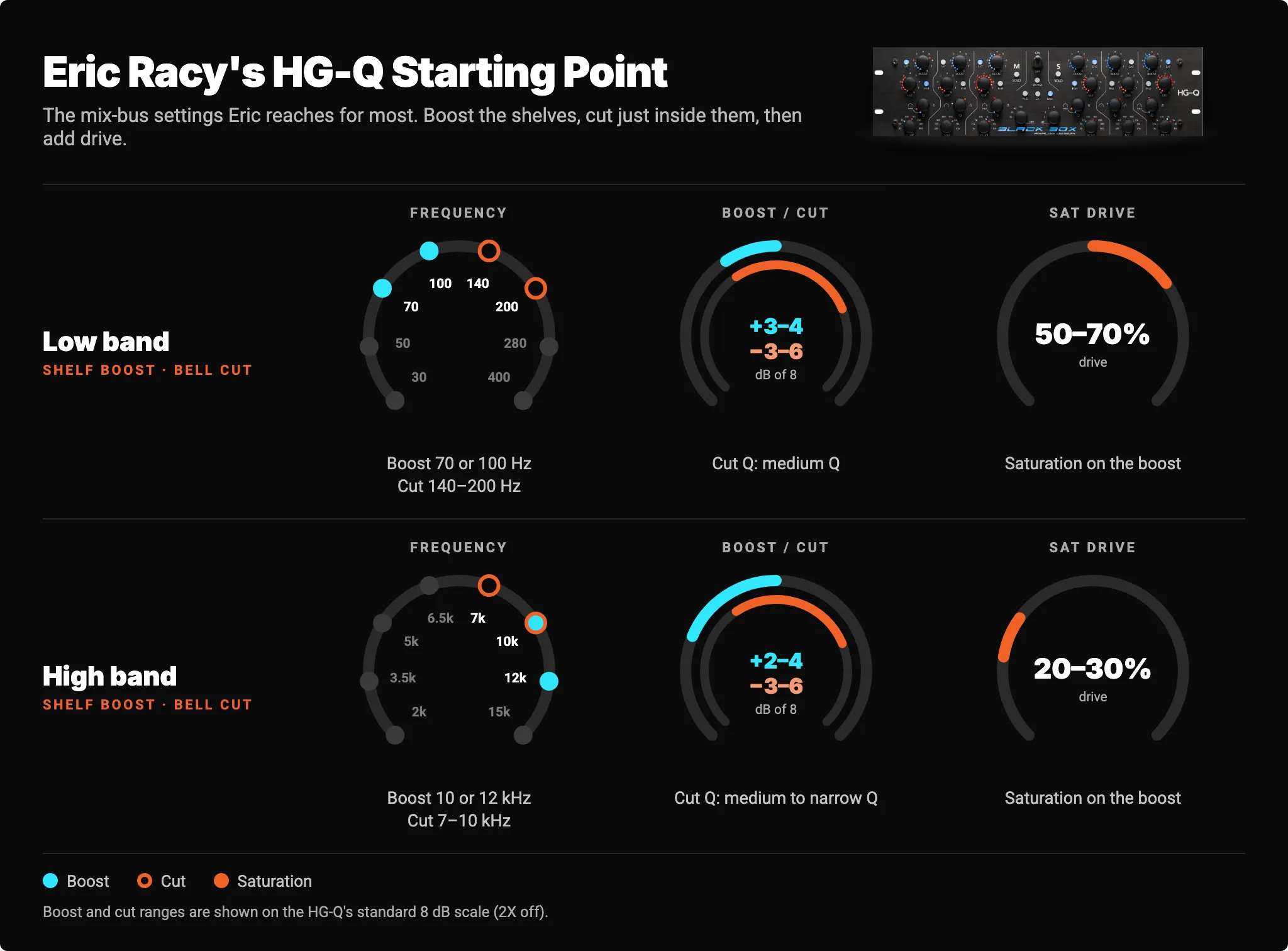
In the Analog Matrix, a pop-up shows Sat Drive as a percentage as you turn the knob (available in version 8.3.11), so you can dial in Eric's figures directly.
Boost the shelf, cut just inside it, add drive, cut a little deeper. That's the HG-Q in four moves.
Series or Parallel: What Does the Par Button Do?
In series (the default), each band's cut comes before its boost, like a clean EQ feeding a colorful one. In parallel, both take the full input and are mixed back together, which creates phase interactions between the two curves and hits the tube stage with the whole signal.
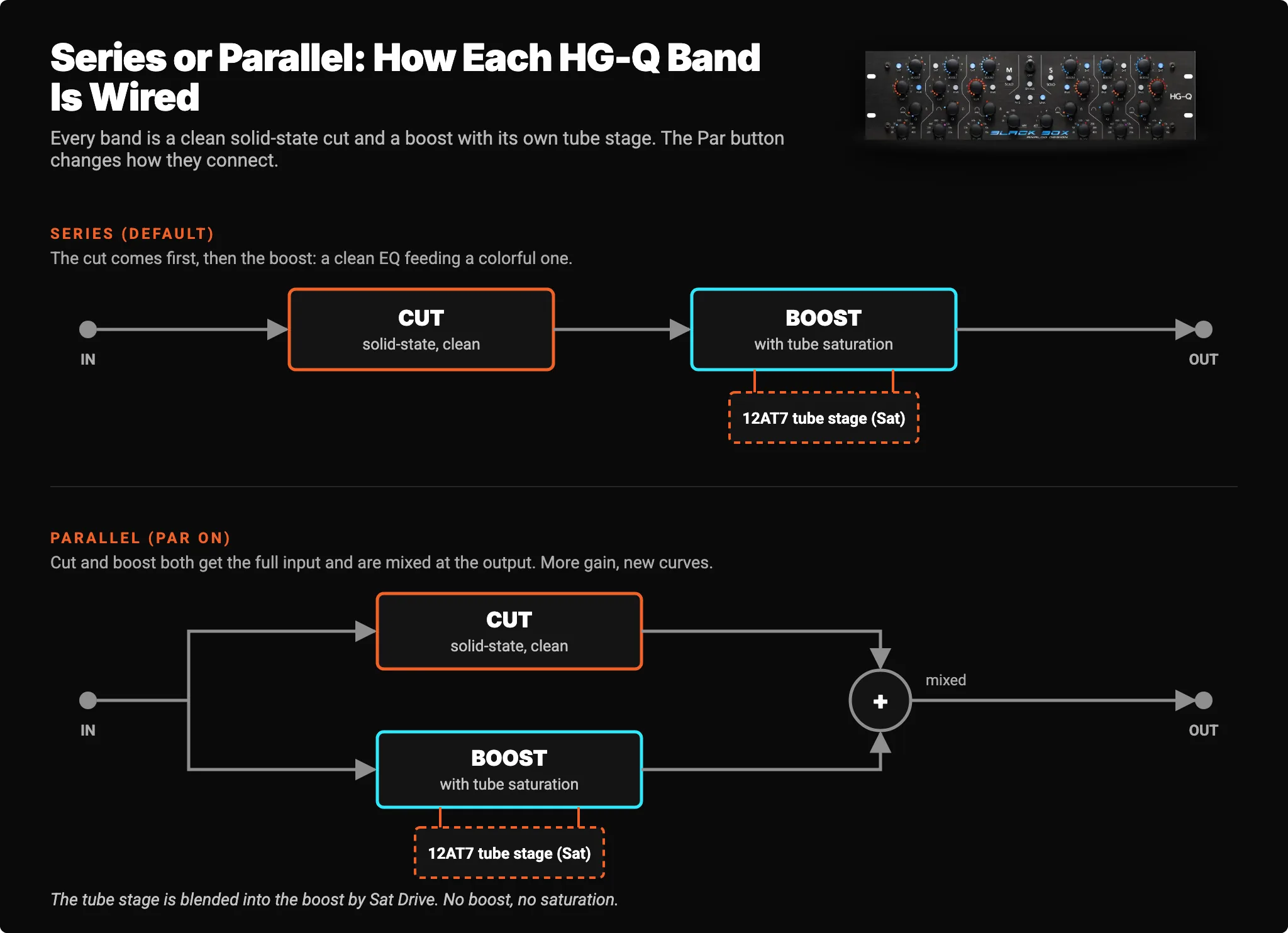
Eric often flips to parallel just to hear which contour suits the material. Parallel gives noticeably more gain when you boost and cut together, so he reduces the boost or deepens the cut. If he runs out of cut, he switches to 2X and halves the boost setting, which keeps the boost where it was and doubles the cut range.
Black Box suggests one more experiment: boost and cut the same frequency, then make the cut's Q slightly narrower or move it one frequency over, and try both modes. The small offsets are where the musical phase interactions live.
You don't pick series or parallel on paper. You flip the button and keep whichever one makes the mix lean forward.
Where Should You Use the HG-Q?
It works on almost anything, but the mix bus is its home, and that's where Eric keeps his. Our guide to mix-bus and master-bus glue covers where an EQ like this sits in a bus chain.
M/S for mastering. M/S mode lets you treat the center and sides separately, and Eric calls the width and dimension it can add "like magic." His warning applies to any M/S EQ: once you EQ in M/S, hard-panned elements start appearing in the opposite speaker, which can reduce separation. Whether to use it depends on the mix. Our mid/side processing explainer covers why.
2X on tracks and stems. 2X doubles the range to 16 dB in 1 dB steps and pushes the saturation harder. In Sound On Sound's HG-Q review, Julian Rodgers found it useful for more assertive shaping on individual channels.
What Mistakes Should You Avoid on the HG-Q?
Eric's answer: the HG-Q is hard to make sound bad. With the tube stages in parallel, you could turn everything all the way up and still get surprisingly little obvious distortion. The one real mistake is treating it like a regular EQ.
"Don't think of it as a replacement for another EQ, think of it as a way to push and pull, dig into and contour your mix in ways that nothing else really does."
Eric Racy
Three practical traps are still worth knowing:
- Expecting saturation with zero boost. No boost, no saturation.
- Using ATT as a gain stage. It offers only 4 dB in 1 dB steps, by design, to pull back the slight midrange lift that boosts at both ends create. Usually 1 dB or less does it.
- Engaging Link after setting the right side. Link copies left onto right, and the right side's settings are lost. Set the left first.
How Do You Use the HG-Q on Access Analog?
You run the real Black Box HG-Q in our Colorado racks from your own DAW. Open the Analog Matrix plugin, add the HG-Q, and work its controls exactly as you would on the front panel: the encoders press just like the hardware's, and a pop-up shows each value as you turn (available in version 8.3.11).
Your settings save with your DAW session, and because the controls are stepped, a recall lands on exactly the same positions every time. You can also automate the controls from your DAW, handy for changing a setting on the downbeat of a new section.
It's real hardware with real 12AT7 tubes, not an emulation. The HG-Q is included in the Elite tier of the Access Analog Subscription, or you can reserve it on its own. Plans start at $9.98 a month, and new accounts get 12 free credits, about an hour on an average device.
Conclusion: It's Not an EQ Replacement. It's a New Way In.
Most EQs ask what's wrong with your mix. The HG-Q asks what you want more of. Clean cuts, tube-driven boosts, and the interaction between them let you lift detail that was already there without flattening the transients that make a mix feel alive. Start with Eric's shelves, push the drive, cut a little deeper, and flip a band to parallel just to hear what happens.
Hear what the real Black Box HG-Q does to your own mix, straight from your DAW.
FAQs
What is the Black Box HG-Q?
The Black Box Analog Design HG-Q is a stereo tube EQ and saturator with three bands per channel, each split into a solid-state cut and a boost with its own parallel 12AT7 saturation stage, making it effectively a six-band EQ per channel. Its audio path is fully analog and transformerless, with digital control for exact recall.
Is the HG-Q good for mastering?
Yes. The HG-Q is built for mix-bus and mastering work where you want shape, density, and detail rather than surgical correction. Its M/S mode treats the center and sides separately, though M/S EQ can pull hard-panned elements toward the opposite speaker.
Why isn't the HG-Q's saturation doing anything?
The HG-Q's tube saturation sits inside each band's boost circuit, so a band with zero boost adds none. Add some boost, press Sat, then press the Boost encoder to switch it to Sat Drive and turn it up.
What's the difference between the Black Box HG-Q and the HG-2?
The HG-2 is a tube saturation processor that colors everything and squeezes transients for density; the HG-Q is a transformerless tube EQ that stays clean until you boost and preserves transients. Black Box partner Eric Racy runs the HG-Q first, then the HG-2.
Is the HG-Q at Access Analog real hardware or an emulation?
It's the real Black Box HG-Q, racked in Access Analog's Colorado facility. The Analog Matrix plugin sets its real controls from your DAW, and your settings save and recall with your session.
Hear what real analog gear does to your own mix, before you buy a single piece of it.
Run real outboard hardware from your DAW. New accounts get 12 free credits.
Connect todayMore in Gear Guides
All posts →