
The console's last stage is the part of the sound you've been missing. This is how to get it back.
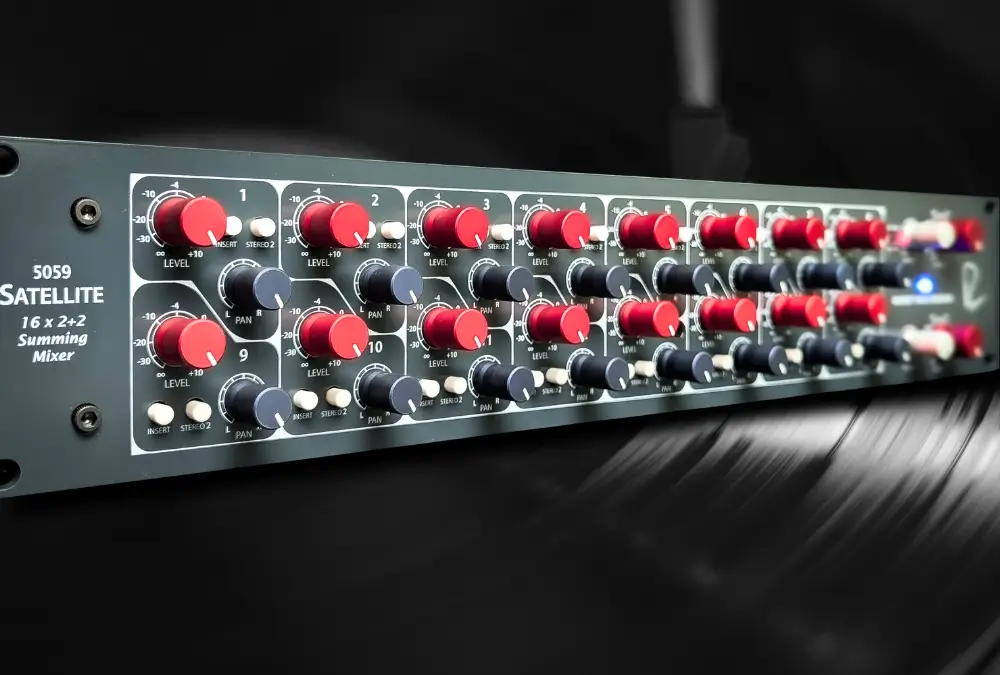
Analog summing gets argued about more than almost any other topic in mixing, and most of the argument is aimed at the wrong thing. The addition isn't the point. What the signal passes through on the way out is.
The Rupert Neve Designs 5059 Satellite is 16 channels of class-A gain, custom transformers, and Silk, built on the same topologies as the 5088 console. In this guide you'll learn what analog summing actually changes, how the 5059 does it, what Silk Red and Silk Blue do to a mix, and how to sum up to 16 stems through the real unit from inside your DAW using Access Analog.
Analog summing means converting your DAW tracks or stems to analog, combining them in an analog circuit instead of the DAW's mix bus, and capturing the stereo result. That's the whole definition. Everything else is what happens to the audio while it's out there.
Let's be straight about the part that gets mangled online. Adding signals is arithmetic, and a modern DAW does it with floating-point precision, which means no rounding you could ever hear. There is no narrow pipe inside the mix bus. Sound On Sound's 2012 roundup of analogue summing mixers says the transformers, valves, and processing in a summing box "can often have a greater effect on the sound than the summing process itself." Alan Parsons ran the test in The Art & Science of Sound Recording, summing the same four tracks both ways at identical levels, and reported that any difference is subtle and depends on the music.
So why do so many working engineers still route out of the box? Because a good summing mixer is not a passive adder. It's a console output section. In Bobby Owsinski's Mixing Engineer's Handbook interviews, rock mixers talk about the size and aggression a console gives them and say they'll use a summing network even on an in-the-box mix. What they're hearing is mechanism, not magic.
Class-A gain stages. Every channel and bus in the 5059 passes through class-A amplifiers on ±24 V power rails, which is a great deal of voltage swing to work with. That's the firehose in our 8 Reasons Why Analog Is Different analogy: the same waveform carried by far more current and voltage than a DAW ever sees, on a transfer curve that bends gently instead of clipping at a hard ceiling.
Transformers. Hugh Robjohns' Analogue Warmth article in Sound On Sound is the best single explanation. A transformer moves energy magnetically between windings. Its core behaves slightly non-linearly at very low levels (hysteresis, the core's magnetic memory) and again at high levels (saturation, when the core can't magnetize any further), and its inductance interacts with the impedances around it. The result is level-dependent harmonic content, density in the lows, and a smoothing of the top end. Rupert Neve's classic modules always used transformers. So does the 5059.
Headroom. The 5059's buses deliver up to +26 dBu at the XLR outputs. Sixteen channels of transients don't crowd each other on the way to a hard limit.
Workflow. Sixteen physical channels with level and pan is a different way to balance a mix than a mouse. Two hands on a bus change how you listen.
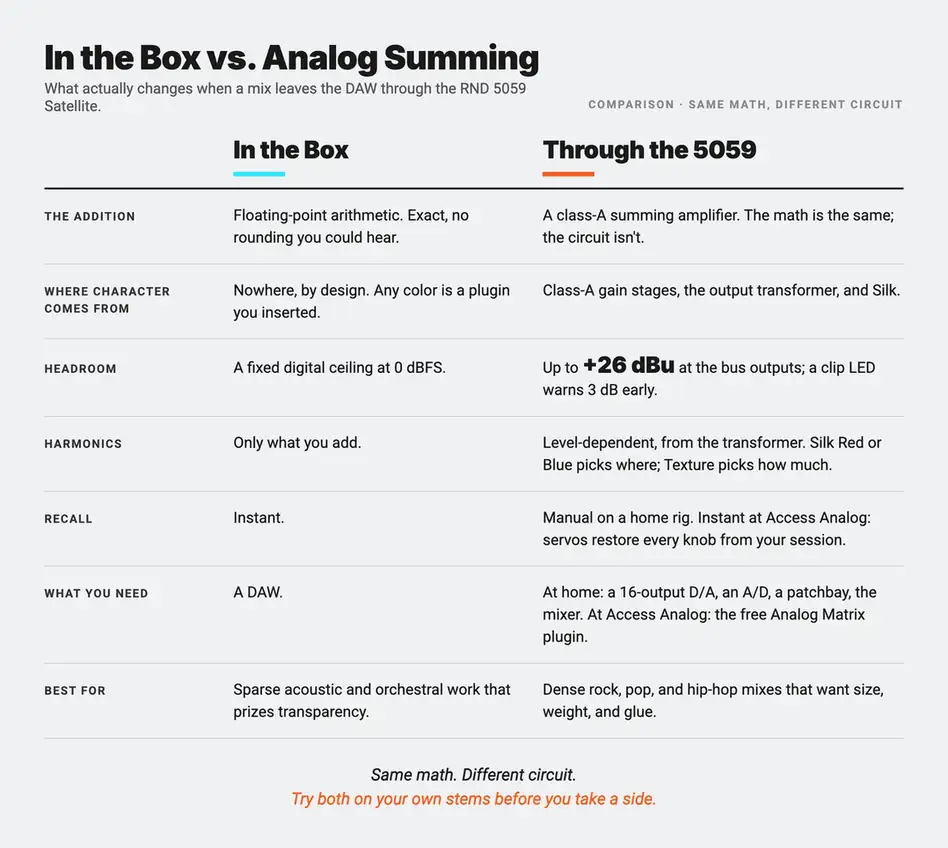
Analog summing doesn't fix the math. It runs your mix through a console's output stage, and that stage has a sound.
One honest caveat. Abbey Road's Simon Rhodes, quoted in Parsons' book, found that for orchestral work he slightly preferred the transparency of staying in the box. Density and harmonic richness are gifts to a rock or hip-hop mix and a compromise for a string quartet. Know which record you're making.
The Rupert Neve Designs 5059 Satellite is a 16×2+2 summing mixer: sixteen line inputs and two independent stereo buses in a 2U rack chassis. Rupert Neve Designs built it around many of the topologies and custom transformers from the 5088 large-format console and the Portico II series, with the stated goal of putting the 5088's out-of-the-box sonics in a rackmount.
The amplification is fully class-A, with Rupert Neve's own transformer designs on the outputs. Rupert Neve Designs is careful about lineage: these circuits share a heritage with Rupert's 1970s console modules and sound similar in many ways, but they were refined for lower noise, higher slew rate, wider dynamic range, and freedom from the unpleasant high-frequency distortion artifacts of the old designs. The 5059 is not a reissue. It's what the same designer built with another forty years of listening.
The numbers back that up. Frequency response is ±0.1 dB from 20 Hz to 20 kHz, with the −3 dB points at 3.5 Hz and 185 kHz. Total harmonic distortion plus noise (THD+N, the added harmonics and hiss as a percentage of the signal) at +20 dBu output is better than 0.003% at 1 kHz. Slew rate, how fast the output can swing and therefore how cleanly it tracks a transient, is 4 V/µs. Maximum bus output is +26 dBu. With Silk off, the 5059 is an extremely clean summing amplifier with a transformer on the end of it. The color is a choice you make with a button and a knob, not a tax you pay for using it.
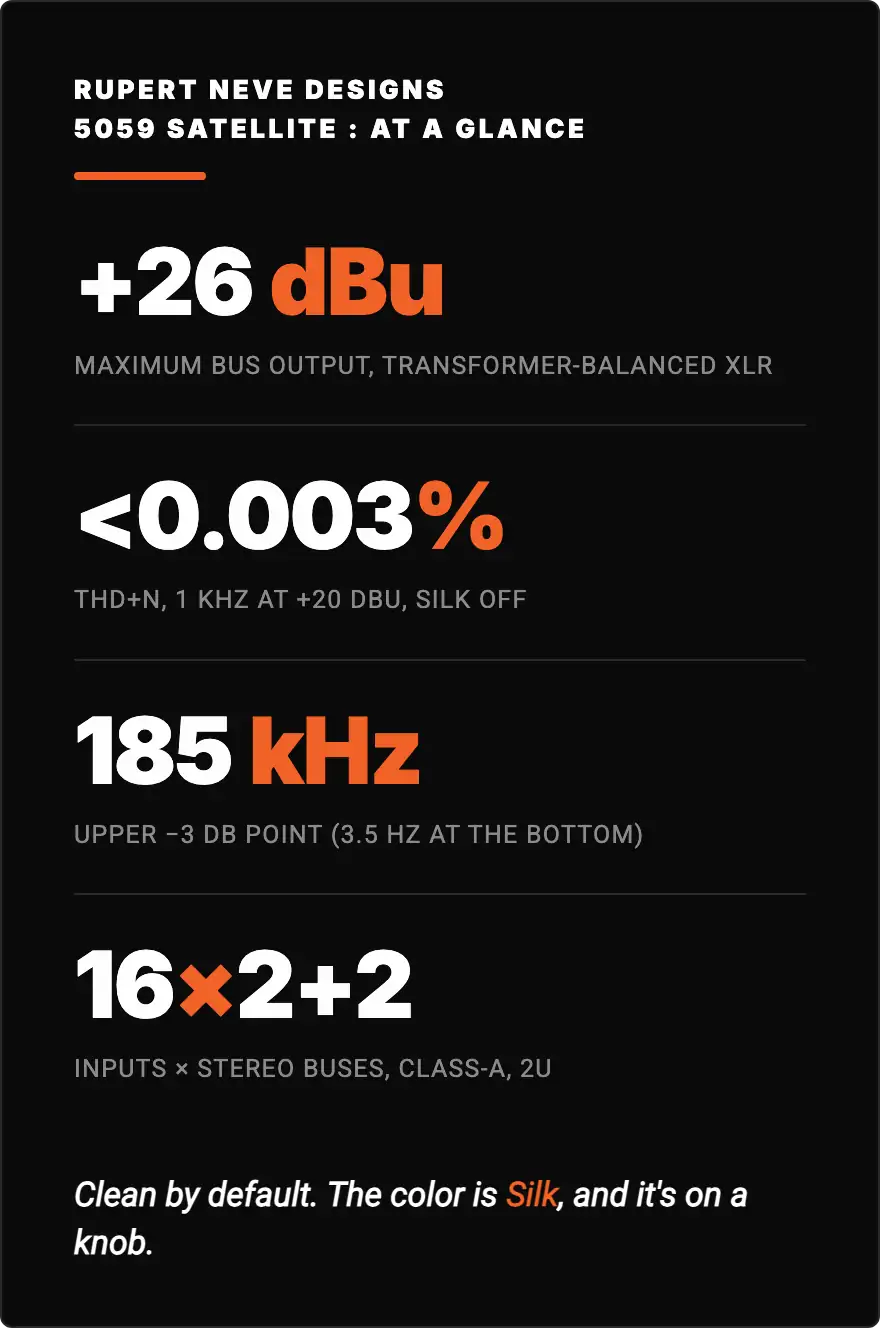
Off, it's a pristine Neve output stage. On, it's a vintage one. You pick.
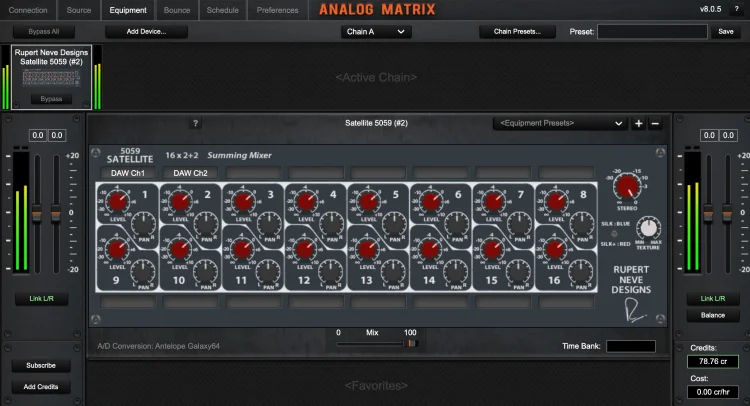
Each of the sixteen channels has the same four controls.
Level. A continuously variable rotary fader from −∞ to +10 dB. Ten dB of gain in hand matters: you can push a channel harder into the summing bus than a DAW at unity would, and the manual recommends experimenting with the balance between channel levels and master level to find the unit's "sweet spot." That's the manufacturer telling you the drive is part of the instrument.
Pan. Continuously variable, center detent, 3 dB pan law: a mono source panned center sits 3 dB down in each side and holds constant power as you sweep it.
Insert. A balanced insert send that is always active (a straight copy, or mult, of the line input) and an insert return. Pressing Insert replaces the line input with the return.
Stereo 2. A per-channel button that sends the channel to the second stereo bus instead of the first.
Then the master section. Each stereo bus has its own output level (−∞ to 0 dB), Silk button, and Texture control, with a red LED that lights when the bus is 3 dB from clipping. The outputs are transformer-balanced XLRs with no ground reference on the output winding, which is why they shrug off hum loops, and they're capable of +26 dBu. That figure is deliberately far above what any converter will ask for. Adam Kagan made the same point in his TapeOp review: he could never hit the channels too hard or drive the outputs past what his A/D would take. You get the output transformer working without ever running the converter into the red.
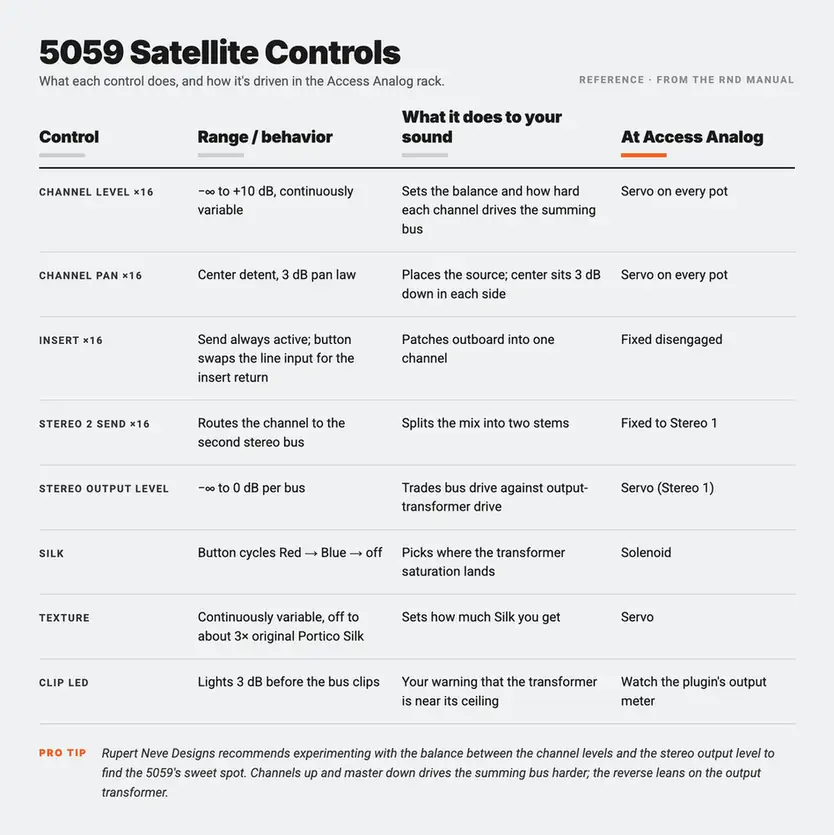
In our racks, those knobs are moved by servos. All sixteen level pots, all sixteen pans, the Texture control, and the Stereo 1 master gain each have a motor on them; the Silk button is thrown by a solenoid. When you turn a knob in the Analog Matrix, the physical pot on the 5059 turns. When you reopen the session next month, it turns back. That's the one thing a hardware summing mixer at home never gives you: recall.
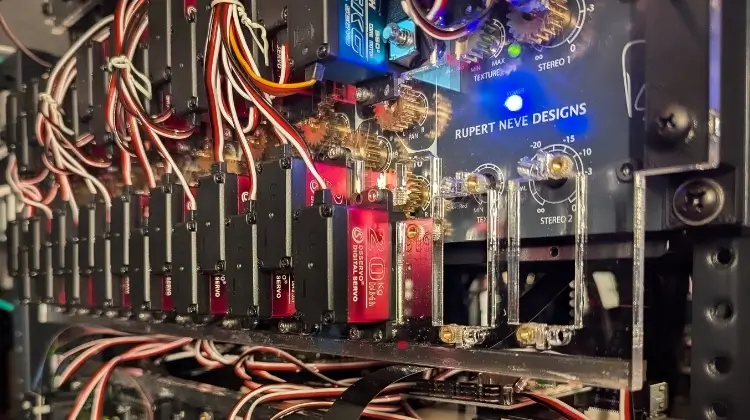
Silk is not an EQ. It's a change to how the output stage behaves. Every amplifier uses negative feedback, a corrective loop that compares output to input and cancels the difference, to stay linear. Engaging Silk reduces that feedback around the output transformer, which lets the transformer's own non-linearity show through as added harmonic content. Texture sets how much feedback is removed. On the 5059, Rupert Neve Designs rates full Texture at roughly three times the coloration of the original Portico series' Silk. Paul White's Sound On Sound review of the Portico II Channel describes the same circuit family: fairly subtle in normal use, more density and forwardness than tonal tilt.
Because the harmonics come from the transformer, they track the program. Louder passages get more; quiet ones get less. A plugin saturator applies a fixed transfer curve. A transformer with reduced feedback is a curve that shifts with level and frequency, which is why the effect sounds like the mix got denser rather than like something was added on top.
The two modes steer where that saturation lands.
Silk Red accentuates saturation in the high-mids and highs. The manual's own suggestions: sparkle on a full mix, brilliance and presence on vocals, snap and sheen on a drum bus, growl and brightness on electric guitars.
Silk Blue accentuates saturation in the lows and low-mids: weight and density on a mix, thickness and proximity on vocals, size on a drum or bass bus, warmth on guitars. The manufacturer calls it out specifically for thin-sounding mixes.
The published distortion figures tell the same story. Measured at 100 Hz with +20 dBu at the output, Silk Blue reads 0.2% THD typical with Texture at 12 o'clock and 0.65% fully clockwise. Silk Red at the same test point reads 0.1% and 0.35%, lower for the obvious reason that its emphasis lives higher up the spectrum. These are low-order, level-dependent harmonics, and you'll hear them as density, not as distortion.
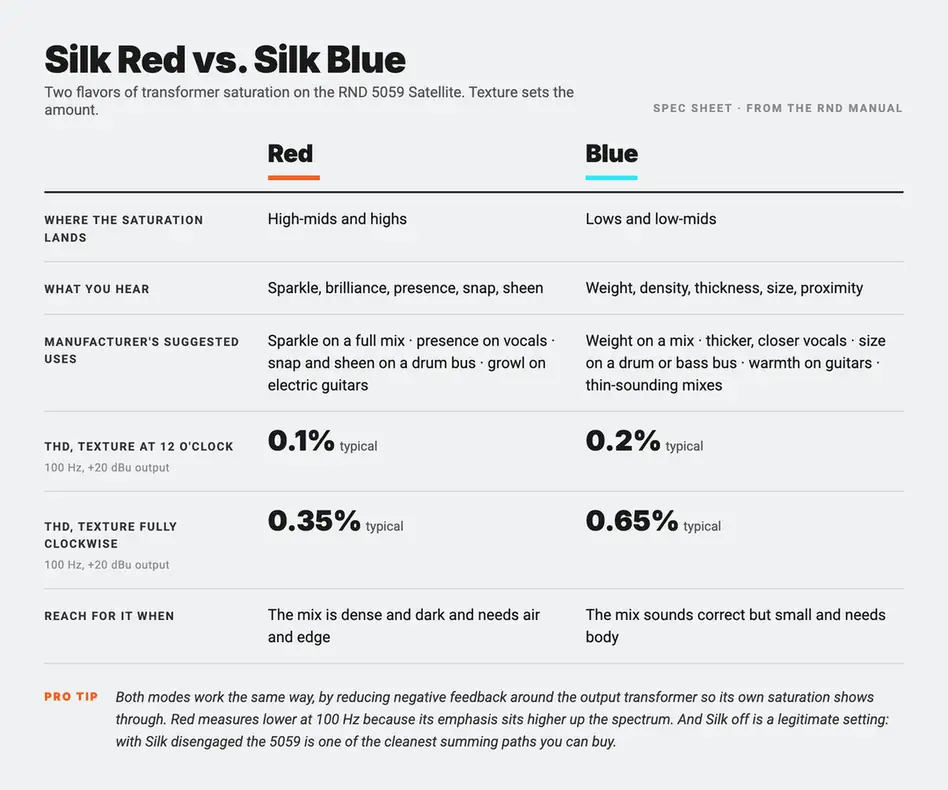
The Silk button cycles: one press engages Red, a second engages Blue, a third returns to bypass. The Analog Matrix panel shows which mode is active so you never have to count presses.
Which one? Start with the problem the mix has. A mix that's already dense and dark wants Red at a modest Texture setting. A mix that sounds correct but small wants Blue. A mix that sounds finished wants neither; with Silk off the 5059 is one of the cleanest summing paths you can buy, and there's no rule that says you have to color it. If you want to hear the same circuit family on a stereo bus with no summing in the picture, our Master Bus Transformer quick-start guide covers Silk and Texture on that unit.
Red for air and edge, Blue for weight and body, Texture for how much, and off is a legitimate setting.
On the hardware, the second bus is what makes the 5059 a 16×2+2 rather than a 16×2. Any channel can be sent to Stereo 2, and each bus has its own Silk, Texture, and output level. The manual describes the uses: splitting a mix into two stems with different Silk settings (drums and bass on Blue, guitars and keys on Red is the classic split), building a subgroup on Stereo 2 and looping it back into channels 15 and 16 so a whole drum kit gets one treatment, or feeding two stems to a 5088 for final summing.
At Access Analog the 5059 is wired for Stereo 1 only. Every channel's output button is fixed to Stereo 1, every insert is disengaged, and the master section you control is the Stereo 1 bus: one Silk button, one Texture knob, one output level. That keeps the signal path simple and predictable for a remote user, so the sixteen channels, the summing bus, and the transformer output are always exactly where you expect them. If you want two stems with two Silk settings, run two bounces. Offline summing makes that trivial, and it's how the next section works.
This is the part nobody expects a cloud service to offer. A summing mixer needs sixteen inputs, and a real-time stream over the internet carries a stereo pair. So the 5059 works two ways in the Analog Matrix, and they suit two different jobs.
A note on what's coming. Analog Matrix 8.3, now in beta, adds real-time streaming of up to 16 DAW tracks. Once it ships, you'll be able to sum sixteen channels through the 5059 live from inside your session, not just offline. The two workflows below describe the current release; we'll update this section when 8.3 is out.
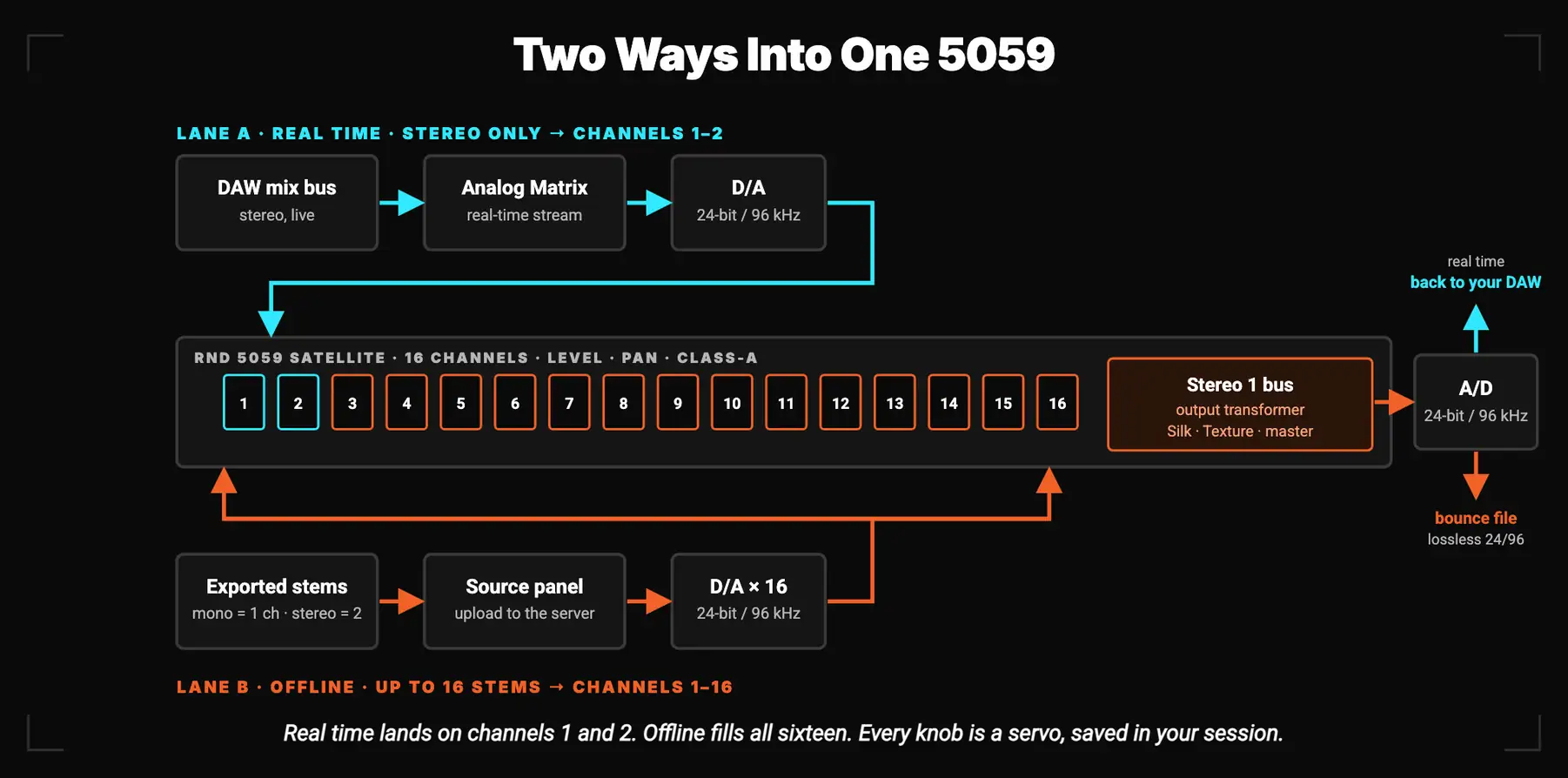
Insert the Analog Matrix on your mix bus, load the 5059, and your DAW's left and right land on channels 1 and 2. From there the signal goes through two class-A channel stages, the summing bus, the output transformer with Silk and Texture, and back through the A/D to your DAW. You get the Neve output section on your stereo mix, every knob under your mouse, in real time. Latency runs from roughly 340 ms to 2.5 s depending on the buffer you choose and your connection, which is a non-issue on a mix bus, where the DAW's delay compensation lines everything back up. Our How Is Our Plugin Different? post explains what's happening under the hood: the plugin is a portal to a physical unit, not an emulation.
Use this mode to audition Silk on a finished mix, to A/B Red against Blue while the song plays, and to find the Texture setting before you commit. You can print this way too, with your DAW's export set to real-time speed, because analog can't go faster than real time.
For actual summing, use the Source and Bounce panels. Export your stems, upload them to the Source panel, and the plugin assigns them to the 5059's channels: a mono stem takes one channel, a stereo stem takes two. Set your sixteen levels and pans, choose Silk and Texture, set the master, and bounce. The server plays every stem through the hardware simultaneously, sums them on the Stereo 1 bus, and captures the result as a lossless 24-bit, 96 kHz file. Because the audio lives on the server for the bounce, a dropout on your connection can't ruin the print, and there's no limit on stem length or file size.
Sixteen channels is a very usable number. Eight stereo stems is a full band: drums, bass, guitars, keys, vocals, backing vocals, effects returns, and one to spare. Or mix mono and stereo stems the way you'd bring stereo subgroups and mono leads up on a console. Rupert Neve Designs describes the 5059 as both a primary mixer and a way to build stems for later mixing, and this is exactly that.
Three practical notes. Export every stem from the same start point and at the same length. Decide whether the DAW balance lives in the stems or on the sixteen 5059 levels (both work; the second is more fun). And work at 96 kHz where you can: the hardware converters run at 24-bit/96 kHz, so a 96 kHz session means no sample-rate conversion anywhere in the chain. The workflow is walked through in our FAQ, and the plugin is a free download.
Stereo in real time to find the sound. Sixteen stems offline to print it. Same hardware, same knobs, same recall.
Most 5059 sessions aren't sixteen-channel summing jobs, and that's fine. The unit earns its place in a few other ways.
Mix-bus color. With a stereo mix on channels 1 and 2 and Silk engaged, the 5059 is a transformer color box with a Neve output stage in front of it. Set the two channel levels equal, pan them hard left and right, and use Texture as your tone control. This is where most engineers should start.
Drive as a tone control. There's no fixed send level you're supposed to hit. You set your DAW output where you want it, our D/A turns that into a line level, and the 5059's channel and master gains take it from there. Push the channels up and the master down and you're driving the summing bus harder; do the reverse and you're leaning on the output transformer. If you want the fundamentals of level in a hybrid chain, our post on gain staging after the mix covers it.
Stem finishing. Deliver stems that have been through the same output stage as the full mix, so a remix or sync edit built from them sits in the same sonic space.
Stacked sounds. Rupert Neve Designs suggests the 5059 for keyboard and instrument sub-mixing: sixteen pannable inputs with up to 10 dB of gain, summed to one stereo pair. Offline, that's a synth stack or a wall of doubled guitars printed through one transformer as a single coherent layer.
In a chain. The Analog Matrix lets you put the 5059 in series with other units up to your chain size. The classic pairing is summing into a bus compressor, which is how a console mix reached the two-track. The 5059 has to be the first device in the chain in our system. So you can chain other devices after the 5059 on the stereo mix, but you can't put devices before it on the stems. Our bus compressor guide covers what to put after the 5059 and how to set it.
The 5059 rewards decisions. Decide who owns the balance, decide what Silk is for, and print once.
Records mixed on Rupert Neve's consoles went through an ancestor of this circuit on the way to the two-track: class-A gain, a custom transformer, a bus with more headroom than any tape machine or converter would ask of it. Mixing in the box gave you every other part of the console back. This is the part it left out.
The 5059 Satellite puts that stage in a 2U box, and Access Analog puts the box in your DAW. In real time it's the Neve output section on your mix bus, with Silk Red and Blue on tap. Offline it's a sixteen-channel summing mixer that prints your stems through real transformers at 24-bit/96 kHz, with every knob saved in your session. No converters to buy, no patchbay to wire, no recall sheets.
Stop arguing about summing. Send it sixteen stems and listen.
What does analog summing actually do to a mix?
Analog summing converts your DAW tracks or stems to analog, combines them in an analog circuit, and captures the stereo result. The addition itself is not the change. The change comes from what the signals pass through: class-A gain stages, transformers, and the headroom of the summing bus. On the Rupert Neve Designs 5059 Satellite that means level-dependent harmonics from the output transformer, +26 dBu of headroom, and optional Silk saturation, which together read as density, weight, and a smoother top end.
Is analog summing better than mixing in the box?
Not inherently. A modern DAW sums with floating-point precision and no loss. Analog summing is a sonic choice, the same way a console is a sonic choice: it adds the character of the circuit doing the summing. Dense rock, pop, and hip-hop mixes usually benefit from that character. Sparse acoustic and orchestral work sometimes prefers the transparency of staying in the box. The honest answer is to try both on your own material, which is what Access Analog's offline bounce makes easy.
What is the difference between Silk Red and Silk Blue on the 5059?
Both modes reduce negative feedback around the output transformer so its saturation shows through, and the Texture knob sets how much. Silk Red accentuates that saturation in the high-mids and highs, adding sparkle, presence, and edge. Silk Blue accentuates the lows and low-mids, adding weight, thickness, and a sense of proximity. Rupert Neve Designs rates the 5059's full Texture at roughly three times the coloration of the original Portico Silk.
How many channels can I sum through the 5059 at Access Analog?
Up to sixteen. Real-time streaming from your DAW is stereo, landing on channels 1 and 2, which makes the 5059 a mix-bus processor in that mode. For full summing, upload up to sixteen stems to the Source panel in the Analog Matrix and bounce through the hardware offline. Mono stems take one channel each and stereo stems take two. The bounce is captured at lossless 24-bit/96 kHz and is immune to connection dropouts.
Can I use the 5059 just as a stereo mix-bus processor?
Yes, and it's the most common way people use it. Insert the Analog Matrix on your mix bus, load the 5059, set channels 1 and 2 to equal levels panned hard left and right, and use Silk and Texture as a transformer color stage. You can A/B Silk Red against Silk Blue while the song plays and print in real time or offline.
Do I need my own converters or a patchbay to use the 5059?
No. At Access Analog the 5059 Satellite is already wired to pro D/A and A/D converters running at 24-bit/96 kHz, and the robotics move the physical knobs. You need the free Analog Matrix plugin or standalone app, a DAW or your exported stems, and either a reservation, credits, or an Elite subscription.
What Rupert Neve Designs 5059 settings should I start with?
Start clean: channel levels at unity, pans as your mix dictates, master at 0 dB, Silk off. Listen. Then engage Silk Blue with Texture around 10 to 12 o'clock if the mix needs weight, or Silk Red at the same range if it needs air and presence, and level-match your comparison. Push channel levels up and the master down to drive the summing bus harder; do the reverse to lean on the output transformer. Rupert Neve Designs' own manual recommends experimenting with that balance to find the sweet spot.
Which Access Analog subscription includes the 5059 Satellite?
Both 5059 Satellite units are in the Elite tier of the Access Analog Subscription. Non-subscribers can book the 5059 by reservation or use it on demand with credits, and new accounts start with 12 free credits, roughly an hour on an average device.