How Is Our Plugin Different? Real Analog Gear, Not an Emulation
Most plugins imitate analog gear. Ours plugs you into it.
It's the question we hear most often: how is the Analog Matrix different from every other plugin out there? The short answer is that it isn't an emulation. It's a portal to real analog gear in our racks in Longmont, Colorado, and robotics turn the real knobs as you turn them in the plugin.
In this guide, Dr. Dan shows the difference side by side: first a software emulation of the Pultec EQP-1A, then the Analog Matrix with the real thing.
Key Takeaways
- The Analog Matrix isn't an emulation. It streams your audio to real analog hardware in our racks and brings it back to your DAW.
- Robotics turn the real knobs as you move them in the plugin. The hardware is never opened or modified.
- The round trip: your DAW, then D/A conversion, the real unit, A/D conversion and back, at 24-bit / 96 kHz.
- Every device works this way, from compressors and EQs to reverbs and full mastering chains, in chains of up to eight devices.
- It's free to try. Download the plugin, create an account with no credit card, and start with 12 free credits.
How Does a Plugin Emulation Work?
To show the difference, Dan starts with a free software emulation of the Pultec EQP-1A, loaded in his DAW like any other plugin.
As the session plays, the audio goes into the plugin. An algorithm running on your computer's processor changes it and sends it straight back. The knobs on screen are inputs to that math. Everything happens in the box, in software.
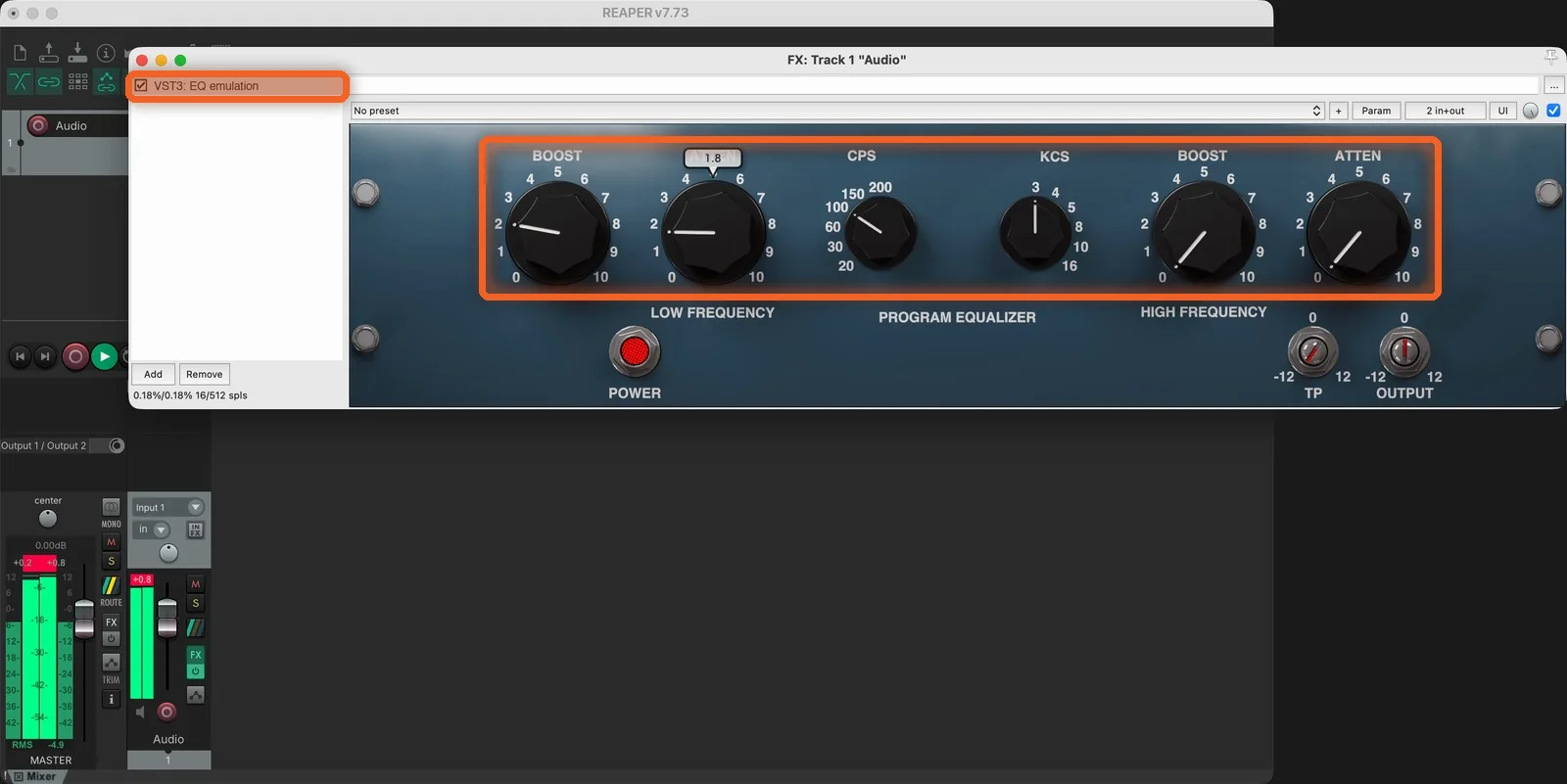
Emulations can sound good, and they're convenient. But they are a model of the gear, not the gear itself. A model captures what its designers measured and chose to keep; the real circuit just does what it does, with every transformer, tube and component reacting to your signal at once. For the full trade-off, see our guide to analog hardware vs. plugins.
How Does the Analog Matrix Work?
The Analog Matrix works differently. Think of it as a portal to real gear in our racks in Longmont, Colorado. Your audio makes a round trip:
- Your DAW streams the audio over the internet to our racks.
- It's converted from digital to analog.
- It runs through the real hardware.
- It's converted back to digital.
- It comes back to your DAW for playback.
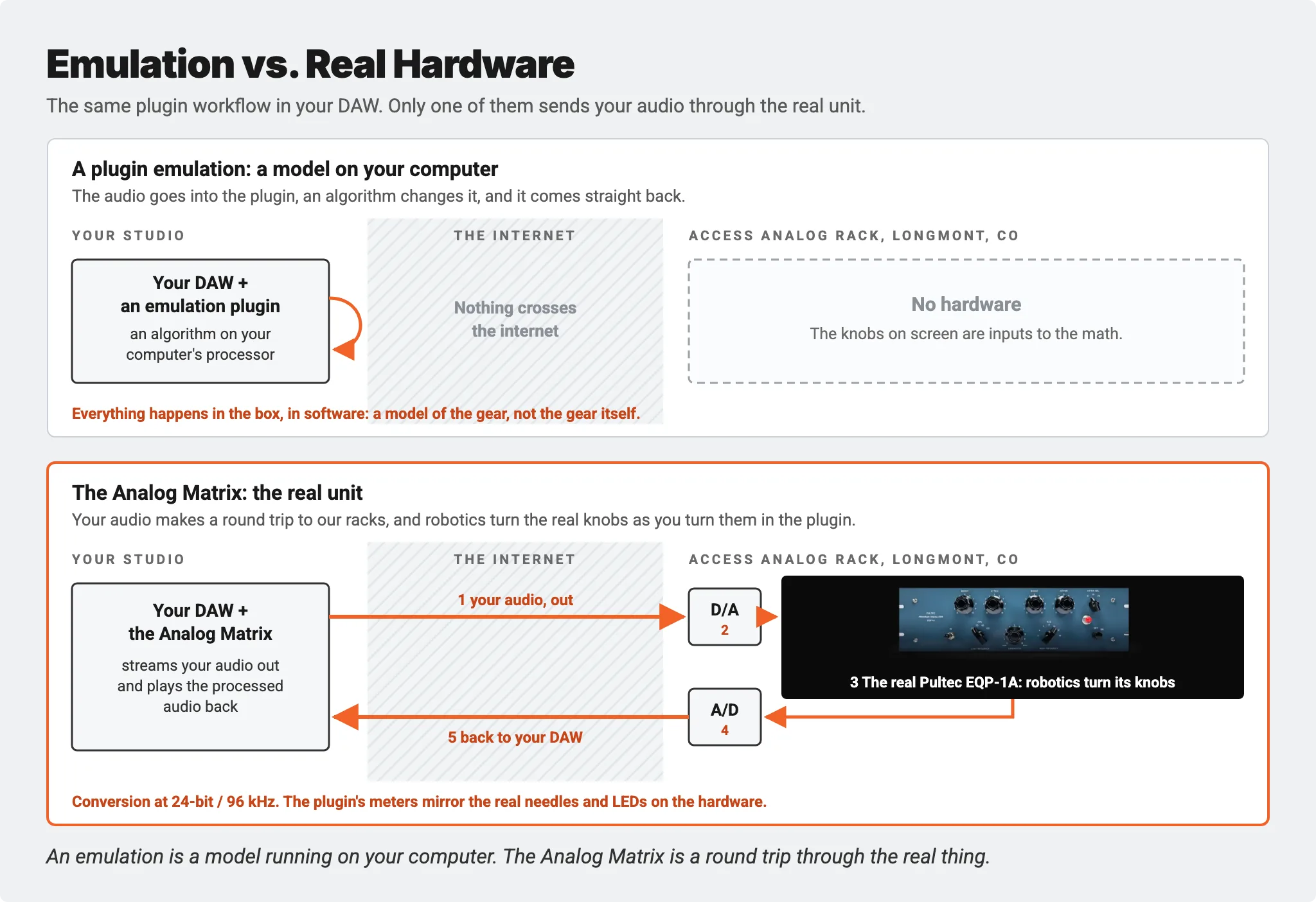
Our main gear library uses pro-grade conversion at 24-bit / 96 kHz, and the meters in the plugin mirror the real needles and LEDs on the hardware, in sync with the audio. Nothing is being modeled.
What you hear is the actual unit.
See It in the Plugin
Dan swaps the emulation for the Analog Matrix, on the same track in the same session.
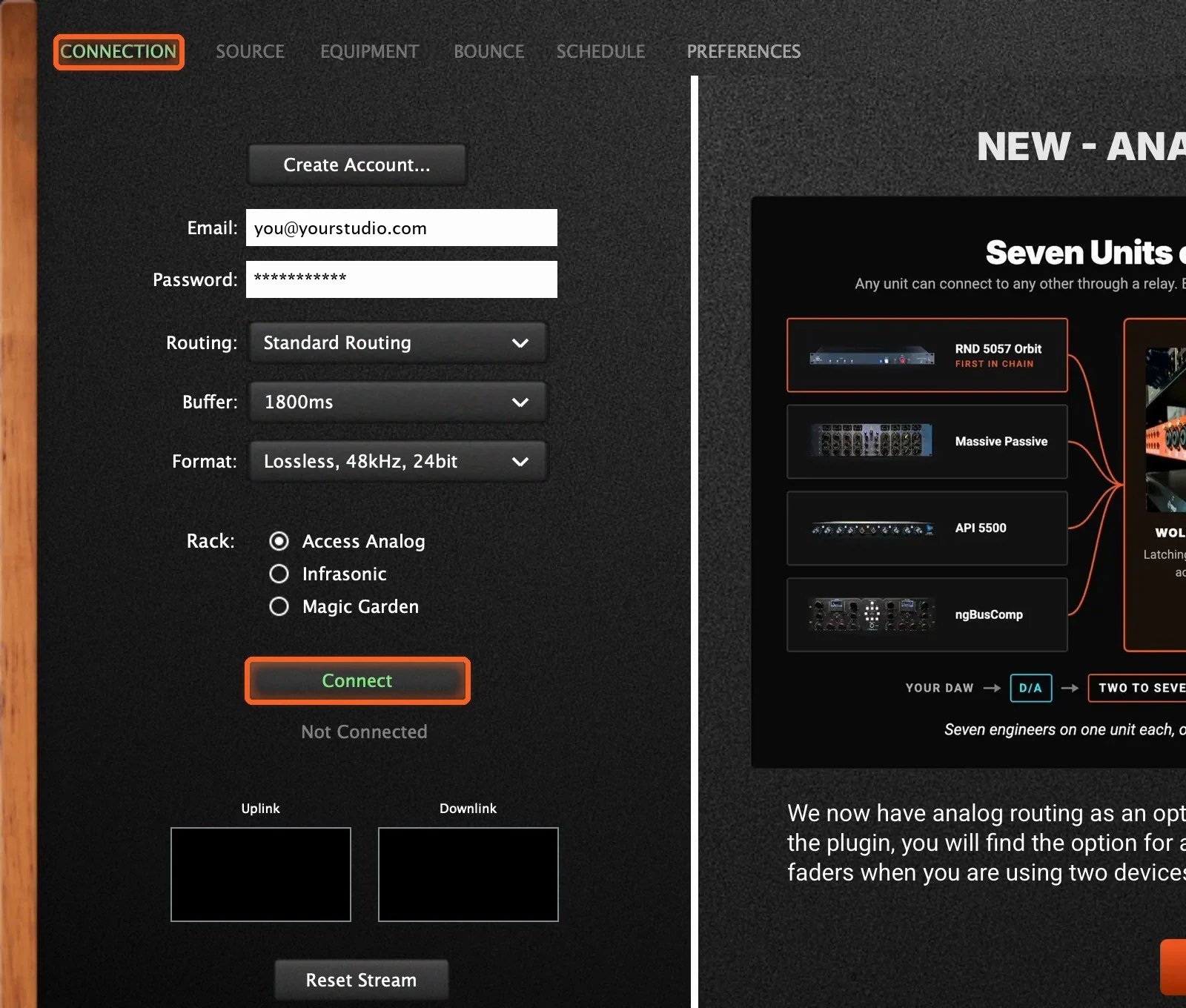
Step 1: Connect
On the Connection tab, click Connect. The plugin opens the stream to our racks and switches to the Equipment tab, ready for gear.
Step 2: Add the Real Pultec
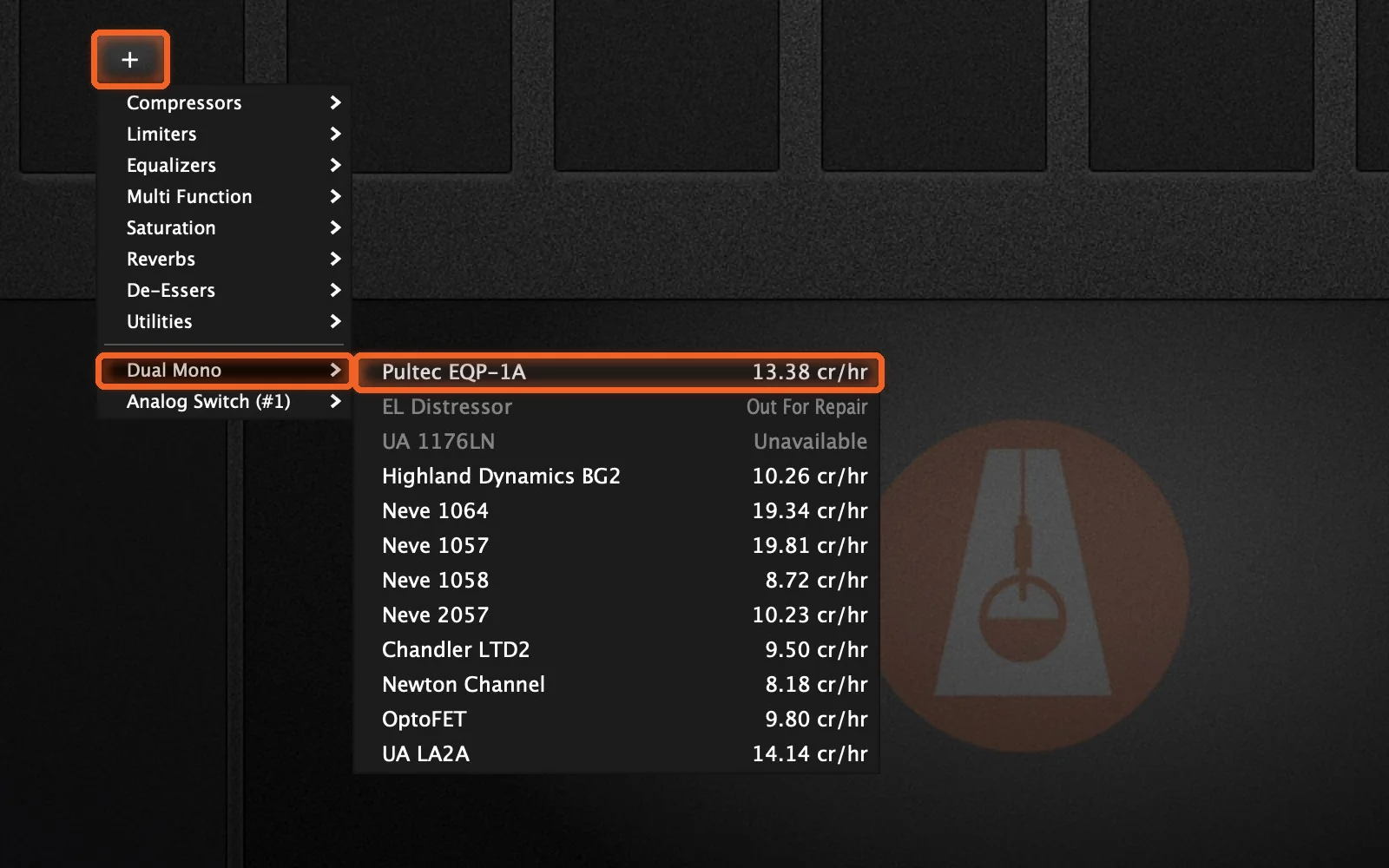
Click + in the first slot of the chain and choose Dual Mono › Pultec EQP-1A. Dual mono means two real Pultec EQP-1A units, one for the left side and one for the right. We keep two of most mono units for exactly this.
Step 3: The Pultec Is in Your Chain
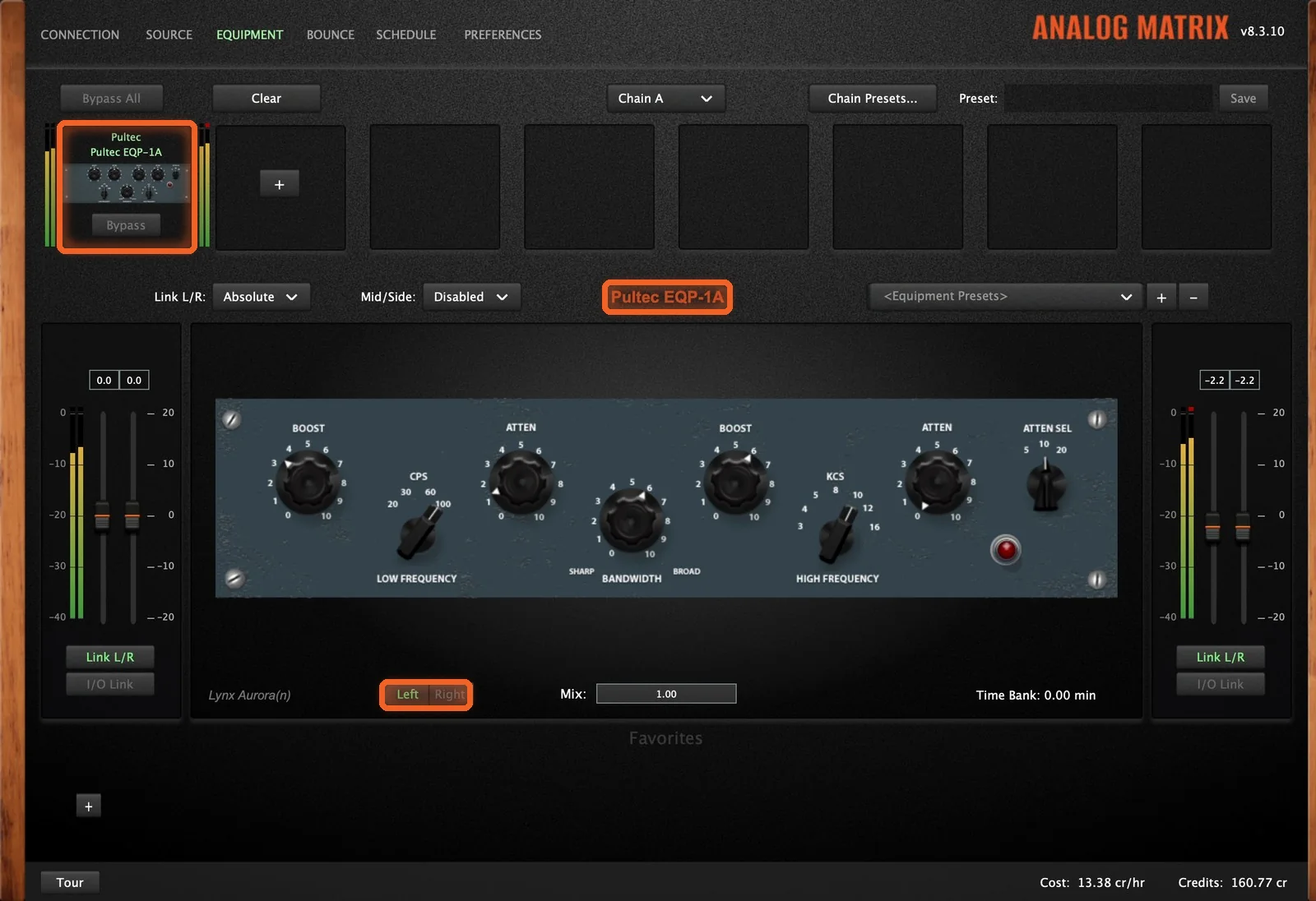
The Pultec now sits in the first slot of the chain, and its front panel fills the plugin. Because it's a dual mono pair, a Left / Right selector under the panel lets you switch between the two units.
Step 4: Turn a Knob
Now you have full control. As Dan turns the Boost, Atten and high band in the plugin, robotics turn the same knobs on the real units. Every move you make in the plugin happens on the hardware.
The robotics sit on the outside of the front panel and turn the knobs just as your hand would. The enclosure is never opened or modified, so the gear stays original.
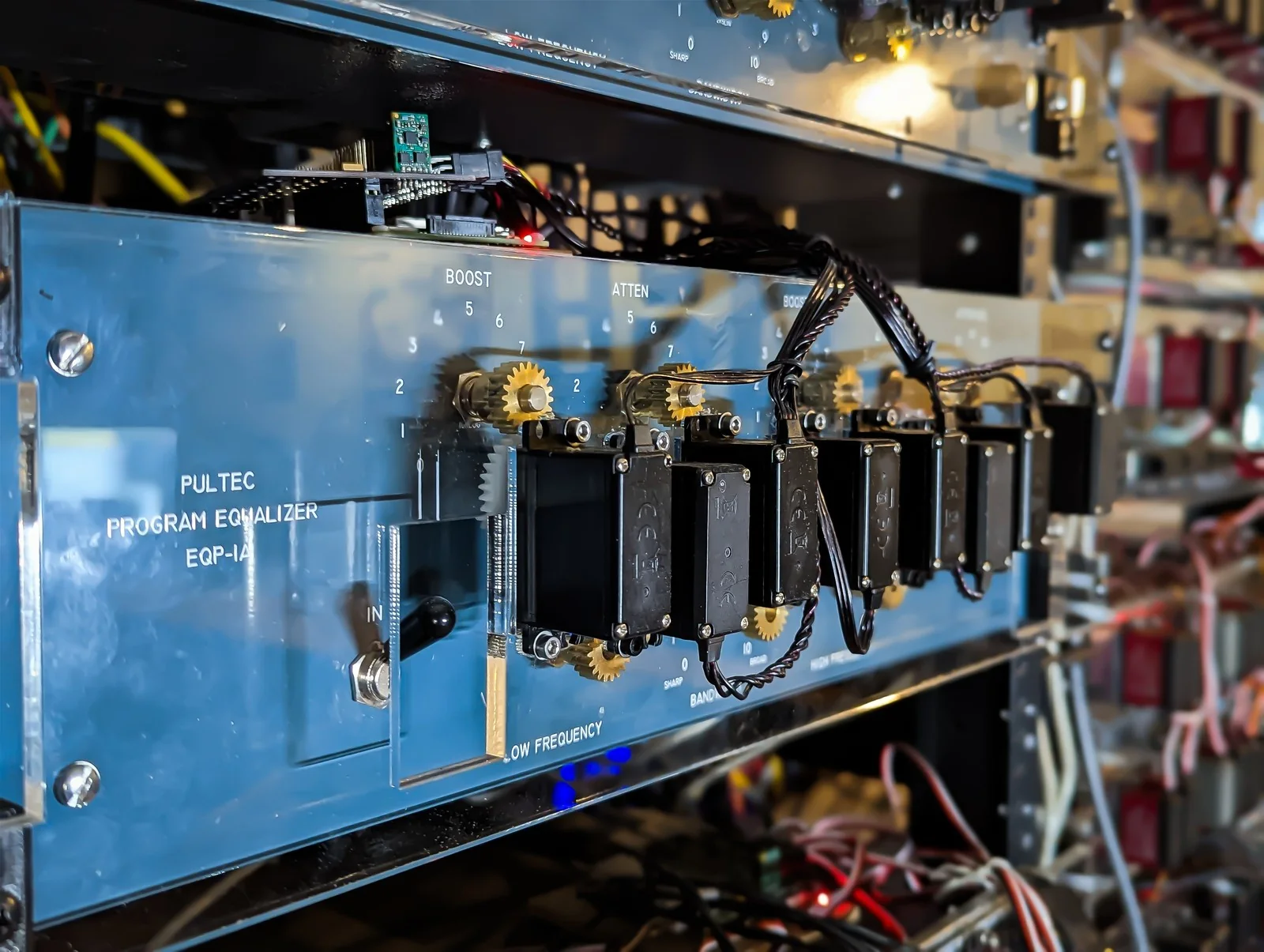
Every move you make in the plugin happens on the real hardware.
Every Piece of Gear Works This Way
The Pultec is one example. Every device in our racks works the same way: compressors, limiters, equalizers, multifunction units, saturation, reverbs, de-essers and more, from makers like Rupert Neve Designs, Manley, Universal Audio, SSL and Tube-Tech. Open the + menu and each category lists real units you can load.
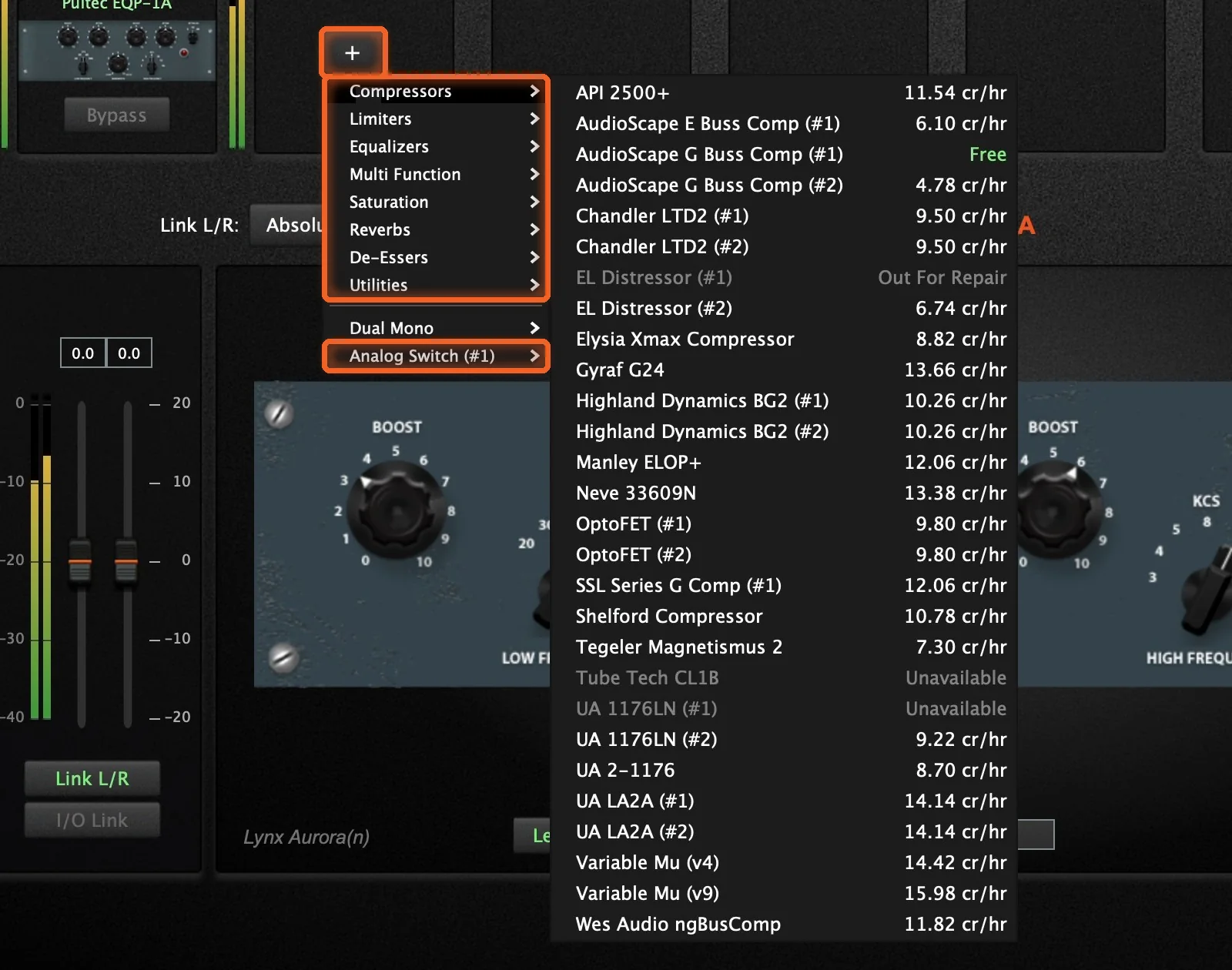
You can build a chain of up to eight devices in any order, and add, remove or reorder them in real time while your track plays. Two of our racks are full mastering chains, Infrasonic and Magic Garden, which you choose on the Connection tab.
Some units can also pass audio to each other without leaving analog. With Analog Switching, a chain of units on the Analog Switch gets one D/A conversion on the way in and one A/D conversion on the way out, with real hardware driving real hardware in between.
What Else Can the Plugin Do?
This guide is the starting point for our Analog Matrix guides. Each one takes a single feature and shows it step by step, in plugin v8.3.10:
- Offline Bounce: print through real gear from audio on our server, so a shaky connection can't drop out of your final file.
- Upload From DAW: send a track from your session to our server, in sync, by arming, playing and stopping.
- Standalone App: use the gear with no DAW at all, for mastering, batch bounces and summing.
- Cloud Storage: upload files once, then load, organize and download them, with your bounces kept on our servers.
- Connection Tab: choose the format, rack, buffer and routing for a smooth, clean stream.
- Auto Balance: measure your gear's left/right imbalance and even it out on the output faders in one click.
- Hardware Presets: save and recall settings for one device or a whole chain, and compare Chain A against Chain B.
- Playback From Server: play your track from our server through the gear, so only the download has to keep up.
- Schedule Gear: book real hardware for a set time from the Schedule tab, without leaving your session.
How Do I Get Started?
Download the Analog Matrix. One free download from our downloads page installs the plugins (VST, VST3, AU and AAX) and the standalone app, for Mac and Windows.
Create an account and try it for free. Open the plugin and click Create Account… on the Connection tab. No credit card is needed. A new account starts with 12 free credits, roughly an hour on an average device, plus permanent access to two free devices that don't use credits: the Iron Age LH95 EQ and the Audioscape Bus Compressor.
Pick how you pay for gear time. Buy credits on demand, reserve a unit for a set time, or move to the Access Analog Subscription (Essential, Pro or Elite) for the best rate.
Real Gear, Real Knobs, Right in Your DAW
An emulation is a model running on your computer. The Analog Matrix sends your audio through the real unit, with robotics turning the real knobs, and brings it back to your session. Same plugin workflow, actual hardware.
Put a real Pultec, SSL, Neve or Manley on your track tonight, from your own DAW.
FAQs
Is the Analog Matrix an emulation?
No. It's a portal to real analog hardware. Your audio streams to our racks, runs through the actual unit, and comes back to your DAW. Robotics turn the real knobs to match the plugin.
Where is the gear?
In our racks in Longmont, Colorado, USA.
Has the hardware been modified for the robotics?
Never. The robotics work the controls on the outside of the front panel, just as you would by hand. The enclosure is never opened unless a repair is needed.
Are the meters in the plugin real?
Yes. The meters and indicators in the plugin mirror the hardware's actual needles and LEDs, in sync with the audio.
What does dual mono mean?
Two of the same mono unit, one for your left channel and one for your right. We keep two of most mono units for this. Choose them from the Dual Mono submenu in the + menu.
Can I use more than one piece of gear at once?
Yes. You can build a chain of up to eight devices in any order, and add, remove or reorder them in real time.
Which DAWs does it work with?
The plugin comes as AU, AAX, VST and VST3, for Mac and Windows, so it works in Pro Tools, Logic Pro, Ableton Live, Reaper, Cubase and most other DAWs. Our FAQ page has setup notes for each. There's also a standalone app if you only want to process files.
How can I try it for free?
Download the free plugin and create an account, with no credit card. New accounts get 12 free credits, roughly an hour on an average device, plus permanent access to two free devices that don't use credits.
Hear what real analog gear does to your own mix, before you buy a single piece of it.
Run real outboard hardware from your DAW. New accounts get 12 free credits.
Connect todayMore in Getting Started
All posts →