
One conversion in, one conversion out, and real hardware driving real hardware in between.
When Access Analog was built, we faced an architectural decision: feature first, or function first? We chose feature first. Every unit in our racks is wired straight to its own converter channels, and that is what makes a catalog of 70+ units chainable in any order, with auto-balance, wet/dry mix, mid/side, per-unit bypass, and full recall inside the Analog Matrix plugin. The price of that choice has always been a D/A and an A/D between every pair of units.
Analog Switching removes that price. The first Analog Switch is live now with seven of our most-requested bus and mastering units. Between any two of them you can choose a relay-hardwired analog connection right in the plugin, so a whole chain costs one D/A at the start and one A/D at the end, however many boxes sit in between.
Analog Switching is a mechanical relay-based, software-controlled analog patching system that lets you chain Access Analog hardware with a single D/A conversion at the start of the chain and a single A/D at the end. Instead of converting after every piece of gear, the output of one unit is hard-wired to the input of the next through a latching relay. There are no buffers, amplifiers, or active electronics in that path: when the relay closes, the two boxes are connected by copper, exactly as they would be on a mastering room's patch bay.
The switching hardware is a Wolff Audio ProPatch 64R, a 1U, 32-in / 32-out relay patch bay built around the same principle we built Access Analog on: route the signal without touching it. Our server drives the ProPatch from the routing selector you see in the Analog Matrix, so the relays follow your session the same way our servos follow your knob moves.
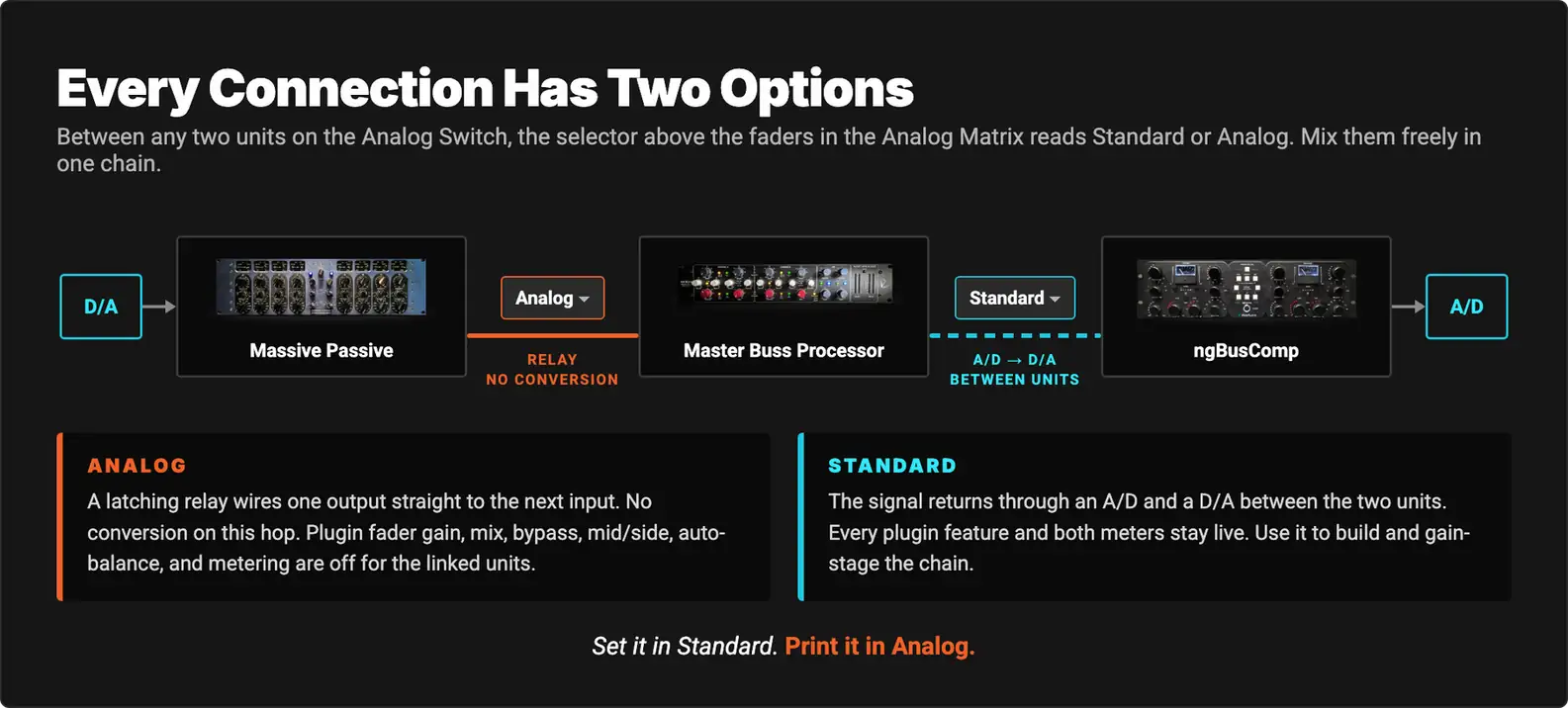
Every unit on the Analog Switch is still wired to our converters, so nothing you already do goes away. A unit can be used on its own by one engineer, chained digitally the way it always has been, or chained analog to its neighbors. The Analog Matrix simply offers you a second kind of connection between two boxes, and it is up to you which one you pick for each hop.
The signal stays analog from box to box, and you choose where it does so.
In Standard routing, every hop between two units is a round trip: the first unit's output hits an A/D, the audio crosses our server, and a D/A feeds the next unit's input. Each pass through a converter adds its own anti-alias and reconstruction filtering, its own noise floor and residual distortion, more round-trip latency, and another place to clip. Our converters are excellent, and on paper the residuals from one pass are vanishingly small. The problem is that they accumulate, and a serious mastering chain was never one pass.
Think of translating a sentence into French and back. Done once by a good translator, nobody notices. Done four times in a row, the phrasing starts to drift, and the drift is in exactly the places a careful reader looks: the subtle word choices. Conversion is the same. One D/A plus A/D pass sits below most listeners' threshold. Two is where some professionals start to hear a difference in transient edges and depth. Three or more is where it becomes a real decision, which is why at Access Analog we suggest reaching for Analog links once your chain has three or more units in it. Bob Katz says it plainly in Mastering Audio: "we should still avoid extra conversion whenever possible."
There is a second benefit beyond the conversion math. On an Analog hop, the output stage of one box sees the input stage of the next, the way it would on a console. A transformer output drives a transformer input. A tube stage drives a VCA. The small non-linearities that engineers describe as glue (harmonic interaction, soft rounding of transients, the cumulative character of several gain stages in series) are allowed to build on each other without a sterile, linear re-sampling in between. This is the thing plugins, and even individually converted hardware, cannot fully reproduce: not one circuit, but circuits reacting to circuits.
Analog Switching makes the number of units in your chain and the number of conversions independent of each other.
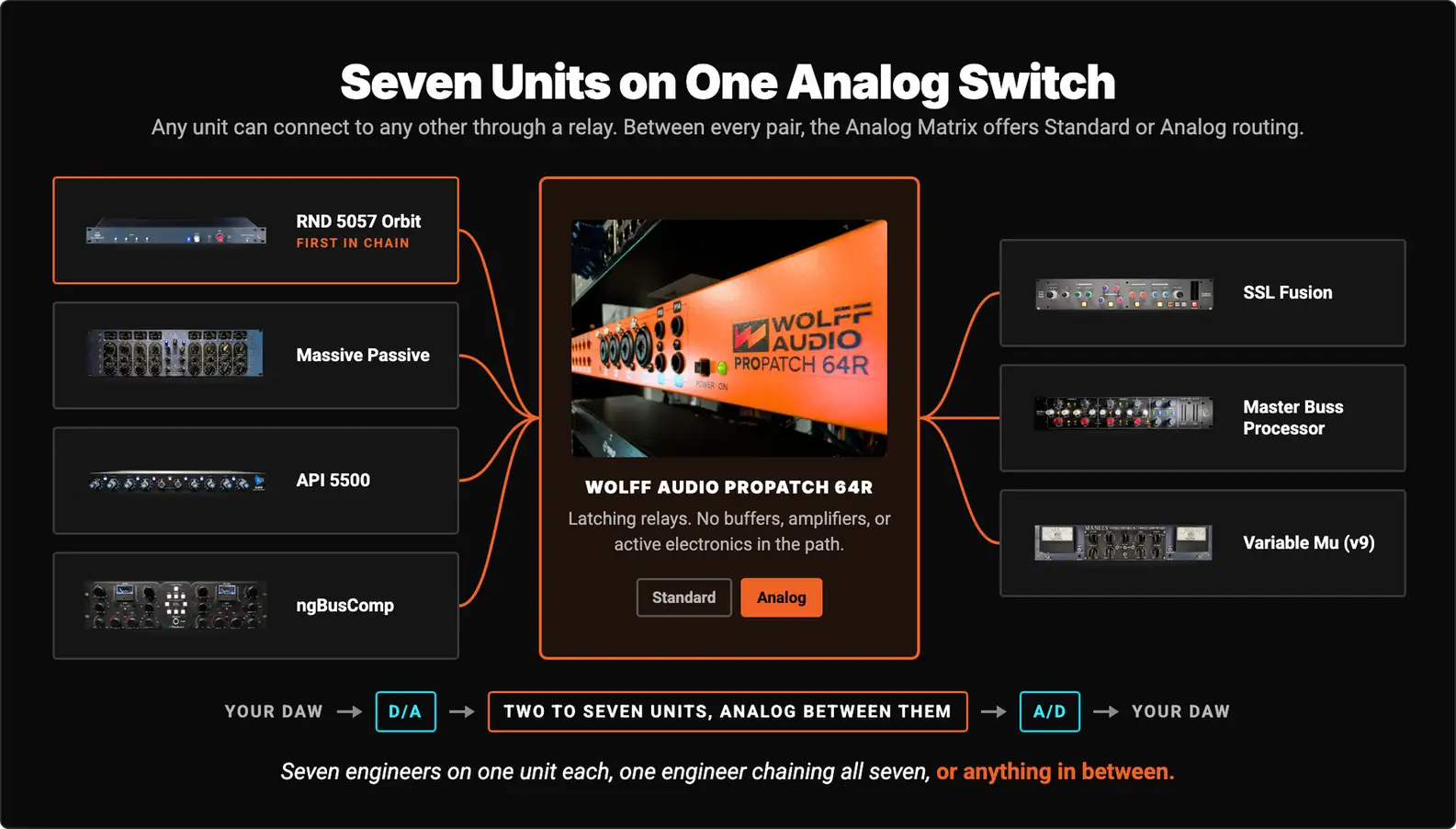
The first Analog Switch holds seven units, chosen because they are the ones you already chain together most often on the bus and in mastering:
Most of these units live in the Elite tier of the Access Analog Subscription, so most analog chains need an Elite subscription with a chain size of two or more. The API 5500 and the Master Buss Processor are Pro-tier units, which means a Pro subscription with a two-device chain can run that pair as a fully analog chain. You do not need a subscription to try it: reserve any two or more units on the Analog Switch, or run them on credits, and the Analog option is there.
The Analog Switch is shared the way the rest of our racks are. Seven engineers can each use one unit at the same time, one engineer can chain all seven in a single analog chain, or anything in between.
The relays live in a Wolff Audio ProPatch 64R. Wolff builds its patch bays around one idea, which is that a patch bay's job is to route a signal without affecting it. The ProPatch uses telecom-grade latching relays rated for millions of cycles rather than electronic switch chips, so there is nothing active in the audio path and nothing to add noise, crosstalk, or distortion. Because the path is essentially wire, it will pass anything from mic level to line level without caring what it is.
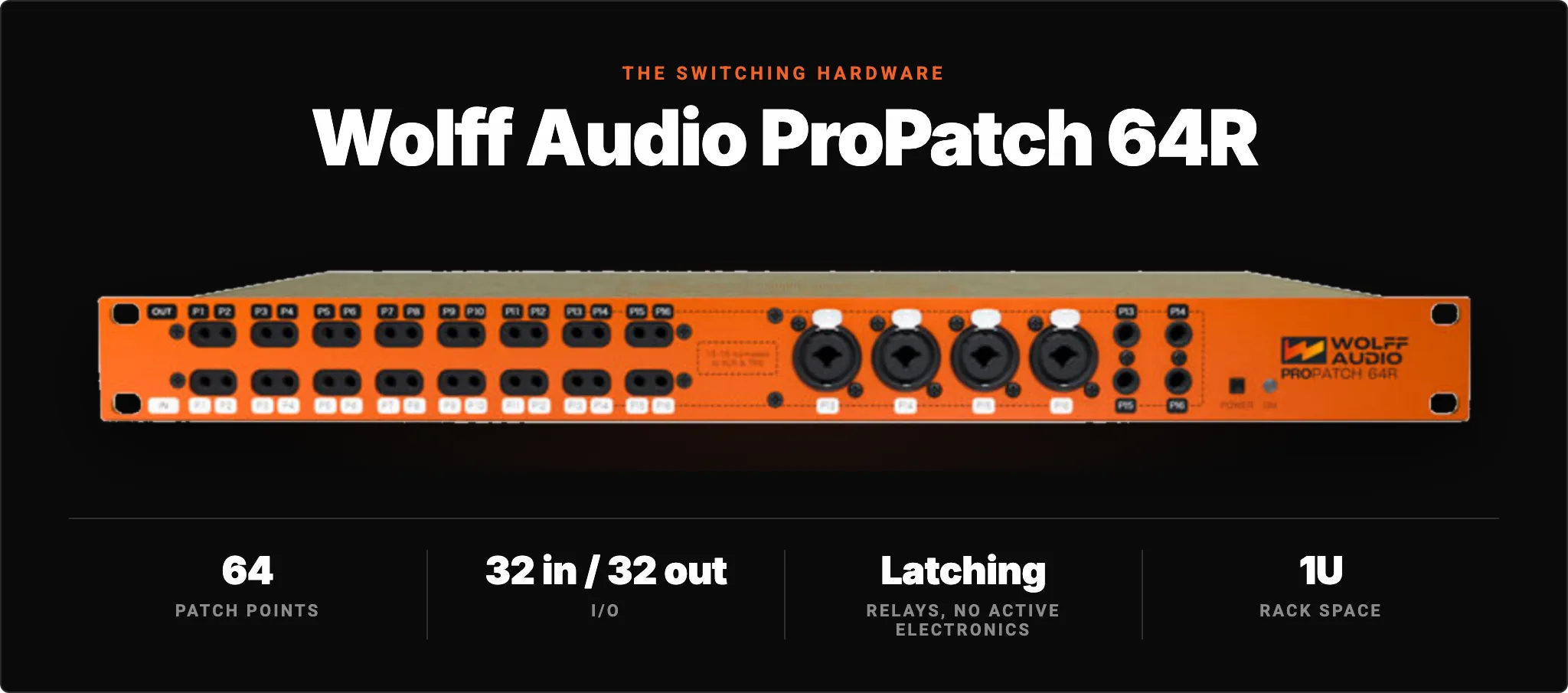
The 64R gives us 64 patch points as 32 inputs and 32 outputs in a single rack space, on eight DB25 connectors at the rear. Its relays latch, which means a routing survives a power interruption, and its routing presets recall instantly at startup. Those are the same reasons we trust it in a rack that runs around the clock. Our software, not Wolff's, is what talks to it: the routing selector in the Analog Matrix drives the relays, so an Analog hop is one more setting that saves and recalls with your DAW session.
We did not design the ProPatch. We chose it because its philosophy about the signal path matches ours, and because a device built for recallable patching in a working studio is exactly the device a robotically controlled rack needs.
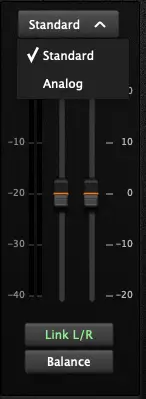
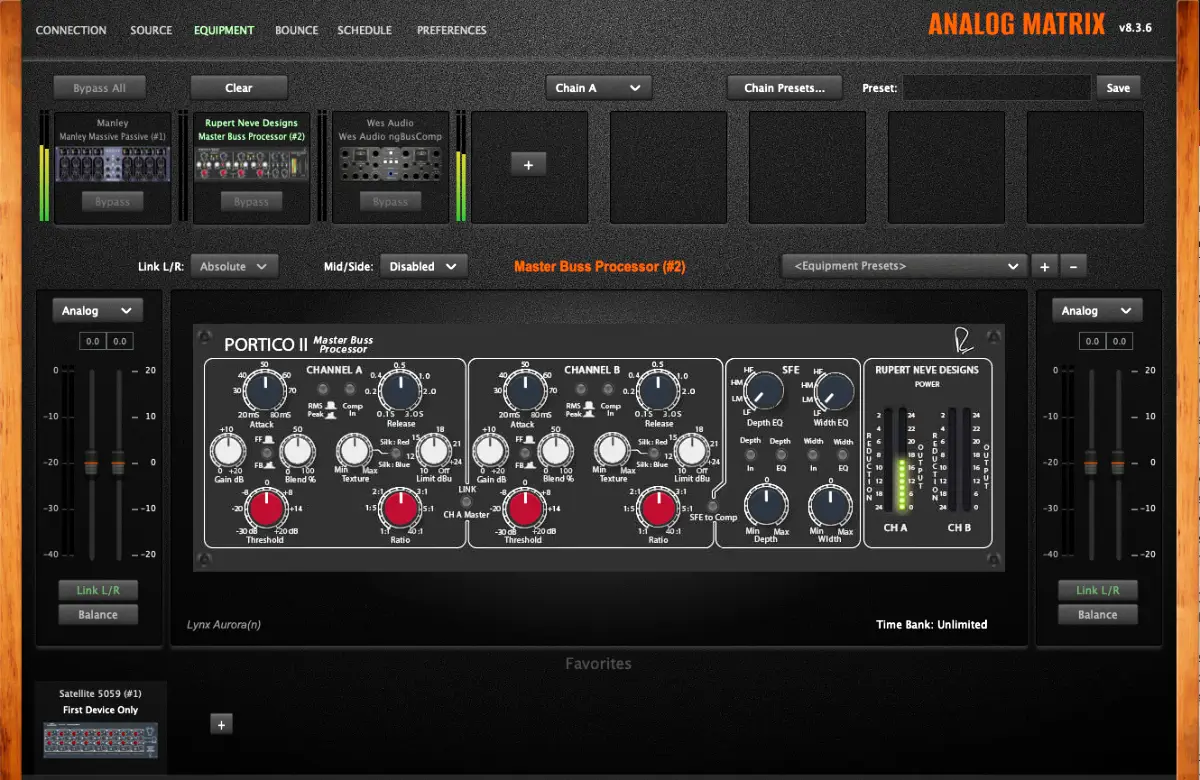
Both routing modes are available between any two units on the Analog Switch, and you pick per connection in the Analog Matrix. Above the faders on each side of a unit you will find a selector that reads Standard or Analog. If only one option exists for a hop (for instance, into a unit that is not on the switch), the plugin selects it for you.
Each mode has real strengths. Standard routing keeps every digital feature the Analog Matrix adds between units, because the signal passes through the digital domain where those features live. Analog routing gives you the purest possible connection, and in exchange it takes those features away for the linked hop.
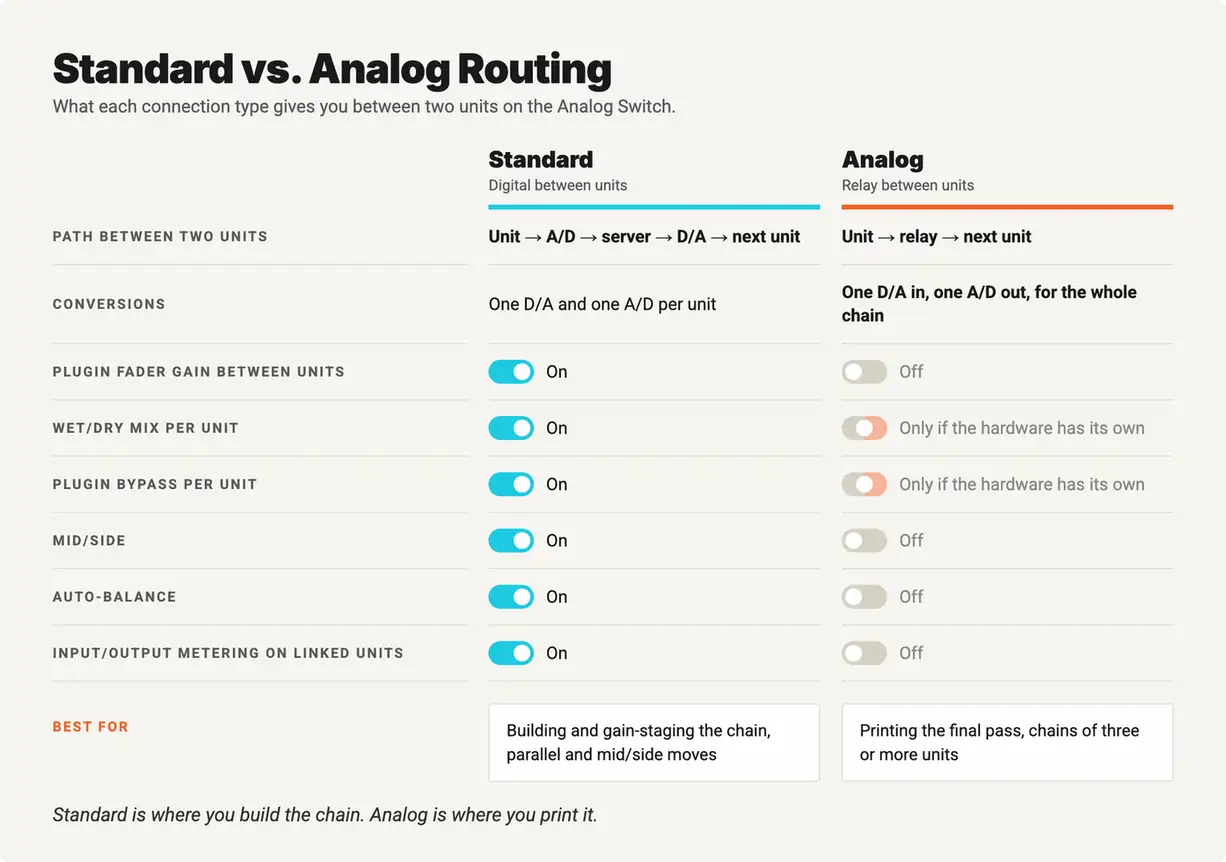
Why no metering? A meter needs samples, and on an Analog hop there are none between the two boxes. The audio goes from one output to the next input without ever passing our A/D, so there is nothing for the plugin to measure until the chain's final conversion. That is the trade for a pure analog hop, and it is the reason the workflow below sets levels first.
Mix and match as much as you like. Any combination of Standard and Analog connections is supported in one chain, so you can run three units analog, then route Standard into a reverb that lives elsewhere in the racks, or bring the signal back to the digital domain mid-chain to use a wet/dry mix on one unit.
Standard is where you build the chain. Analog is where you print it.
At Access Analog we recommend four steps to get the best performance from an analog chain:
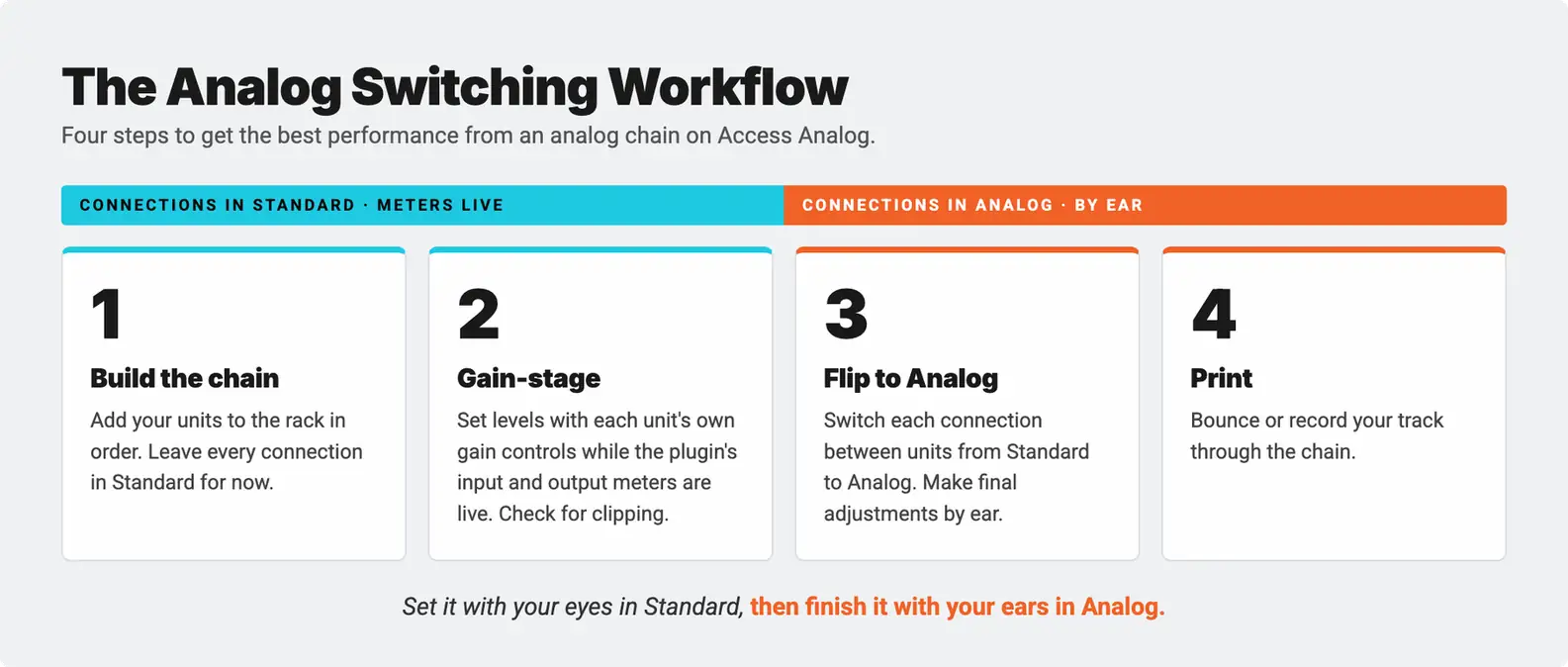
The order matters because of what each mode gives you. Standard mode lets you see what you are doing. Analog mode lets you hear the chain the way it was meant to connect. Do the looking first, then the listening.
Set it with your eyes in Standard, then finish it with your ears in Analog.
Here are three ready-to-go chains to try on the Analog Switch, each aimed at a different job. Build each one in Standard, gain-stage, then flip the hops to Analog and listen to what hardware driving hardware sounds like.
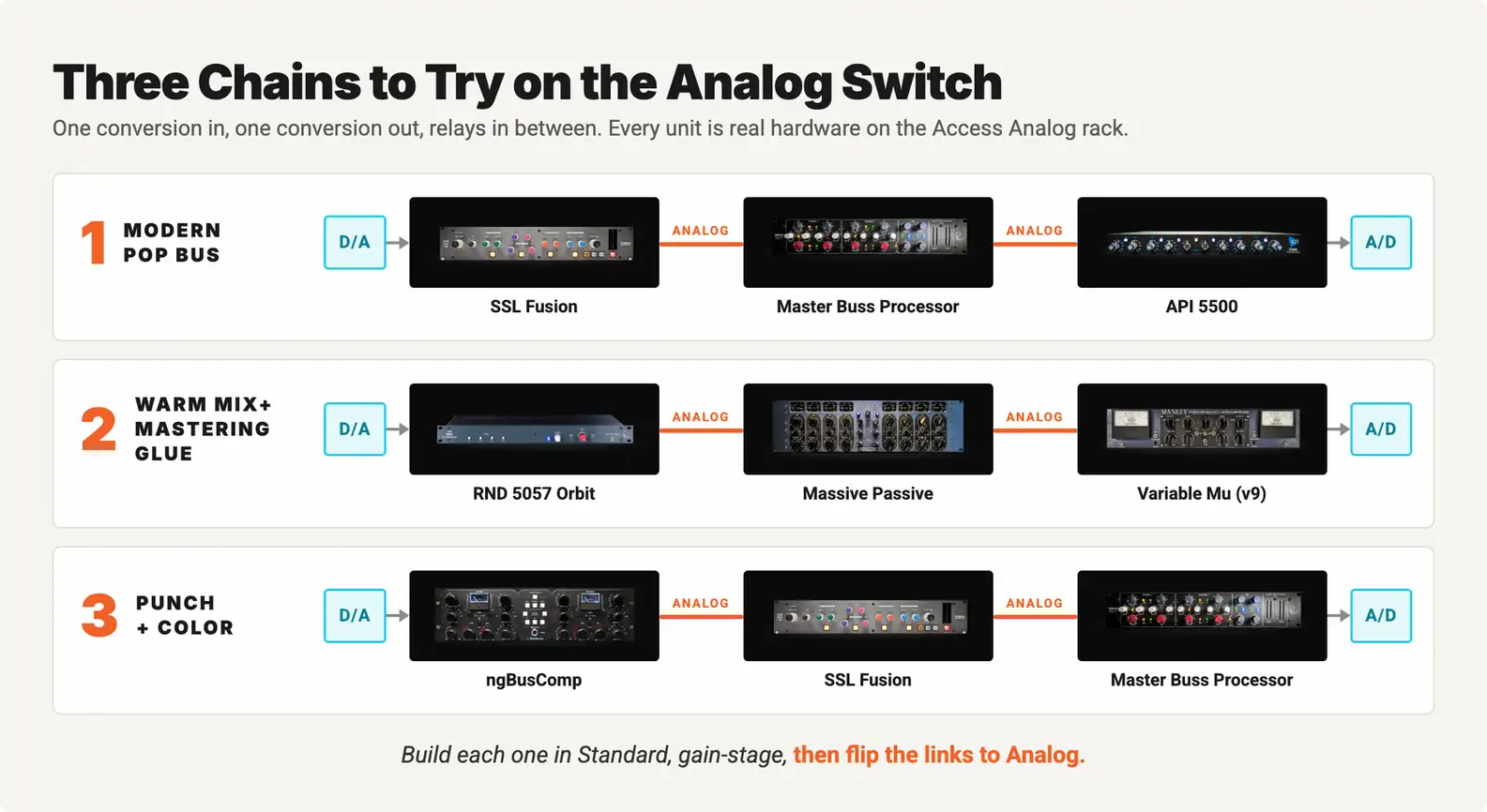
Modern Pop Bus: SSL Fusion → Master Buss Processor → API 5500. Vintage Drive and the Violet EQ on the Fusion add weight and sheen, the Portico II compressor holds the bus together, and the API 5500 adds the last bit of air and punch. With both hops on Analog, the three color stages stack without a conversion between them.
Warm Mix+Mastering Glue: 5057 Orbit → Massive Passive → Variable Mu (v9). Sum your stems through the Orbit's class-A transformer outputs with Silk engaged, shape the tone on the Massive Passive, and let the Variable Mu's tubes do the final leveling. This is the classic Neve-into-Manley mastering path, and it is now one conversion in and one conversion out.
Punch + Color: ngBusComp → SSL Fusion → Master Buss Processor. Fast VCA compression on the ngBusComp sets the energy, the Fusion colors it, and the Master Buss Processor's limiter catches the peaks. If you want a reverb from elsewhere in the racks after it, route that last hop in Standard; everything before it stays analog.
These are starting points, not rules. Every one of these units has a hardware character that rewards being driven a little differently, and the only way to find your setting is to push the chain until it sings.
Download the Analog Matrix. The plugin is free from our downloads page for Mac and Windows in VST, VST3, AU, and AAX. It is not an emulation. Every knob you move turns a real control on real hardware in our racks.
Create your account. New accounts start with 12 free credits, which is about an hour on an average unit. From there you can subscribe to the Access Analog Subscription at the Essential, Pro, or Elite tier, or buy credit bundles that never expire. Many engineers start with credits to try a chain before committing.
Build your chain and choose Analog. Add units from the Analog Switch to your rack, then use the selector above the faders to choose Analog between units that share the switch. Use Standard where you want digital gain, mix, bypass, or mid/side.
If you have been curious whether real hardware is worth it over emulations, we wrote about how our plugin is different and why analog is different. Analog Switching is the next step in that argument: not just real hardware, but real hardware connected the way it would be in the room.
Access Analog has always been about giving you the real thing, with the recall and convenience of a plugin. Analog Switching closes the last gap between our racks and a mastering suite's patch bay. The Massive Passive now drives the Variable Mu through copper. The Fusion's transformers now load the Portico II's input directly. The chain reacts as one instrument, and it saves and recalls with your session like everything else in the Analog Matrix.
Download the Analog Matrix, build a chain on the Analog Switch, and flip the hops to Analog. Then tell us what your dream seven-unit chain should be. We are building the next switches with you.
Hear your processors breathe as one, the way analog was meant to flow.
What exactly is Analog Switching?
Analog Switching is Access Analog's relay-based, software-controlled analog patching system. It lets you chain units on the same Analog Switch with a single D/A conversion at the start of the chain and a single A/D at the end, so the audio stays analog from box to box instead of being converted after every piece of gear. The relays live in a Wolff Audio ProPatch 64R and are controlled from the routing selector in the Analog Matrix plugin.
How do I choose between Standard and Analog routing?
In the Analog Matrix, look above the faders on either side of a unit for the routing selector. If both options are available for that hop, pick Analog for a pure relay connection or Standard to keep the plugin's gain, mix, bypass, and mid/side controls. If only one option exists, the plugin selects it automatically.
Can I mix digital and analog connections in one chain?
Yes. Any combination of Standard and Analog connections is supported. A common pattern is to run the color and dynamics units in Analog and then route Standard into a unit that is not on the switch, such as a reverb, or into a unit where you want a wet/dry mix.
When does D/A and A/D conversion actually affect the sound?
This is a subjective question, and we try to answer it honestly. Very few listeners can hear a single D/A and A/D pass through a modern professional converter. Some professionals can hear two. The effects are cumulative, so at Access Analog we suggest using Analog links once your chain has three or more units in it. For a one- or two-unit chain, Standard routing with its gain, mix, and metering features is often the better tool.
Can I route analog between two different Analog Switches?
Not at this time. An analog connection is only possible between units on the same Analog Switch, so which units share a switch matters when you plan a chain. Between switches, or to any unit elsewhere in the racks, the Analog Matrix routes in Standard mode.
Do I lose metering when I use Analog routing?
Yes. On an Analog hop the audio never passes our A/D converter, so there are no digital samples to measure and the plugin cannot show input or output levels for the linked units. That is why we recommend gain-staging the whole chain in Standard first and then switching the hops to Analog.
Can multiple users share one Analog Switch?
Yes. The Analog Switch serves up to seven independent engineers using one unit each, one engineer chaining all seven units in a single analog chain, or anything in between, depending on what is reserved at the time.
What gear is on the first Analog Switch?
The first Analog Switch includes the Rupert Neve Designs 5057 Orbit, Manley Massive Passive, API 5500 Dual EQ, WesAudio ngBusComp, SSL Fusion, Rupert Neve Designs Master Buss Processor, and Manley Variable Mu (v9). The 5057 Orbit must be the first unit in any chain that uses it.
Is Analog Switching available now, and what does it cost?
Yes. The first Analog Switch is live. Most of its units are in the Elite tier of the Access Analog Subscription, so most analog chains need an Elite subscription with a chain size of two or more. The API 5500 and the Master Buss Processor are Pro-tier units, so a Pro subscription with a two-device chain can run that pair as an analog chain. Without a subscription, any two or more units on the Analog Switch can be reserved or run on credits, and new accounts start with 12 free credits.