
Sum up to sixteen stems through real analog hardware, live, while your session plays. No stem exports, no bouncing. Just press play.
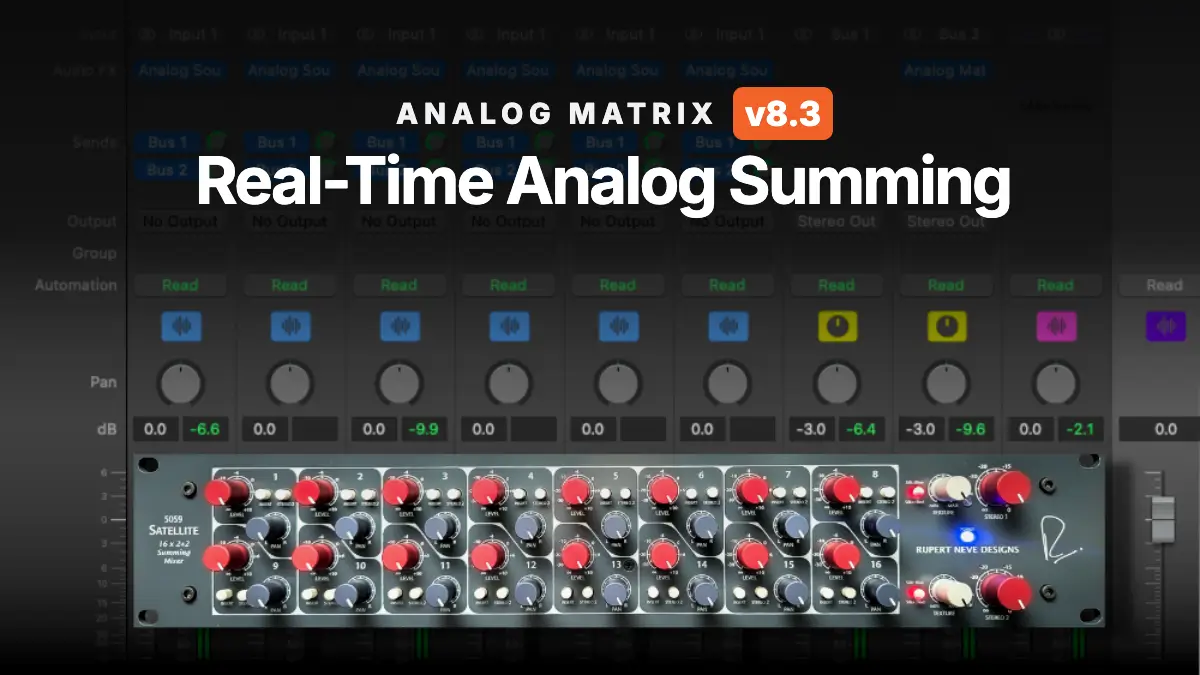
Until now, summing through the hardware at Access Analog meant working offline: export your stems, upload them, and bounce through the unit. That still works, and for guaranteed-perfect prints it's still the way. But Analog Matrix 8.3 adds the thing everyone asked for, real-time, multi-channel summing straight from your DAW, and it's driven by a small new companion plugin called Analog Source. Put one on each stem, put the Analog Matrix on an aux, and your DAW's individual tracks fan out across the sixteen inputs of a real Rupert Neve Designs 5059 Satellite (or any summing mixer on the rack), summing in analog as you listen.
If you want the full case for why analog summing changes a mix (the class-A stages, the transformers, the headroom), start with our RND 5059 Satellite guide. This guide is about the how: getting sixteen live channels out of your DAW and into the hardware.
A summing mixer needs sixteen inputs. A real-time internet stream, historically, carried a stereo pair, which is why summing at Access Analog used to be an offline job. Analog Matrix 8.3 lifts that limit: it streams up to sixteen DAW channels to the rack at once, so the 5059's sixteen inputs each get their own live feed from your session.
The result is the workflow a hardware summing setup gives you, with none of the patching: sixteen faders of balance, real transformers on the output, and the sound updating the instant you move something, all from inside the DAW you're already mixing in.
There's a quieter part of this worth saying out loud. Sixteen live channels means sixteen channels of digital-to-analog conversion feeding the mixer and a stereo analog-to-digital pair bringing the sum back. In a home rig that converter count is the expensive half of analog summing, and it's the reason each summing mixer in our racks ties up a large share of the conversion we have. At Access Analog every one of those converter channels is already wired to the hardware and included with the service. You bring the stems.
Real-time summing means you mix into the hardware, not toward it.
Analog Source is a lightweight utility that goes on each stem you want summed. Its only job is to send that track's audio to the Analog Matrix.

Analog Matrix goes on one channel, an aux/bus or the master, and acts as the hub. It receives every stem, lays them across the summing mixer's inputs, and returns the summed stereo signal.
One plugin per stem, one Matrix to catch them all.
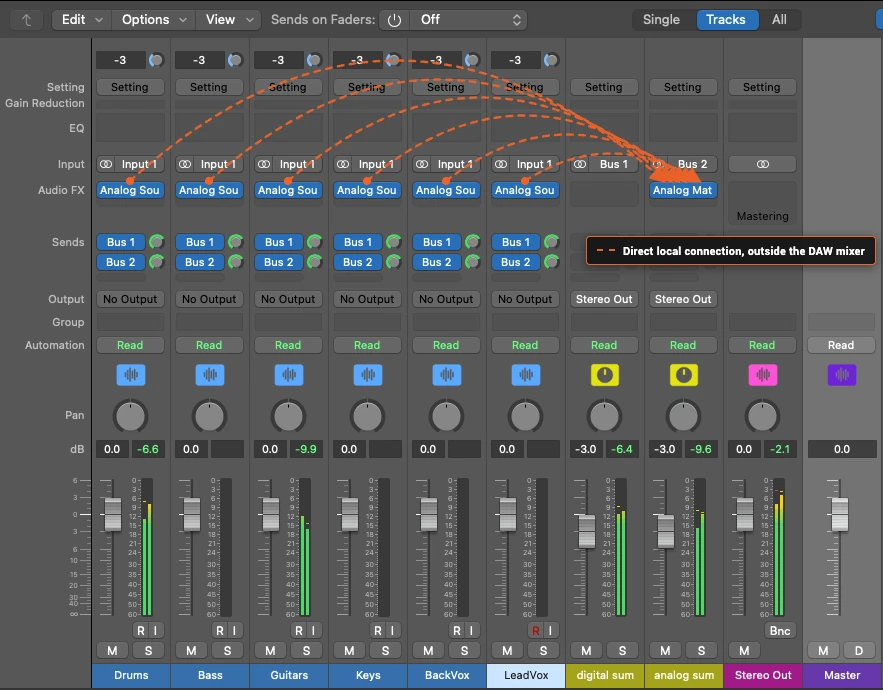
Here's the part that makes it work: each Analog Source sends its stem to the Analog Matrix over a direct connection on your computer, not through your DAW's mixer. The stems travel side-by-side, already separated, and land on their own channels at the Matrix, which routes them straight to the summing mixer's individual inputs.
That's the whole trick behind per-channel summing. Twelve mono channels of six stereo stems arrive as twelve discrete feeds, exactly as if you'd run twelve cables into the back of the 5059, not as one stereo mix your DAW already added together.
Your DAW does the playing; the summing happens channel-by-channel in the box.
If the stems reach the Matrix on their own, do you also need to route audio to it inside the DAW? Two answers:
So the setup we recommend is simple: an Analog Source on every stem, and your mix bussed into the Analog Matrix's aux.
Route the mix in, and the DAW keeps the Matrix awake.
Insert an Analog Source on each stem, make an aux for the Analog Matrix, and send the stems to it.
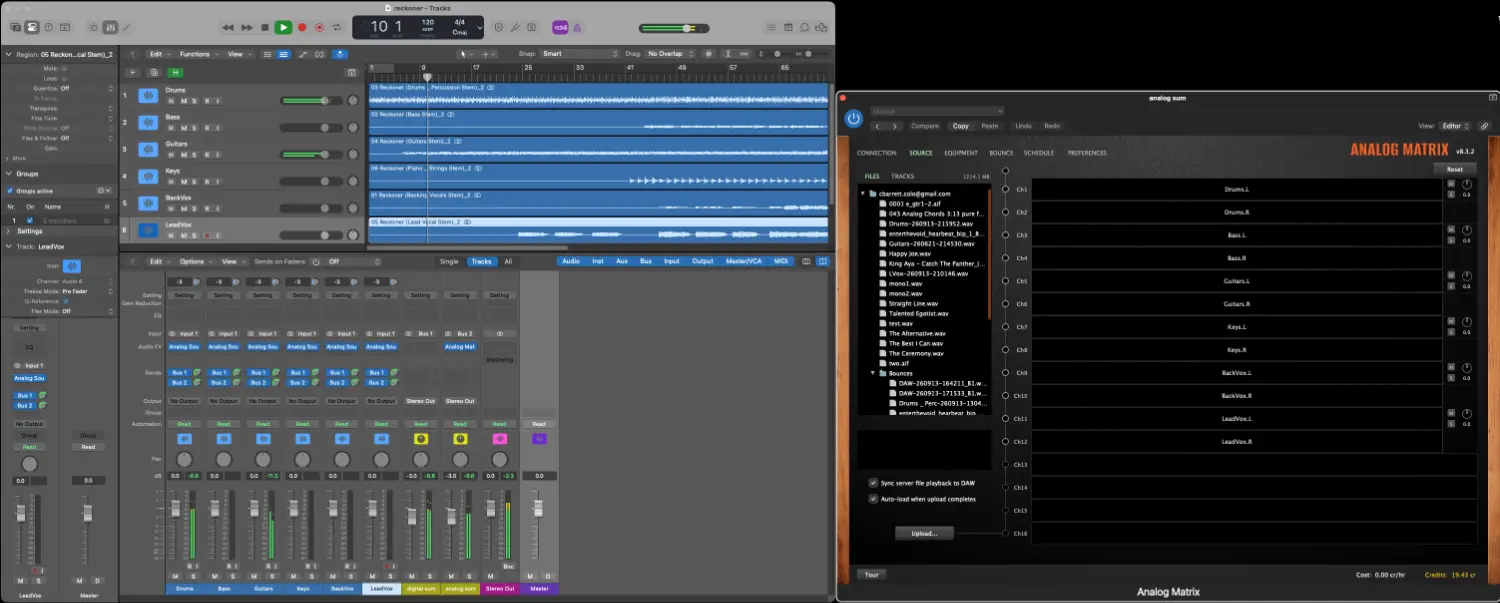
Here the stems feed two auxes: analog sum, which hosts the Analog Matrix, and digital sum. The digital aux exists only to A/B the in-the-box mix against the analog return. It's not required. For summing alone, one aux with the Analog Matrix is all you need.
In the mixer detail you can see the recipe: an Analog Source in the first insert of every stem, Bus 1 and Bus 2 sends on each, and the Analog Matrix sitting in the insert of the analog sum aux. The dotted arrows show the part Logic doesn't draw for you: each Analog Source hands its stem straight to the Analog Matrix over a direct local connection, outside the bus sends.
Same idea, one destination. Each stem carries an Analog Source and routes to a single track running the Analog Matrix.
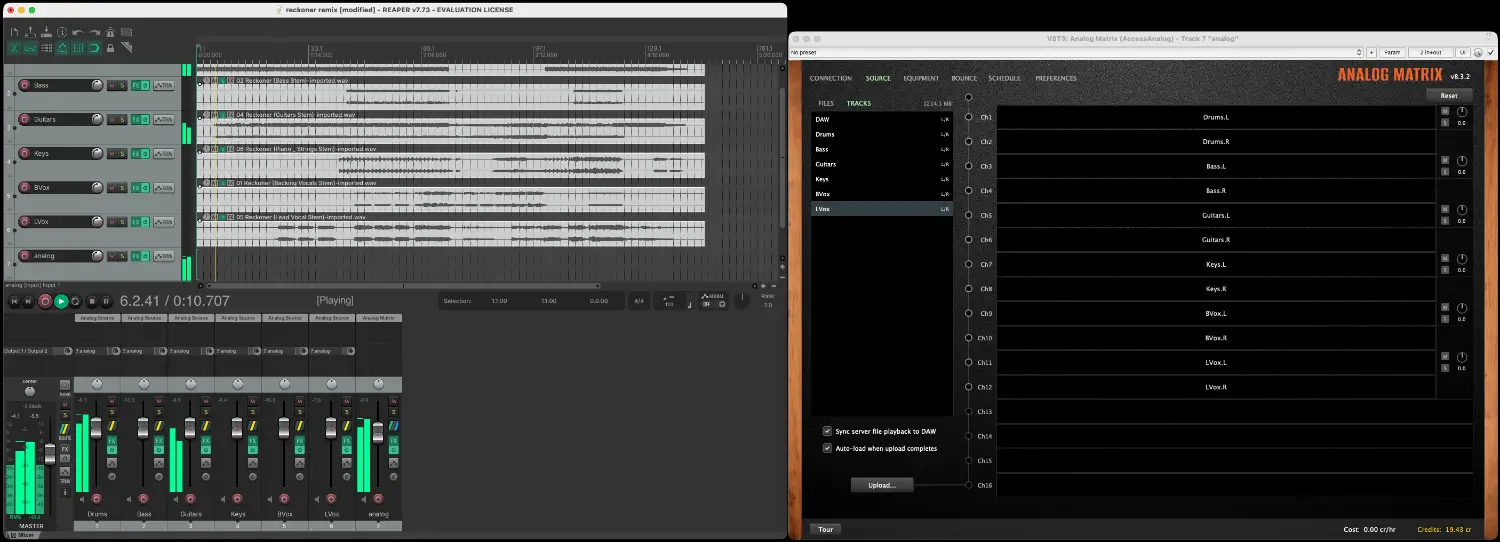
Different DAW, identical recipe: sources on the stems, Matrix on the bus.
Open the Analog Matrix and go to the Source tab. Your connected stems appear under Tracks on the left (next to DAW, which is the mix you bussed in). Drag each source onto the channels you want it summed on. Here six stereo stems fill channels 1–12 as L/R pairs.
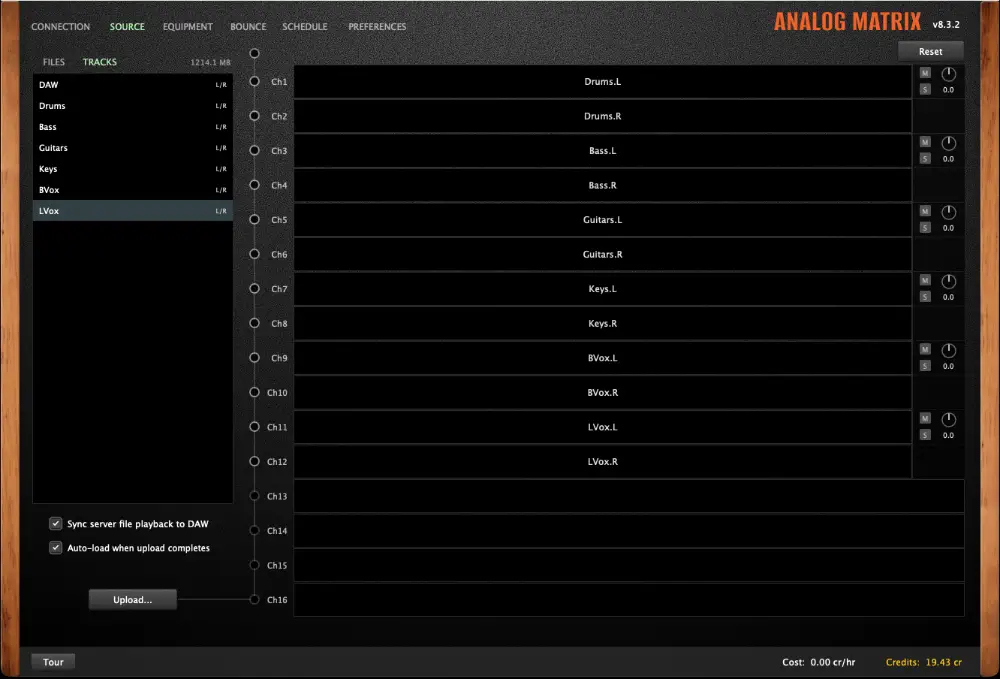
Every routed channel gets a mute / solo / gain strip, so you can balance the sum right here. The gain readout is click-to-type when you want an exact number.
Drag a source to a channel, and it's on that input of the summing mixer.
Routing sources to channels doesn't sum them on its own. Those channels only combine once a summing device leads the equipment chain. On the Equipment tab, add your summing mixer as the first device.
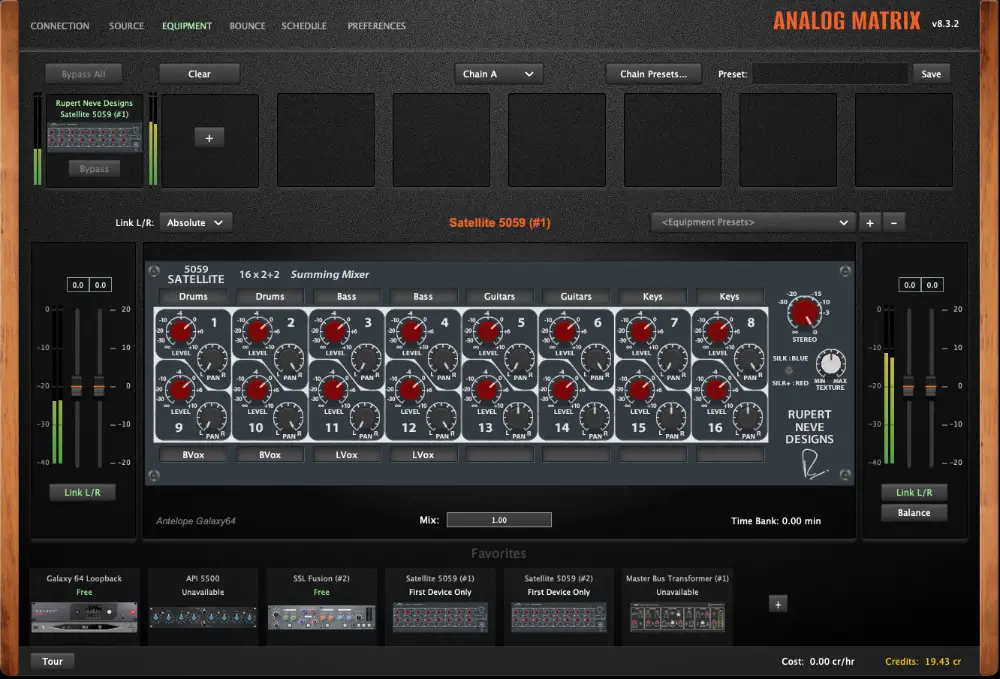
The 5059 Satellite is a 16 × 2+2 summing mixer, so all twelve routed channels land on its inputs. You can see them labeled Drums, Bass, Guitars, Keys, BVox, and LVox, with level, pan, Silk, and Texture ready to go.
Only hearing the first source?
That's the tell-tale sign that no summing device is first in the chain (or none is loaded). With sources on channels 3, 4, 5 and up but no multi-input summing unit up front, only channel one passes and the rest fall silent. Make your summing mixer the first device and the full sum appears. (The 5059 is even flagged "First Device Only": a summing mixer has to lead.)
A summing mixer only sums when it's first in line.
You have two sets of hands on the balance, and you can use either or both:
If your summing unit has no input gain of its own, the Source-tab gains become your primary balance control. Set the mix there. That's exactly the case with the Rupert Neve Designs 5057 Orbit, a 16-channel summing mixer with Silk and Texture but no per-channel level or pan, which is joining the Access Analog rack soon.
Balance in the panel, on the hardware, or both, whatever your unit gives you.
Once the real-time sum sounds right, printing it is a short, hands-off sequence on the Source tab:
Because the print happens from the files on the server, a hiccup on your connection can't ruin it, and there's no limit on how long the section runs.
Mix it live, then capture it clean.
Here's a second trick the Analog Source unlocks, and it has nothing to do with summing. Suppose you want to hear the same piece of hardware, one compressor, one EQ, on your vocal, then the snare, then the bass, to compare how it treats each. Normally that means dragging the Analog Matrix from track to track, or running several instances and pulling the gear out of one to load it into the next: slow, and you lose the moment you were chasing.
Instead, set it up like a mini summing rig. Put an Analog Source on each candidate track, put one Analog Matrix on an aux with your processor loaded, and route to channels 1/2. Now, with the song playing, drag a different source onto channels 1/2 whenever you like. The input feeding the hardware switches in real time. Vocal, snare, bass, back to the vocal, all through the same physical unit, no reloading and no re-patching.
Why this works
The Analog Source has already put every track's audio one drag away from the hardware's input. You're not moving the processor to the audio. You're moving the audio to the processor.
One unit, every track, instant compares, while the music plays.
Real-time summing closes the gap between mixing in the box and finishing on a console's output stage. Drop an Analog Source on each stem, an Analog Matrix on an aux, put a summing mixer first in the chain, and your session plays straight through sixteen channels of real analog hardware: balanced with your mouse, colored with Silk and Texture, and captured to a bounce whenever you're ready. The last stage of the console, live in your DAW.
Analog Matrix 8.3 is in public beta now on the Downloads page, and the 5059 Satellite lives in the Elite tier of the Access Analog Subscription.
Sixteen channels, one summing mixer, zero exports. Press play.
Do I have to route audio to the Analog Matrix inside my DAW?
Not for the summing itself. The stems reach the Matrix over a direct local connection regardless of DAW routing. But bus your mix into the Matrix's channel anyway: some DAWs (notably Logic) stop processing a plugin they think has no input, and this keeps the Matrix running. It's also your monitor path for the analog return.
I routed all my sources but only hear the first one. What's wrong?
There's no summing device first in the equipment chain. Add your summing mixer (for example the 5059) as the first device on the Equipment tab and every routed channel will sum.
How many stems can I sum at once?
Up to sixteen channels: eight stereo stems, sixteen mono sources, or any combination.
Do I need the "digital sum" track from the Logic screenshot?
No. That second aux is only there to A/B the in-the-box mix against the analog return. One aux with the Analog Matrix is all summing requires.
A mono track is coming across as stereo. Can I fix it?
Turn on Show as mono source in matrix on that track's Analog Source. It sends a single mono channel instead of a duplicated stereo pair.
Do I need my own converters to sum through real hardware?
No. Sixteen channels of digital-to-analog conversion and the stereo analog-to-digital return are the costly part of any analog summing setup, and at Access Analog they are already wired to the summing mixer and included with the service. Your DAW streams the stems, the racks handle the conversion, and the summed stereo return comes back to the Analog Matrix.
Can I still change the balance after I've summed live?
Yes. Adjust the per-source gains or the hardware controls and play again. Nothing is committed until you bounce.