
The hardware-versus-plugins argument has been running for twenty years, and nobody has won it. That should tell you something about the question.
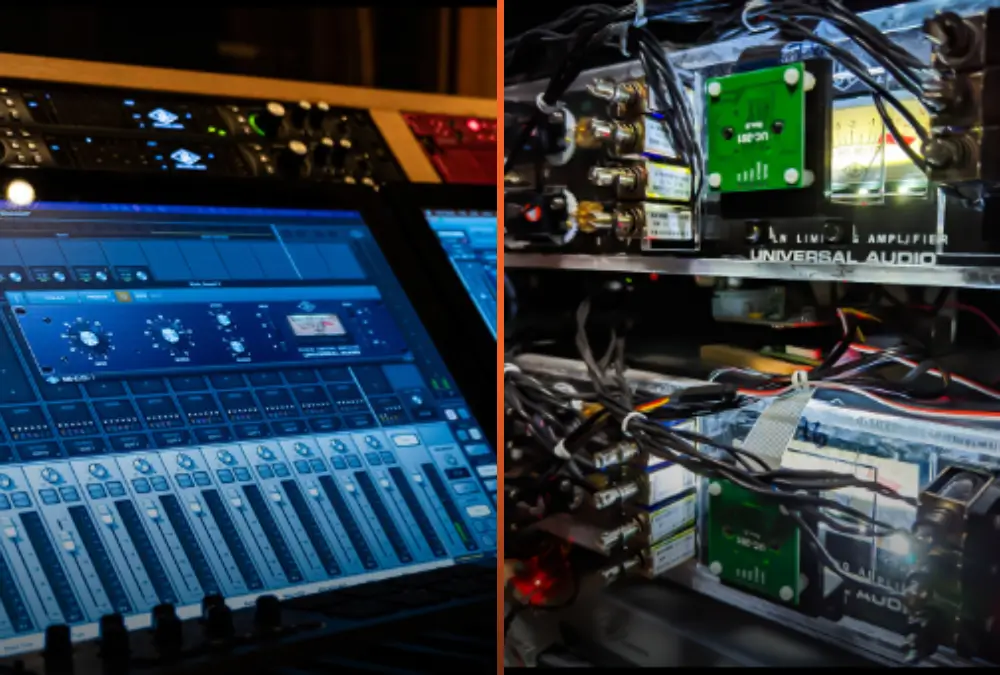
It isn't that the two camps are stubborn. They're answering different questions and calling it a disagreement. The hardware camp is talking about what a circuit does to audio. The plugin camp is talking about how you get work done. Both are right, which is why the argument never ends.
Hardware gives you the circuit. Plugins give you the workflow. The useful question is how much of each your work needs.
In this guide you'll get the standard pros and cons of each side, laid out fairly, then a straight answer on which is "better" (spoiler: it depends on you), and finally how Access Analog puts real hardware inside a plugin so you don't have to give up either.
Analog hardware processes your audio as electricity moving through physical components. A plugin processes it as numbers moving through code. That sounds obvious, but it's the whole argument in one line. When you send a vocal through a hardware compressor, the signal passes through real tubes, transformers, optical cells, and transistors. Each of those parts behaves a little differently depending on how hard you drive it, how warm it is, and what came before it. A plugin does exactly what its code tells it to do, the same way, every time.
Some plugins set out to model a specific piece of hardware. Others do things no hardware ever could. Both are legitimate tools, and both show up on hit records every week.
What engineers usually mean by "analog sound" is harder to pin down. Hugh Robjohns makes the point well in Analogue Warmth for Sound On Sound: warmth isn't one effect. It's the sum of many small, level-dependent imperfections (gentle harmonic distortion, a little soft compression, slight frequency and phase shifts) that build up stage by stage through a recording chain. Digital is more accurate. Analog is more flattering, and the two are not the same thing.
Hardware's strengths are sound, feel, and longevity, and the sound comes from behavior that changes with level.
Sound. A transformer core saturates gradually as low-frequency energy rises, so it thickens bass without you asking it to. A tube stage adds harmonics that grow as you push it. An optical compressor's light cell reacts to the program itself, so its release changes with the material. None of this is a setting. It's physics, and it responds to your audio in real time.
Character that builds through a chain. Because each stage colors the signal a little, analog character accumulates. A transformer-balanced EQ into a tube compressor into a tape-style circuit stacks three different nonlinear behaviors, each reacting to what the last one did. We dug into this in 8 Reasons Why Analog Is Different.
Feel and commitment. Physical knobs push you to make decisions by ear instead of by eye. Many engineers find that printing through hardware ends the "one more tweak" loop and moves the session forward.
Longevity and value. A well-built unit can work for decades, and the classics tend to hold their value on the used market. The money you spend isn't gone. Much of it is parked in the box.
The sound is the reward. The bill is cost, space, upkeep, and recall.
Cost. A single premium compressor or EQ can cost thousands. A mastering-grade chain costs far more, and you still need converters, a patchbay, cabling, and a rack to put it all in.
Space and power. Every unit takes rack space, power, and ventilation. Tube gear runs hot.
Maintenance and calibration. Tubes age, capacitors dry out, pots get scratchy, and stereo units drift out of matched calibration. Keeping gear at spec is an ongoing cost in money and downtime.
One box, one instance. A hardware compressor is one compressor. If you want it on the vocal and the drum bus at the same time, you need two of them. Each unit is mono or stereo, and that's that.
No instant recall. Hardware doesn't save with your session. Revisions mean recall sheets, photos of the front panel, and a recall that's close but rarely exact. Automating a hardware knob over a song isn't practical either.
Foreshadow - Access Analg shifts this entire paradigm.Plugins win on workflow, and in a modern session the workflow is most of the job.
Unlimited instances. Put the same compressor on every track in the session if you want to. The only limit is your CPU.
Total recall. Close the session, open it six months later, and every setting is exactly where you left it. Revisions take minutes.
Automation and presets. Every parameter can be automated, synced to tempo, and saved as a preset to share between sessions.
Cost and access. A plugin usually costs a fraction of the hardware it's named after, and many have free trials. Updates arrive over the internet.
Things hardware can't do. Linear-phase EQ, spectral and multiband dynamics with surgical precision, detailed visual analyzers, look-ahead limiting, and polyphonic pitch correction. These are genuinely digital tools with no analog equivalent.
Plugins don't sound bad. Their weak spots are workflow habits and the gap between a model and a circuit.
Over-editing. Unlimited instances, zoom, and undo make it easy to keep tweaking long after the track stopped getting better.
CPU and latency. Large sessions full of oversampled, look-ahead, or linear-phase plugins can load a machine and add latency the DAW has to compensate for.
Emulations are models. A good emulation captures a lot of what makes a unit special. But it's a model of how that circuit behaved under the conditions the developer measured, not the circuit itself. Robjohns' point applies here: one strong saturation plugin on a finished mix may not recreate the cumulative, stage-by-stage character of a real analog chain.
Gear such as equalizers can be modeled effectively, but if someone tells you they have exactly modeled a nonlinear response such as a compressor/limiter then they are not being fully honest. The number of combinations of analog settings on a real compressor are infinite, and it is not possible to model them all or capture the non-linear aspects. It can be approximated but not replicated.
Little or no resale value. Most plugin licences are worth nothing once you've bought them, and an operating-system update can occasionally leave an older plugin behind.
Plugins get you most of the way there. The whole argument is about the final 15 to 20 percent.
Neither. The choice is subjective, and both are professional tools. Great records are made entirely in the box. Great records are made on consoles and outboard. Most working engineers live somewhere in between: plugins for surgery, recall, and speed; hardware for the handful of moves where character matters most, often the vocal chain, the mix bus, and the master.
Robjohns lays out three routes to analog character: record through a traditional analog chain, emulate it in software, or treat the finished mix with real analog processing. All three are valid. Which one suits you depends on your budget, your room, how often you revise, and what you hear.
That leaves one honest question. If you like what hardware does to audio but your workflow runs on plugins, is there a way to have both without the drawbacks of either? There's a sweet spot between the two camps, and that's where Access Analog sits.
Yes. Access Analog's Analog Matrix plugin sends your audio through real analog hardware and returns it to your DAW, so the sound comes from the circuit and the workflow is a plugin's.
The Analog Matrix plugin loads in your DAW like any other insert (VST, VST3, AU, and AAX, on Mac and Windows). It isn't an emulation. It's a portal to more than $350,000 of real hardware: over 70 compressors, EQs, saturators, reverbs, and complete mastering chains, racked in our facility in Colorado.
Here's what happens when you use it:
The hardware's controls also show up as plugin parameters, so you can automate them from your DAW the same way you'd automate any other plugin.
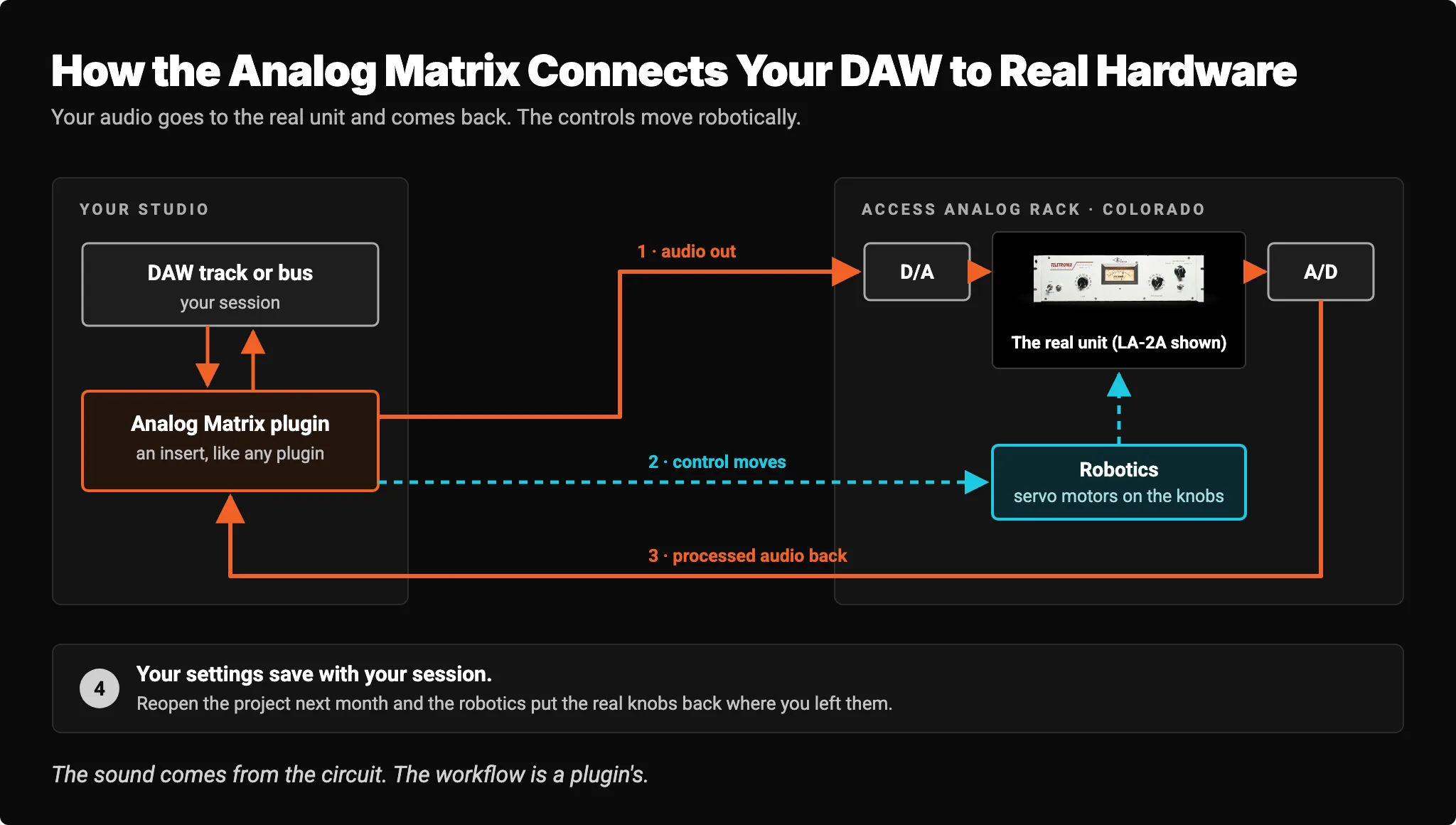
We explain the robotics in more detail in How Is Our Plugin Different?, but the short version is this: every reason hardware is hard to live with in a modern workflow is a reason Access Analog was built.
You keep the circuit and lose most of the overhead. A few honest limits remain.
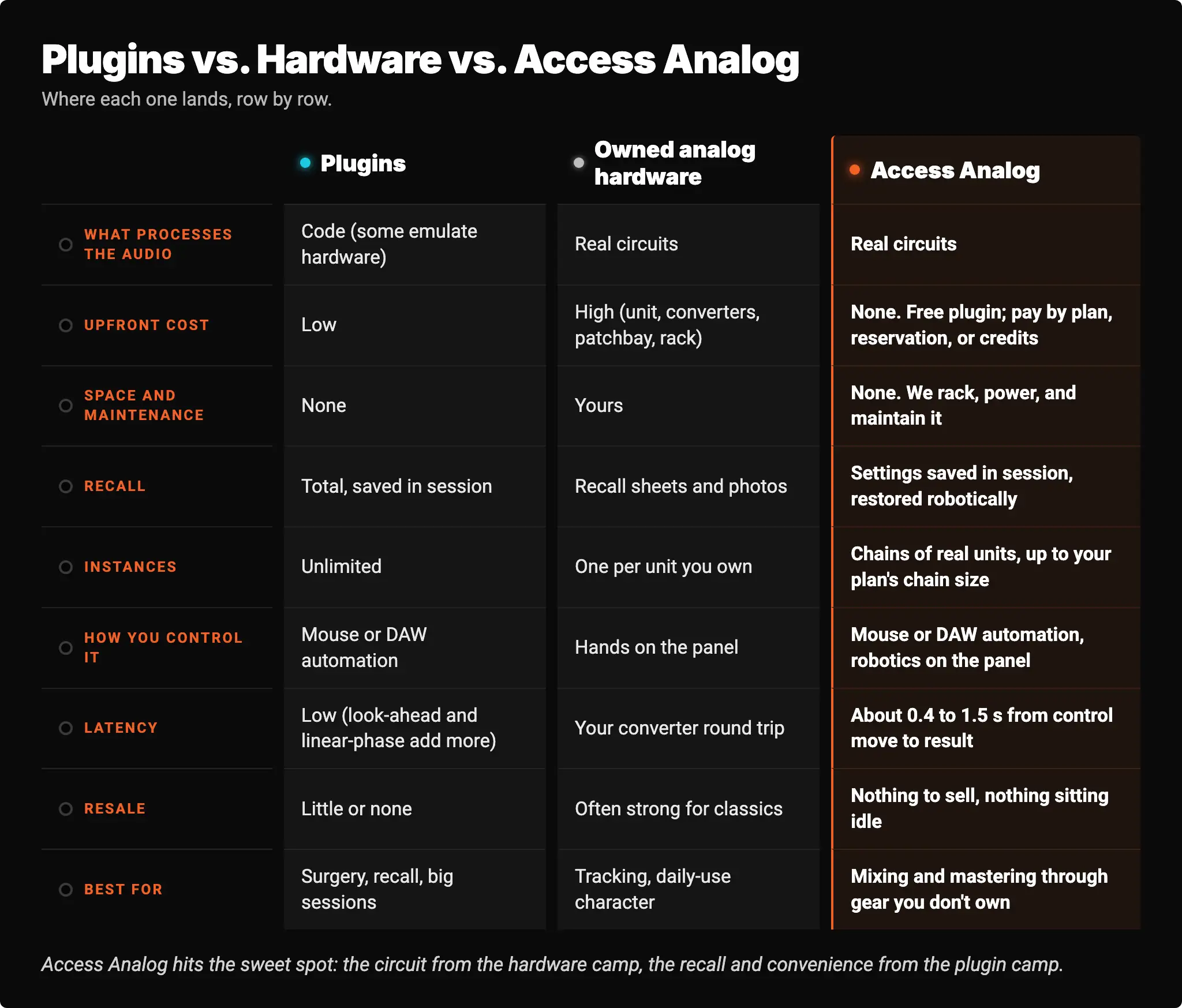
What disappears. No purchase, no rack, no converters to buy, no tube swaps or recalibration on your bill. Your hardware settings recall with the session and can be automated from the DAW, just like a plugin's. And because we monitor every unit hour by hour and keep 99% uptime across the gear, the rack is there when you open the session.
What remains. Streaming audio to a rack and back takes time. In the Analog Matrix the round-trip audio buffer is selectable from 340 ms to 2,500 ms, and the perceived delay between moving a control and hearing the change is roughly 400 ms to 1,500 ms. That makes real-time streaming a mixing and mastering tool, not a tracking insert for a singer in headphones. You set, listen, adjust, and print, which is how outboard has always worked on a mix. You'll also need a stable internet connection. And at the end of the month you own nothing, which for most people is the point.
Access Analog hits the sweet spot: the circuit from the hardware camp, the recall and convenience from the plugin camp.
Here are two chains you can build in the Analog Matrix today: one for a mix bus, one for a lead vocal. These are starting points, not rules. Chain order is a creative choice, and these are one sensible way to stack each set of units.
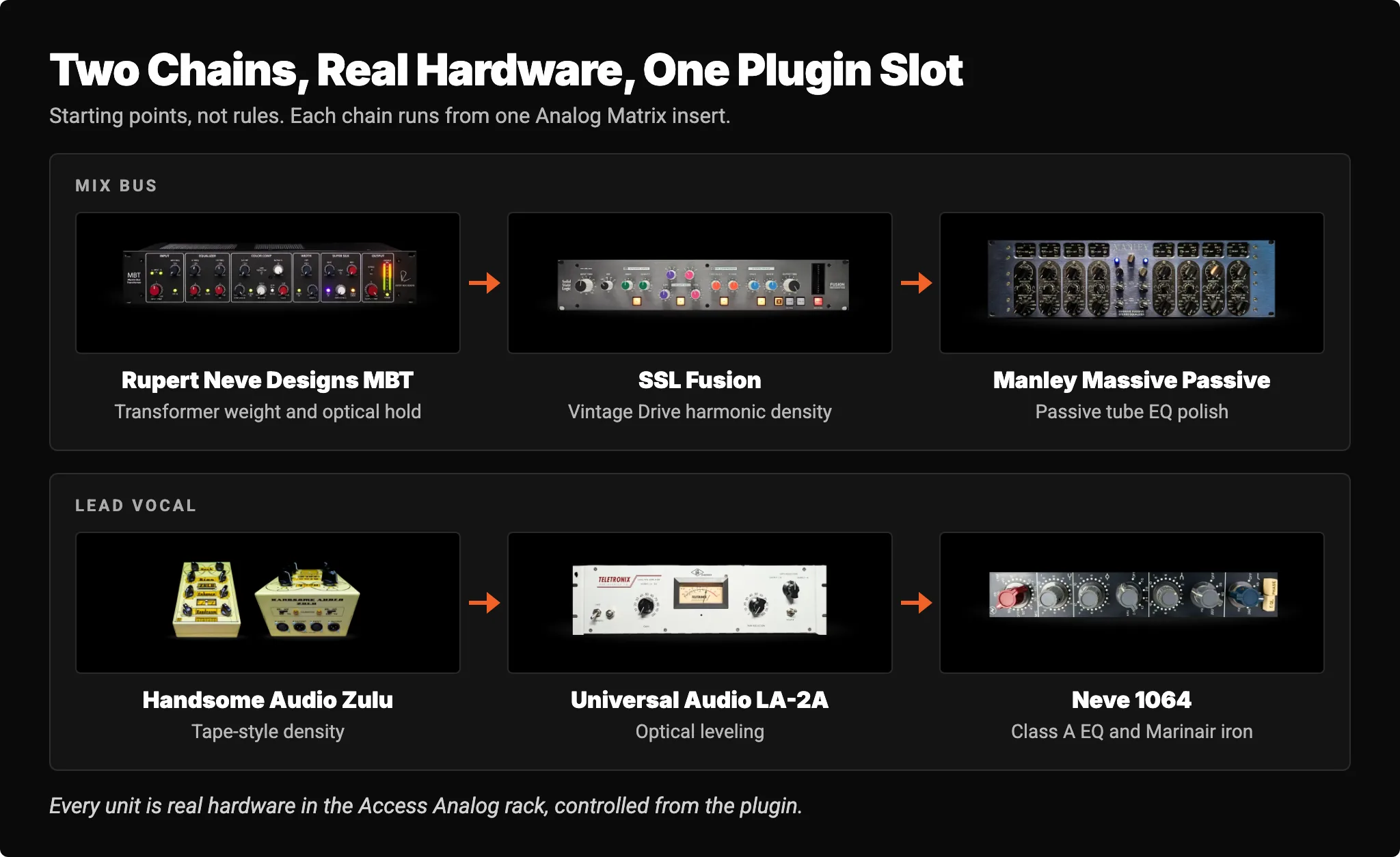
Rupert Neve Designs MBT. The Rupert Neve Designs Master Bus Transformer is a stereo bus processor built around transformer color. Its fixed signal path runs through a high-pass filter, a two-band shelving EQ, the Color Comp optical compressor, a width control, and the Super Silk transformer stage with optional Zener soft clipping. Its Color Comp is a full stereo bus compressor in its own right: a 2:1 or 5:1 ratio, release from 100 ms to 1.5 s, a sidechain high-pass filter, and a Blend control for parallel compression. So the glue is built into the first unit, before the Fusion and the Massive Passive add color and polish. Bob Thomas's Sound On Sound review of the MBT walks through each stage.
SSL Fusion. The SSL Fusion was designed to bring analog character to in-the-box mixes. Its Vintage Drive circuit adds density and harmonics, with a Density control that moves the balance from smoother even-order toward edgier odd-order content. It also has the Violet shelving EQ, an HF Compressor to tame the top, a Stereo Image section, and a transformer stage built on a pair of 600-ohm, 1:1 transformers. In his Sound On Sound review, Hugh Robjohns rated Vintage Drive one of the unit's strongest sections.
Manley Massive Passive. The Manley Massive Passive is a stereo tube EQ with four passive bands wired in parallel rather than in series, so the bands interact with each other in a way a conventional EQ's don't. Each band can be a shelf or a bell. It's a final polish: broad, smooth moves on the top and bottom of an already-glued mix.
Transformer weight, then harmonic density, then passive tube EQ. Three different circuits, three different kinds of analog behavior, stacked the way Robjohns says real character is built.
Handsome Audio Zulu. The Handsome Audio Zulu is a passive analog tape simulator with custom Altran transformers. A Deck switch picks one of three tape-machine voicings, a Bias switch offers eleven bias colorations, Enhance adds harmonically enhanced upper mids and bass saturation, and a Headroom switch sets the tape's headroom, which changes how hard it compresses. On a vocal it adds tape-style density before the compressor.
Universal Audio LA-2A. The Universal Audio LA-2A is a tube leveling amplifier with a T4 electro-optical cell: a light panel that glows brighter with level and a photocell that reads it. Its release is program-dependent, about 0.06 seconds for the first half and 0.5 to 5 seconds to fully recover, depending on how much it was compressing. Two knobs, Peak Reduction and Gain, and a Compress/Limit switch. It's the smooth, steady leveler vocals have trusted for six decades. Our LA-2A guide covers it in depth.
Neve 1064. The Neve 1064 is a 1969 Class A console module with a three-band EQ, sharing its preamp and EQ with the 1066 that the 1073 grew out of. A single-ended Class A output stage drives a Marinair output transformer. After the LA-2A it shapes tone with switched, musical frequency points and adds the transformer's weight. Our vintage Neve units are from the personal collection of F. Reid Shippen.
Tape density, optical leveling, then Neve iron. A chain few project studios could ever rack, running from one plugin slot.
Nothing, to start. You can run the real gear on your own material before you spend a dollar.
The hardware-versus-plugins argument lasts because each side is answering its own question. Hardware answers "what does this do to the sound?" with real circuits that respond to your audio in ways code models but doesn't duplicate. Plugins answer "how do I get the work done?" with recall, instances, and speed that hardware can't match.
You don't have to pick a side, and you don't have to buy a rack to hear the difference. Run your own mix bus or vocal through the real units, A/B it against your plugin chain, and trust what you hear.
Keep the plugins you love. Add the circuits you've been missing. Access Analog is the sweet spot between them.
Is analog hardware better than plugins?
Neither is objectively better. Analog hardware adds level-dependent character from real tubes, transformers, and optical cells, while plugins offer unlimited instances, total recall, and tools hardware can't provide. Most professional engineers use both. The right choice depends on your workflow, budget, and ears.
Do plugin emulations sound exactly like the real hardware?
A good emulation captures much of a unit's character, but it's a model of how the circuit behaved under measured conditions, not the circuit itself. The differences show up most in level-dependent behavior and in the cumulative character of several analog stages in a row. Access Analog lets you A/B the real unit against your plugin version on your own material.
Is a hybrid analog/digital studio worth it?
For most engineers, yes. Plugins handle surgical work, recall, and large sessions; analog hardware handles the moves where character matters most, such as the vocal chain, mix bus, and master. With Access Analog, you can add real analog hardware to a hybrid workflow without buying, racking, or maintaining it.
Can I use real analog gear without buying it?
Yes. Access Analog's Analog Matrix plugin streams your audio from your DAW through more than 70 real analog units in our Colorado facility and back, with the controls moved robotically from the plugin. New accounts start with 12 free credits, roughly an hour on an average device.
Does Access Analog add latency?
Yes. The Analog Matrix's round-trip buffer is selectable from 340 ms to 2,500 ms, and the perceived delay between moving a control and hearing the result is roughly 400 ms to 1,500 ms. That makes it a mixing and mastering tool rather than a live tracking insert. Uploading or bouncing has no real-time constraint.
Can I recall and automate hardware settings like a plugin?
With Access Analog, yes. Your hardware settings are saved in your DAW session, and when you reopen it, robotics return the physical controls to where you left them. The controls also appear as plugin parameters, so you can automate them from your DAW like any other plugin. With hardware you own, recall usually means notes, photos, and resetting each knob by hand.
Which Access Analog plan covers a mix bus or vocal chain?
Plans start at $9.98 a month. The Access Analog Subscription comes in Essential, Pro, and Elite tiers, plus a chain size you choose; the Rupert Neve Designs MBT, SSL Fusion, Manley Massive Passive, Universal Audio LA-2A, and Neve 1064 are Elite units, and the Handsome Audio Zulu is in Pro (Elite includes everything in Pro). You can also reserve any unit or run it on demand with credits.